

Most sales teams do not fail at “AI.” They fail at adoption.
Reps ignore tools that add clicks, hide context, or feel like extra admin. The goal of sales automation AI is not to sprinkle generative features everywhere, it is to build a workflow that removes friction, protects selling time, and improves win rates in ways reps can feel within a week.
This guide shows how to design a sales automation AI workflow that your team actually uses, plus how to roll it out with training and feedback loops so it sticks.
What “sales automation AI” should mean in practice
Sales automation used to mean rules and routing: if X then assign Y, if stage changes then send email Z. AI adds two useful capabilities:
- Understanding messy inputs (calls, emails, notes, meeting transcripts) and turning them into structured CRM updates.
- Generating useful outputs (drafts, summaries, next steps, objection responses) that still require human judgment.
The best workflows combine both. AI handles the repetitive pattern work, reps make the decisions that require nuance.
A helpful benchmark from the field: Salesforce has consistently reported that sellers spend a significant portion of their week on non-selling tasks. Even if your numbers differ, the direction is clear: shrinking admin time is a practical, rep-friendly place to start. (See Salesforce State of Sales.)
Start with the rep’s day, not the tool’s feature list
Before you choose automations, capture the “default path” a rep takes from lead to close:
- Where do they start the day (CRM, inbox, Slack, dialer)?
- What triggers action (inbound lead, renewal alert, stalled deal, demo request)?
- Where do they lose time (logging, finding context, writing follow-ups, creating proposals)?
If you cannot point to a specific moment where the workflow saves time or increases quality, reps will not change behavior.
The 7 building blocks of a workflow reps actually use
1) Pick 1 to 2 high-friction moments to automate first
Avoid “boil the ocean” rollouts. Reps adopt when they see fast, personal wins.
Good starting moments for sales automation AI:
- After a call: summarize, extract next steps, log to CRM.
- Before a meeting: generate an account brief and agenda.
- After a demo: draft a tailored follow-up email with recap and mutual action plan.
- When a deal stalls: suggest a re-engagement sequence based on deal context.
These work because they attach to a natural trigger, and the output is immediately useful.
2) Define inputs, outputs, and the “definition of done”
AI adoption collapses when outputs are vague. For every automation, specify:
- Inputs: what information the AI is allowed to use.
- Outputs: what it produces.
- Quality bar: what “good” looks like.
- Owner: who approves, maintains, and monitors.
Here is a simple way to document it:
| Workflow moment | Allowed inputs | AI output | Rep action | Definition of done |
|---|---|---|---|---|
| Post-call | Call notes/transcript, CRM fields, email thread | Call summary, key pain points, next steps, CRM update draft | Review and approve updates | CRM updated in under 2 minutes, summary matches reality |
| Pre-meeting | CRM history, past emails, meeting purpose | 1-page brief + 3 discovery questions | Edit questions, confirm goal | Rep enters meeting with context and questions |
| Post-demo | Demo notes, buyer role, use case, objections raised | Follow-up email draft + action plan bullets | Personalize and send | Email sent same day with accurate recap |
When this is clear, reps trust the system because it behaves predictably.
3) Design “human-in-the-loop” guardrails (so reps feel safe using it)
Reps hesitate when AI can send messages or update CRM without visibility. The fix is simple: start with drafts and suggestions, then automate only after trust is earned.
Guardrails that improve adoption:
- Draft-only mode by default for emails, call recaps, and CRM updates.
- Required approval for anything customer-facing.
- Source visibility (what the AI used) so reps can validate quickly.
- Clear disclaimers for confidence and unknowns.
Also involve Sales Ops and Security early. If your organization handles regulated data, align with internal policies and vendor security documentation. Do not treat this as an afterthought.
4) Put automation where reps already work
The fastest way to kill adoption is to force sellers into a separate AI portal.
A practical rule: the rep should be able to trigger the automation from their existing workflow (CRM, inbox, calendar, or call tool) and complete it in a short loop.
If you are evaluating tools, prioritize:
- Low-friction access (extensions, CRM panels, or embedded actions)
- Fast time-to-output
- Easy editing
- Clean handoff into CRM fields
This is not just UX. It is behavior change.
5) Measure adoption with behavior metrics, not vanity metrics
Many teams track “number of AI generations” and call it success. Reps care about outcomes.
Track:
- Time saved per rep per week (self-reported plus observed)
- CRM freshness (days since last update, completeness of key fields)
- Speed to first follow-up after calls/demos
- Conversion rates at the stage you targeted (lead to meeting, meeting to opp, opp to next stage)
Then review examples. A weekly quality sampling of AI outputs (10 to 20 artifacts) is more valuable than a dashboard full of counts.
6) Train the workflow, not the concept of AI
This is where most rollouts break.
Reps do not need a seminar on prompting. They need practice runs on:
- When to use the automation
- What a “good” output looks like
- How to edit quickly without rewriting from scratch
- How to handle objections when buyers ask, “Did AI write this?”
This is exactly the kind of enablement that sticks when it is scenario-based.
Scenario IQ, for example, is built around AI roleplay simulations, personalized training scenarios, and real-time feedback that can help teams practice the exact moments where automation meets the buyer conversation. Instead of hoping reps apply new messaging in live deals, you can run targeted simulations, reinforce best practices, and track progress with analytics.
A practical training sequence that aligns with sales automation AI:
- Week 1 (Foundations): reps practice using the new call recap and follow-up workflow in simulated scenarios, then get feedback on accuracy, tone, and clarity.
- Week 2 (Objections): roleplay the top objections that come up right after a demo or proposal, then use the workflow to draft concise responses.
- Week 3 (Consistency): set a minimum standard for what every follow-up must include (recap, value, next step) and practice until it becomes muscle memory.
The point is not to “train on AI.” It is to train the selling motions that your automation supports.
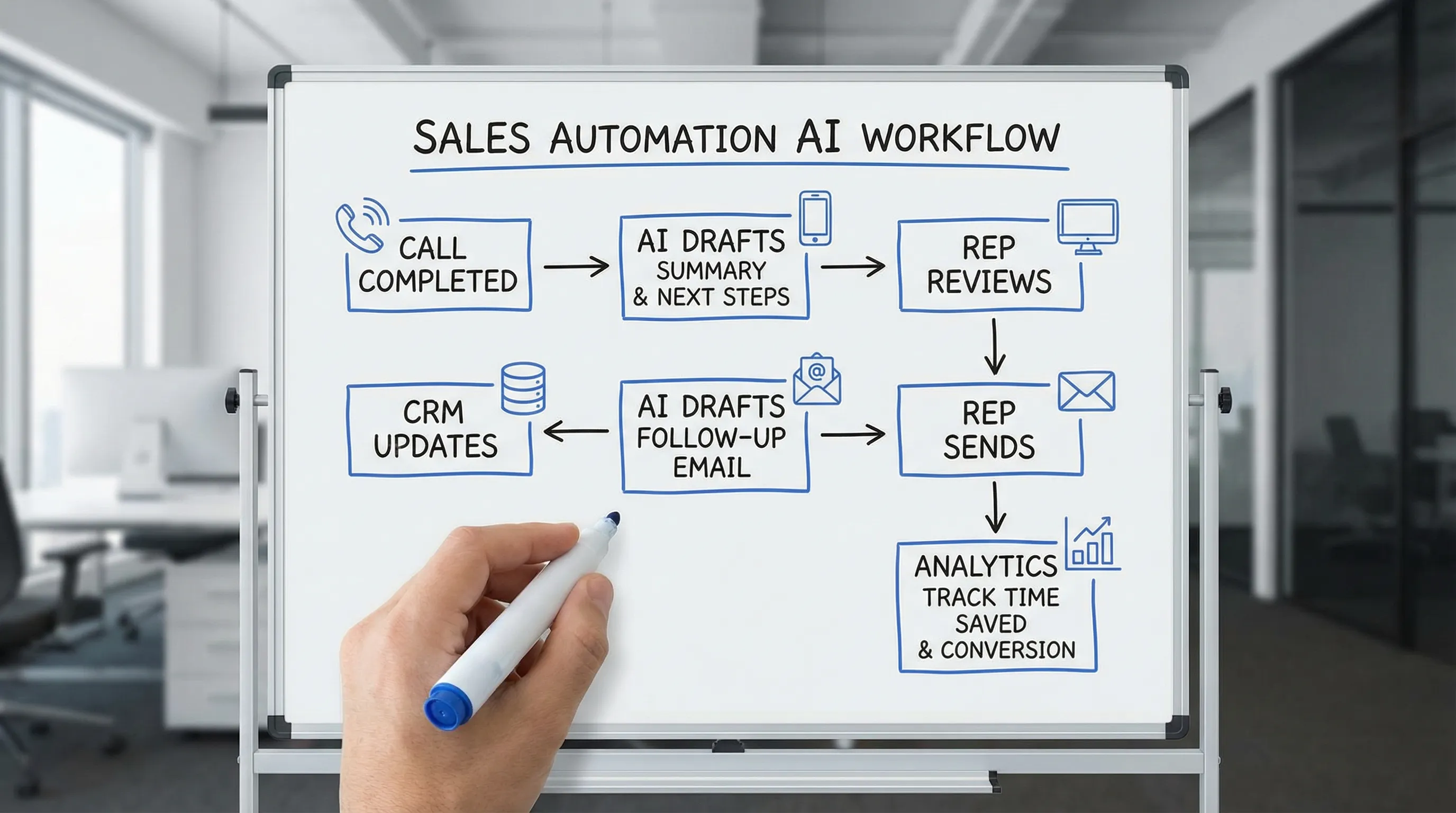
7) Roll out in iterations with champions and a tight feedback loop
Treat your first workflow as a pilot product.
Make it easy for reps to give feedback in the moment:
- “This summary missed the decision criteria”
- “The email tone is too formal for this account”
- “The CRM fields are wrong for our sales process”
Then publish small improvements weekly. Adoption grows when reps see their input turning into upgrades.
A rep-friendly example workflow: Inbound lead to booked meeting
Below is a concrete workflow that many teams can implement without redesigning their entire tech stack.
Trigger: New inbound lead qualifies
AI can help by:
- Summarizing form inputs and enrichment into a short brief
- Suggesting the best next action (book a meeting, send clarifying questions, route to SDR)
Rep still decides if it is real intent.
Action: First-touch outreach
AI drafts two options:
- A short email tailored to the lead’s role and use case
- A call opener and 2 discovery questions
Rep edits and sends.
After contact: Update CRM and schedule follow-up
AI produces:
- A structured note
- Next steps
- Suggested follow-up timing based on lead type
Rep confirms and saves.
To make this operational, document responsibilities and tool handoffs:
| Step | What gets automated | What stays human | Common failure | Fix |
|---|---|---|---|---|
| Lead brief | Summary + suggested discovery angle | Decide if it is worth pursuing | Generic brief | Restrict inputs to relevant fields, require 3 specific bullets |
| Outreach draft | Email + call opener | Personalization and sending | “Sounds like marketing” tone | Provide examples of winning emails, set tone guidelines |
| Logging | Draft CRM update | Final approve | Wrong field mapping | Lock field schema, test on real records |
| Follow-up | Suggested next step and date | Choose commitment and timing | Too aggressive timing | Add rules by segment and buyer role |
Common reasons reps reject sales automation AI (and how to fix them)
“It’s faster to do it myself”
This is often true if the workflow requires copy-paste or switching tabs.
Fix: reduce friction until the automation is a 30 to 60 second review, not a 5 minute task.
“It doesn’t sound like me”
Fix: standardize tone guidelines and require reps to save 2 to 3 approved examples of their own writing that define their voice. Then measure whether editing time drops over time.
“It makes mistakes, so I can’t trust it”
Fix: start with low-risk outputs (summaries, internal notes) and make the system show its sources. Build trust before automating customer-facing actions.
“I’ll get in trouble if it logs the wrong thing”
Fix: keep approvals explicit, and agree on governance. Make it clear who owns field definitions, validation, and auditing.
“This feels like management surveillance”
Fix: be transparent about what you measure and why. Prioritize coaching signals over policing signals. Scenario-based training can help here because it frames improvement as skill growth, not monitoring.
A lightweight governance checklist (so the workflow scales)
You do not need heavy bureaucracy, but you do need clarity.
| Area | Decide upfront | Why it matters |
|---|---|---|
| Data access | What fields and content the AI can use | Reduces risk and improves relevance |
| Approval rules | What can be auto-sent vs draft-only | Prevents customer-facing errors |
| Quality review | Who samples outputs weekly | Maintains trust and performance |
| Prompt/playbook ownership | Sales Ops, Enablement, or RevOps | Ensures updates happen |
| Change management | How changes are announced | Avoids “it changed again” frustration |
If you want the workflow to survive beyond the initial excitement, governance is what keeps it stable.
Where Scenario IQ fits in an adoption-first AI workflow
Even with a well-designed workflow, adoption rises fastest when reps can practice the exact moments they will use it.
Scenario IQ’s scenario-based approach aligns well with sales automation AI because you can:
- Build roleplays around your real deal stages and objections
- Provide real-time feedback so reps learn faster
- Track progress with analytics so managers coach consistently
If your automation is supposed to improve follow-ups, discovery, or objection handling, simulated practice is often the shortest path from “we launched it” to “reps use it daily.”

Frequently Asked Questions
What is sales automation AI? Sales automation AI uses AI to turn sales activity (calls, emails, notes, CRM data) into useful drafts and actions like summaries, next steps, follow-ups, and structured CRM updates, typically with human approval.
How do you get reps to actually use AI in sales? Start with 1 to 2 workflows that save time immediately, embed them where reps already work, keep outputs in draft mode at first, and reinforce adoption with scenario-based practice and coaching.
What should you automate first with AI in sales? Post-call and post-demo moments are usually best: call summaries, next steps, CRM updates, and follow-up drafts. They have clear triggers and obvious value.
Is it risky to use AI for customer emails? It can be if emails are auto-sent. Reduce risk by requiring rep approval, showing what sources were used, and starting with internal summaries until the team trusts quality.
How do you measure whether sales automation AI is working? Focus on behavior and outcomes: time saved, CRM freshness, speed to follow-up, and conversion rates in the stage you targeted, plus weekly quality sampling of outputs.
Build a workflow your reps trust, then train it into habit
If you want sales automation AI to drive revenue, design it around rep moments that matter, keep guardrails tight, and operationalize feedback.
To reinforce adoption with realistic practice, explore Scenario IQ for AI roleplay training that builds confidence, sharpens objection handling, and helps teams execute new workflows consistently.