

An intelligent virtual assistant (IVA) can be your best customer experience hire or your most expensive source of confusion. In sales and service, the difference often comes down to two design goals that sound simple but are hard to execute consistently: trust (users feel safe following its guidance) and accuracy (its answers and actions are correct, grounded, and repeatable).
This guide breaks down how to design an intelligent virtual assistant for trust and accuracy, from conversation design and knowledge strategy to testing, governance, and team readiness.
What is an intelligent virtual assistant (and why it is not “just a chatbot”)
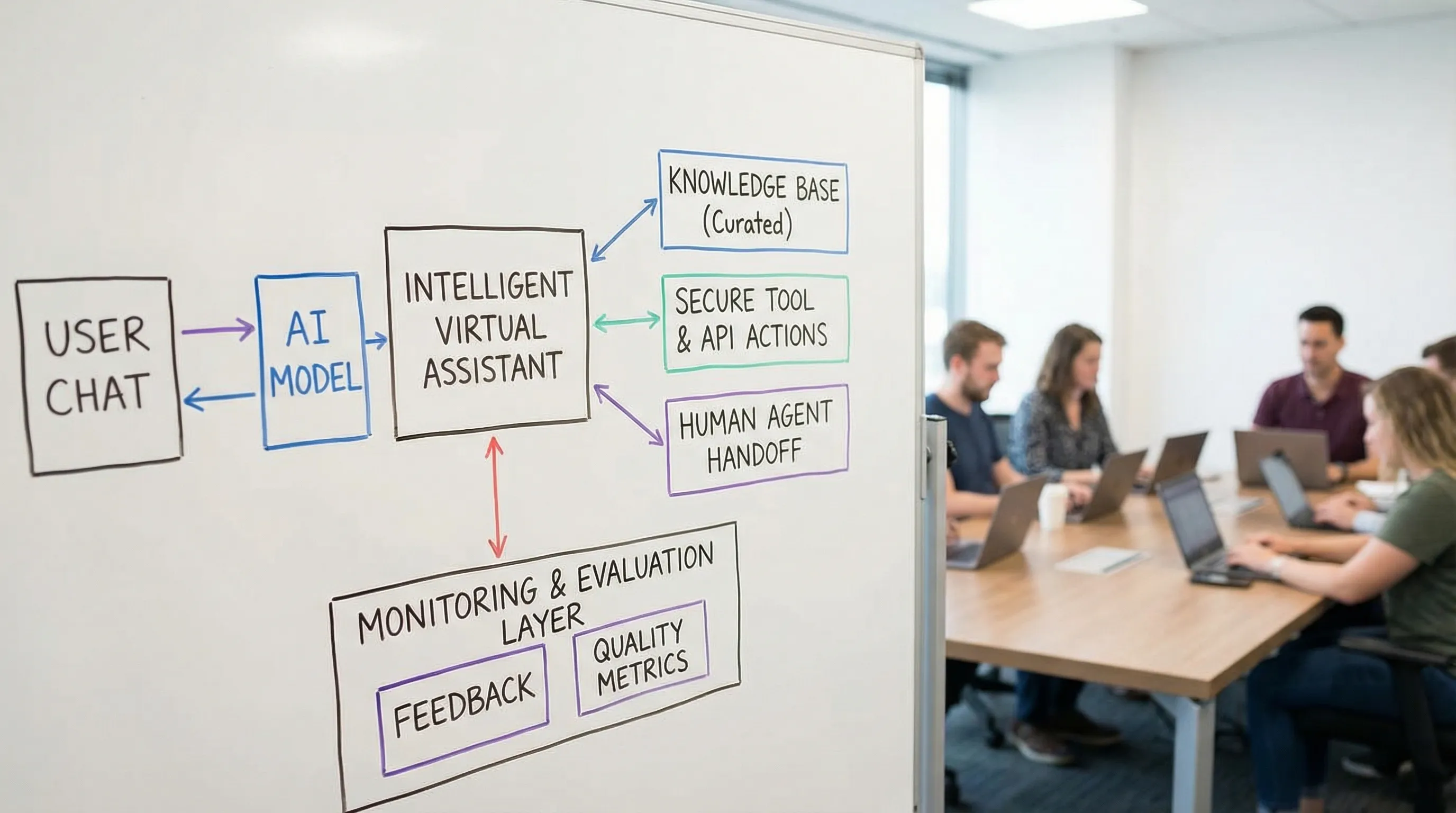
An intelligent virtual assistant is an AI system that can understand user intent across multiple turns, maintain context, and help complete tasks through conversation. Unlike older rule-based chatbots, an IVA typically combines:
- Natural language understanding (NLU) for intent and entities
- A reasoning-capable model (often an LLM) to interpret requests and generate responses
- Retrieval of approved knowledge (policies, product docs, troubleshooting steps)
- Integrations (CRM, ticketing, ordering, scheduling) to take actions
- Guardrails and escalation logic to handle risk and hand off to humans
In practice, an IVA becomes part of your frontline operating model. That is why trust and accuracy are not “nice to have”. They are the product.
Why trust and accuracy determine adoption (and ROI)
Users do not evaluate your assistant like they evaluate a search bar. They evaluate it like they evaluate a person representing your company.
- Trust affects whether customers share information, follow guidance, and accept outcomes (for example, payment steps, account changes, troubleshooting instructions).
- Accuracy affects whether the assistant resolves issues quickly, reduces rework, and avoids compliance or brand risk.
If either fails, you get predictable symptoms: low containment, increased escalations, agent frustration, and “shadow support” where customers bypass the assistant to reach a human.
Design for trust: the core principles
Trust is built when the assistant behaves predictably, protects users, and stays honest about what it can and cannot do.
1) Set expectations early and keep them consistent
Trust starts in the first two messages. Be explicit about:
- What the assistant can help with (billing, returns, troubleshooting, booking)
- What it cannot do (legal advice, medical advice, account actions without verification)
- When it will involve a human
Avoid overpromising language like “I can handle anything.” Users remember the first promise, not the fine print.
2) Be transparent that it is AI, and explain how answers are produced
In regulated or high-stakes contexts, transparency is a trust multiplier. Disclose that the assistant is AI and, when relevant, explain whether it is answering from:
- Your official help center and policy documents
- Customer account data (with permission)
- A human agent’s input
If your assistant is grounded in approved content, say so. If it is not sure, it should say so.
For a practical framework on trustworthy AI risk management, reference the NIST AI Risk Management Framework (AI RMF).
3) Make privacy and consent part of the conversation, not a footer link
Users are more willing to trust when the assistant asks for data only when needed. Consider:
- Data minimization (ask only for what is required to solve the problem)
- Clear consent prompts when accessing account information
- “Do not store” patterns for sensitive fields when feasible
Privacy-by-design is especially important if the assistant is used by employees for internal help (HR, IT) where requests can include personal or confidential information.
4) Prove security through behavior
Most users will never read your security page. They will judge security by what the assistant asks and what it reveals.
Trust-friendly behaviors include:
- Authentication before account-specific answers
- Role-based access controls for internal assistants
- Safe refusals when users request restricted data
For common AI security failure modes (prompt injection, data leakage), OWASP’s guidance is a useful baseline. See OWASP Top 10 for LLM Applications.
5) Provide graceful human handoff (and make it feel seamless)
A trustworthy assistant does not trap users. It knows when to escalate and does so cleanly.
Key handoff design choices:
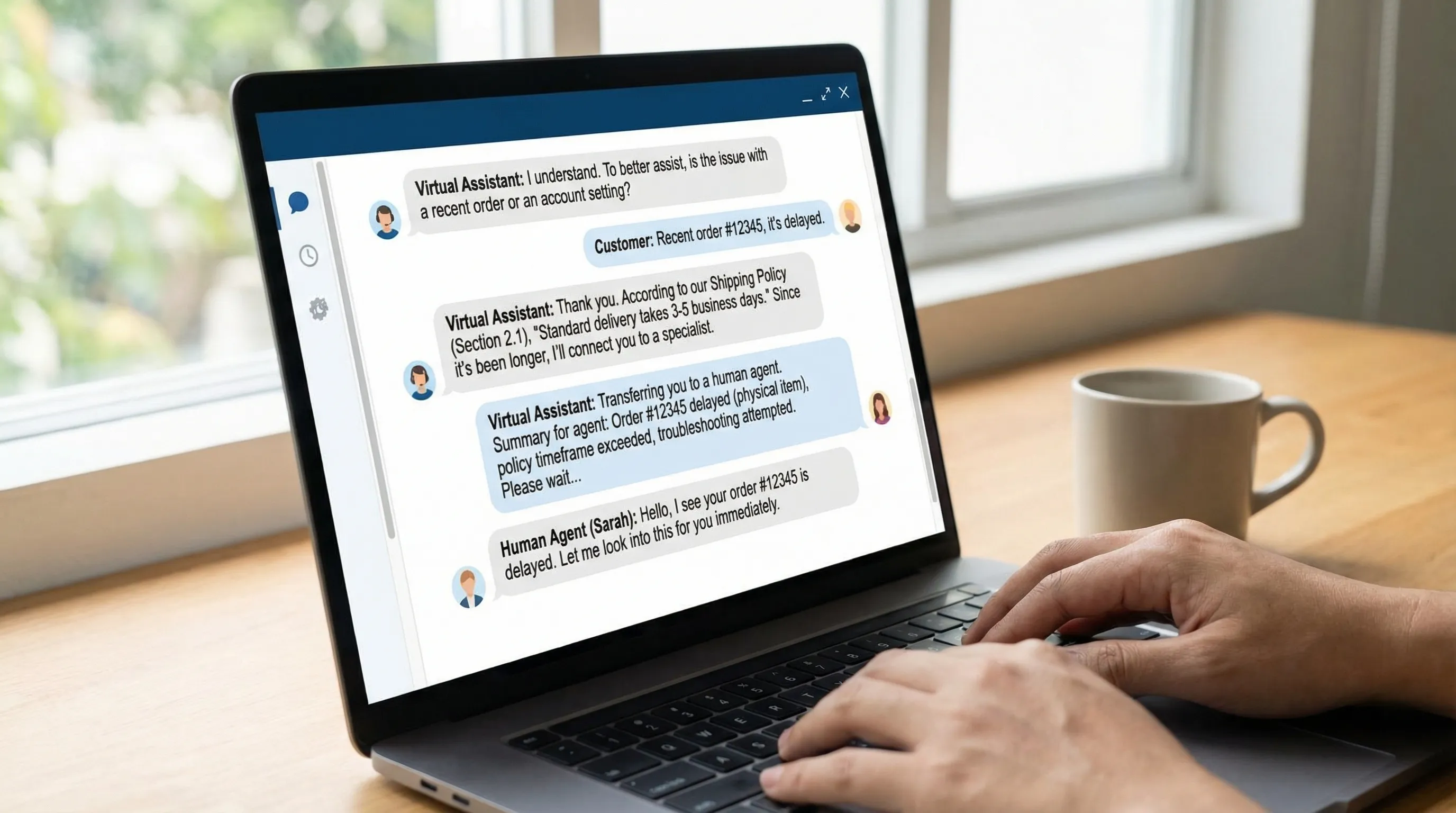
- Preserve context (summary of the issue, steps already tried, relevant identifiers)
- Offer channel choice (chat, phone, email) where possible
- Make the transition feel intentional (“I’m bringing in a specialist because…”) rather than like a failure
6) Use “calm competence” tone, not overly human mimicry
Human-like language can be helpful, but pretending to be human erodes trust when users notice inconsistency.
Aim for:
- Clear, respectful, neutral phrasing
- No fake empathy scripts that do not match the situation
- No invented personal experiences
7) Make error recovery a first-class feature
Even strong systems fail in edge cases. What matters is how they fail.
Design for:
- Easy correction (“That’s not what I meant” options)
- Clarifying questions when intent is ambiguous
- A visible “start over” that does not punish users
8) Close the loop with user feedback
Trust improves when users feel heard and see improvement.
At minimum, add lightweight feedback prompts at the end of key flows (resolved or escalated). Capture:
- Was the answer correct?
- Did it solve your problem?
- What was missing?
Then route that feedback into content updates and evaluation datasets.
Design for accuracy: how to reduce wrong answers and risky actions
Accuracy is not a single feature. It is the outcome of architecture, content discipline, and continuous evaluation.
Start with a “source of truth” knowledge strategy
Most IVA accuracy problems are content problems:
- Policies live in PDFs, wikis, and old ticket macros
- Product details differ by region, plan, or date
- Internal teams publish updates without notifying support
Before tuning models or swapping vendors, define:
- Which repositories are authoritative n- Who owns each content area
- Update cadence and approval workflow
Ground responses with retrieval, not guesswork
If your assistant answers from a general-purpose model alone, it will eventually invent details. To improve factuality, many production IVAs use retrieval-augmented generation (RAG), which pulls relevant passages from your approved knowledge base and answers based on those passages.
Accuracy improves further when you:
- Retrieve only from curated, versioned content
- Prefer short, specific snippets over long pages
- Store metadata (effective date, region, product tier) and filter retrieval accordingly
Use tools for actions, and keep actions deterministic
For any operation that changes state (refunds, password resets, cancellations, appointment booking), avoid “freeform” execution.
A safer pattern is:
- The assistant collects required fields
- A rules layer validates fields and eligibility
- A tool/API performs the action deterministically
- The assistant confirms outcome and next steps
This is where accuracy becomes operational, not just linguistic.
Constrain outputs in high-risk scenarios
Some answers should not be improvised.
Examples: compliance statements, warranty language, pricing rules, safety instructions.
Design techniques:
- Approved templates with variables
- Policy snippets that must be quoted verbatim
- Refusal patterns when the user requests prohibited guidance
Add “confidence behaviors” without pretending to know probabilities
Many teams try to display a confidence score. Unless you have a validated calibration method, numeric confidence can create false trust.
Instead, use behavior-based confidence:
- Provide citations or “based on our policy” references
- Offer a quick verification step (“What plan are you on?” “Which model?”)
- Present options when uncertain, and explain tradeoffs
Test with conversation simulations, not only single prompts
An IVA fails across turns: a wrong assumption in turn 2 can become a harmful action in turn 6.
Build a testing program that includes:
- Golden conversation sets (real transcripts, anonymized)
- Edge cases (angry users, unclear intent, mixed-language input)
- Adversarial prompts (prompt injection attempts, policy bypass attempts)
Red teaming should be part of your release process, especially if the assistant can access internal tools or sensitive data.
Metrics that make trust and accuracy measurable
You cannot manage what you cannot measure, but you also should not over-index on a single KPI like “deflection.” High deflection with low accuracy is brand damage.
A practical metrics set looks like this:
| Metric | What it tells you | Why it matters for trust and accuracy |
|---|---|---|
| Containment rate | How often the IVA resolves without escalation | High containment is only good if quality stays high |
| Escalation quality | Whether handoffs include correct context and routing | Bad handoffs increase handle time and frustrate users |
| First-contact resolution (FCR) | Whether the issue is solved in one interaction | Strong proxy for accuracy and flow design |
| Repeat contact rate | Whether users come back for the same issue | Reveals subtle inaccuracies and missing steps |
| Policy compliance rate | Whether responses follow approved language | Critical for regulated workflows |
| Hallucination incidence (reviewed sample) | Frequency of unsupported claims | Direct accuracy and safety indicator |
| CSAT / user effort score | Perceived helpfulness and ease | Directly tied to trust |
To keep these metrics honest, pair dashboards with regular human review of sampled transcripts.
A risk-to-mitigation checklist for IVA accuracy
The fastest way to improve accuracy is to map failure modes to controls.
| Failure mode | What it looks like | Mitigation pattern |
|---|---|---|
| Outdated policy answers | Correct last month, wrong today | Versioned content, effective dates, change alerts |
| Prompt injection | User tries to override rules or exfiltrate data | Input filtering, tool permissioning, system prompt hardening |
| Overconfident wrong answers | No uncertainty, no verification | Clarifying questions, citations, safe escalation |
| Incorrect account-specific guidance | Wrong plan, wrong eligibility | Authentication, CRM lookup, eligibility rules |
| Inconsistent answers across channels | Chat says one thing, email bot another | Shared knowledge base and governance |
Governance: keep the assistant accurate after launch
Most assistants degrade because the business changes faster than the content and evaluation do.
A lightweight but effective governance model includes:
Clear content ownership
Assign owners for major domains (billing, returns, technical support, product). Owners approve updates and are accountable for correctness.
Release discipline
Treat assistant changes like software releases:
- Model or prompt changes go through staging
- Knowledge base changes are logged and reviewable
- Evaluation runs before and after deployment
Auditability
Keep records of:
- Which content sources were used
- Which model version and configuration was active
- What the assistant responded, and why (at least at the level of retrieved sources)
This supports compliance reviews and accelerates incident response.
Conversation design blueprint: trust and accuracy in every step
Conversation design is where trust and accuracy become visible.
Opening: orient the user
A strong opening does three things: sets scope, asks a targeted first question, and offers a human option for sensitive cases.
Discovery: confirm intent and constraints
Before giving instructions, confirm the key variables that change the answer (plan, product version, region, timeframe, device type).
Resolution: give steps that are easy to execute
Accuracy is not only “factual.” It is also procedural.
Use:
- Short steps
- Clear prerequisites
- Checks after each step (“Did you see X?”)
Closure: summarize and document
Summaries reduce repeat contact and make escalations cleaner.
A good closure includes:
- What was done
- What the user should expect next
- How to get help if the outcome is not achieved
Do not skip the human factor: train teams to work with the assistant
Even a highly accurate IVA changes how people work.
- Service teams need to handle escalations that are more complex (simple issues get contained).
- Sales teams need to collaborate with the assistant without repeating steps or contradicting it.
- Supervisors need to coach to new quality standards (for example, validating what the assistant already collected).
This is where scenario-based practice is valuable. Teams build trust in the assistant when they rehearse realistic conversations: tricky objections, frustrated customers, edge-case policies, and the handoff moment.
Scenario IQ focuses on AI roleplay training to help sales and service teams practice real conversations, get real-time feedback, and track progress over time. If you are rolling out an intelligent virtual assistant, scenario training can also help your team learn how to:
- Take over escalations smoothly
- Verify critical details without restarting the conversation
- Keep tone consistent with the assistant’s experience
Frequently Asked Questions
What makes an assistant “intelligent” compared to a chatbot? An intelligent virtual assistant handles multi-turn context, can retrieve and apply knowledge, and may take actions through tools and integrations, not just follow scripted flows.
How do I improve intelligent virtual assistant accuracy quickly? Start by curating a single source of truth, grounding responses with retrieval from approved content, constraining high-risk outputs, and adding conversation-level testing with real transcripts.
Should an intelligent virtual assistant show citations or sources? When feasible, yes. Citations (or clear references to policy documents) increase trust, help users verify answers, and make internal auditing easier.
How do I prevent hallucinations in an IVA? Use curated retrieval (RAG), limit the assistant to approved content for sensitive topics, require clarifying questions when key variables are missing, and add monitoring plus regular transcript review.
When should an IVA hand off to a human? Handoff is appropriate when authentication is needed, risk is high (compliance, payments, safety), user intent is unclear after clarification, or the user is frustrated and asks for a person.
Build an assistant users trust, then train teams to deliver on it
Designing for trust and accuracy is not a one-time prompt tweak. It is a system: grounded knowledge, secure actions, clear escalation, and continuous evaluation. And once your IVA is live, your team needs to be ready for the new conversation patterns it creates.
If you want your sales and service teams to handle real-world scenarios confidently, including IVA escalations and objection-heavy conversations, explore Scenario IQ and see how AI roleplay training can support adoption and performance.