

Most sales teams have an objection doc. Far fewer have an objection library reps actually open mid-deal, trust in the moment, and practice often enough to change outcomes.
A library people use has three traits:
- It mirrors real buyer language, not internal jargon.
- It is easy to search when time is tight.
- It is reinforced through practice, coaching, and measurement.
Below is a practical, sales-leader-friendly way to build that kind of objection library, plus the operating system that keeps it alive.
Start with the goal: speed to a better next step
An objection library is not a script repository. It is a decision-support system.
When a buyer says, “This is too expensive,” your rep does not need paragraphs of theory. They need, within 10 to 20 seconds:
- The most likely root causes behind that objection in your market
- 2 to 4 strong diagnostic questions to find the real issue
- A few approved proof points and next-step options
- A quick signal for when to walk away (disqualification criteria)
If you design every entry to help a rep reach a better next step, adoption goes up.
Step 1: Collect objections from reality (not memory)
The fastest way to kill adoption is to build the library from leadership’s “top objections” brainstorm alone. You want verbatim buyer language.
Pull objections from at least three sources:
Deal artifacts
- CRM “closed lost” notes (especially competitor, timing, and budget fields)
- Email threads where buyers push back on pricing, security, or procurement
- Proposal redlines and legal comments
Conversation evidence
If you record calls, sample them across:
- Early discovery (fit, priorities)
- Demo or evaluation (capabilities, differentiation)
- Procurement (terms, risk, security)
Capture objections word-for-word and include the moment they happened (for example: “after integration question,” “after price reveal,” “after implementation timeline”).
Frontline input, structured
Ask reps and CSMs to submit:
- The exact objection phrasing
- What they tried
- What worked (if anything)
- What they wish they had in the moment
One small but powerful move: require submissions to include “what was the buyer protecting?” (risk, time, credibility, budget, control). That single prompt improves the quality of your final library.
Step 2: Separate objections from stalls and conditions
Teams waste time writing responses to things that are not objections.
Use these definitions:
- Objection: A reason the buyer believes the deal should not move forward.
- Stall: A delay tactic (often uncertainty, low priority, or fear of commitment).
- Condition: A real constraint that must be true to proceed (legal requirement, technical dependency, fiscal calendar).
Why it matters: objections need diagnosis and reframing, stalls need controlled next steps, conditions need planning.
A simple taxonomy makes the library searchable and coachable.
| Type | Example | Best “library output” |
|---|---|---|
| Objection | “I don’t think this will work for our use case.” | Diagnostic questions, proof, use-case stories |
| Stall | “Can you follow up next month?” | Mutual action plan, calendar control, consequence framing |
| Condition | “We need SOC 2 before we can buy.” | Security pathway, documentation checklist, timeline |
Step 3: Build a tagging system your team can actually use
Most libraries fail on navigation. Reps search by what they just heard.
Tag each entry with:
- Category: Price, competition, timing, authority, trust/risk, product fit, implementation, security/legal
- Deal stage: Discovery, evaluation, procurement, renewal/expansion
- Persona: Finance, IT, end user, exec sponsor, procurement
- Severity: Mild pushback, firm objection, hard stop
Avoid creating 25 categories. Seven to nine categories is usually enough.
Step 4: Create an “Objection Card” template (the heart of adoption)
If every entry looks different, the library becomes a reading assignment. Standardize it.
Use a one-screen card format so a rep can skim it during a live call.
Here is a high-usage template you can copy:
| Field | What to include |
|---|---|
| Buyer phrasing (verbatim) | 2 to 5 real quotes that sound like your market |
| What it often means | 2 to 4 likely root causes, written plainly |
| Confirm in 30 seconds | 2 to 4 diagnostic questions |
| Recommended path | A short talk track outline (not a script) |
| Proof points | 2 to 4 claims you can substantiate (case study, metric, demo area) |
| Landmines | What not to say, common rep mistakes |
| Disqualify if… | Clear signals to stop pushing |
| Assets | Links to the right deck slide, one-pager, security doc (if applicable) |
| Practice scenario | A prompt for roleplay drills |
| Owner + review date | Who maintains it, when it is updated |
A note on “pattern recognition”
Objections repeat because humans repeat. Buyers have predictable risk patterns, reps have predictable coping patterns.
If you want a fun, non-sales example of how powerful pattern identification can be, tools like DateSense show how quickly a short, research-backed quiz can surface recurring behaviors. Your objection library should do the same thing for revenue conversations: identify the pattern, label it clearly, then give the rep a better default response.
Step 5: Write responses that drive diagnosis, not defensiveness
A library that “handles objections” by arguing back creates brittle reps. Aim for calm control.
A simple framework that stays usable across objections is:
- Acknowledge: Confirm you heard them.
- Clarify: Ask a precise question to locate the real issue.
- Align: Re-anchor to the buyer’s goal or constraint.
- Advance: Offer a next step (proof, plan, or decision checkpoint).
Example (Price objection card excerpt)
Buyer phrasing: “You’re more expensive than the other options.”
Confirm in 30 seconds (diagnostic questions):
- “When you say expensive, is the concern the total cost, the timing of cash flow, or proving ROI internally?”
- “What are you comparing us to, and what outcome matters most in that comparison?”
- “If price were equal, would this solve the problem the way you need it to?”
Recommended path (outline):
- Acknowledge the comparison.
- Clarify what “expensive” means and what they are benchmarking against.
- Align on the cost of the problem and the value metric that matters.
- Advance with a proof step (ROI model review, reference call, success plan).
Landmines:
- Discounting before understanding the comparison criteria
- Criticizing the competitor instead of clarifying tradeoffs
- Overloading with features when the objection is financial risk
Notice what is missing: a monologue. Your reps need questions and controlled options.
Step 6: Make the library easy to access in the flow of work
A perfect library in the wrong place does not exist.
Choose a home that matches rep behavior:
- If your team lives in the CRM, make it CRM-adjacent.
- If your team uses an internal wiki, make it one click from the deal desk.
- If your team relies on enablement, ensure search is fast and the template is consistent.
Two adoption tips that matter more than the tool:
Keep entries short, but link out for depth
Your objection card should be skimmable. If deeper context is needed, link to it as an asset, not as more text on the card.
Create a “Top 12” view for new hires
New reps do not need 80 objections on day one.
Publish:
- Top 12 objections by frequency
- Top 5 objections by deal risk (they do not happen often, but when they do, they kill deals)
This also makes onboarding measurable.
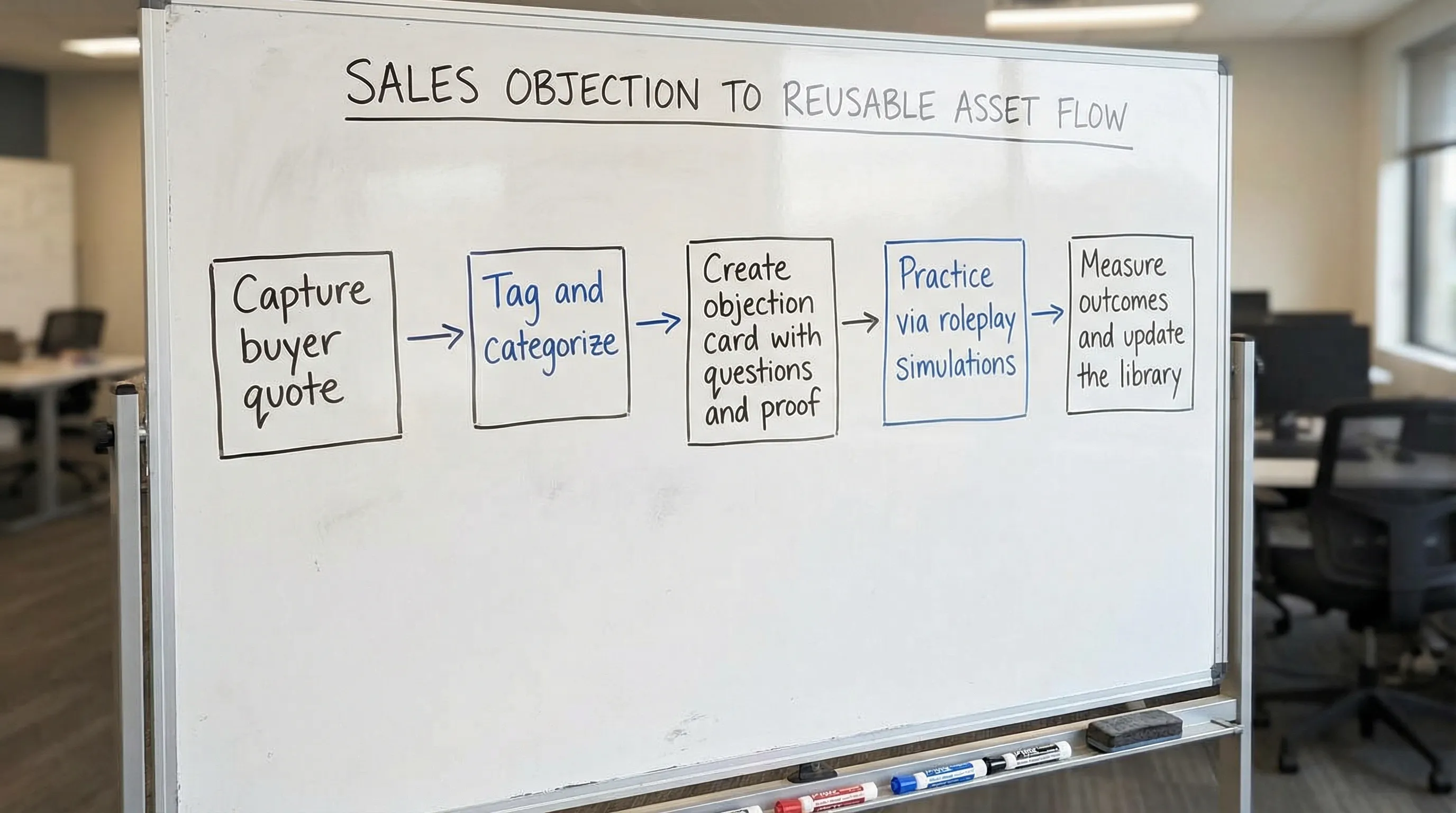
Step 7: Turn the library into a training loop (this is where usage is won)
Libraries become shelfware when they are not practiced.
Build a weekly loop:
Objection of the week
Pick one objection, then:
- Review the objection card in 5 minutes.
- Have reps practice it in short roleplays.
- Collect field feedback: what phrasing came up, what angle worked.
Roleplay using scenario-based simulation
This is where AI roleplay can outperform traditional practice.
Instead of hoping managers can roleplay every persona consistently, you can run scenario-based simulations that:
- Adapt difficulty as reps improve
- Give real-time feedback on wording, clarity, and objection handling
- Track progress across the team so coaching is targeted
Scenario IQ is built for this workflow: you can translate each objection card into a repeatable simulation, then use analytics and feedback to see whether the library is changing behavior in practice, not just living in a document.
Step 8: Add governance so the library stays trusted
The moment reps find outdated talk tracks, they stop coming back.
Assign ownership and a review cadence.
A lightweight governance model:
- Owner per category: One person accountable for accuracy (sales enablement, product marketing, or a senior rep)
- Monthly review: Update top objections and proof points
- Quarterly cleanup: Merge duplicates, delete entries that never occur, refresh competitor notes
- Change triggers: Pricing change, packaging change, new competitor, new security requirement
Also, define what “approved” means. If a proof point cannot be substantiated, it does not belong in the library.
Step 9: Measure adoption and impact (without overcomplicating it)
You want to answer two questions:
- Are reps using it?
- Is it improving outcomes?
Here is a simple measurement set most teams can implement.
| Metric | What it tells you | Practical way to track |
|---|---|---|
| Library usage | Whether it is being accessed | Page views, searches, opens per rep |
| Practice volume | Whether reps are rehearsing | Completed roleplays per objection |
| Proficiency trend | Whether skills are improving | Roleplay scoring over time, manager scorecards |
| Deal impact | Whether it is changing revenue outcomes | Win rate or stage conversion for deals where objection occurred |
| Time-to-confidence | Whether onboarding is improving | Time for new hires to pass key objection scenarios |
If you use AI simulations, you can often quantify improvement faster than waiting for quarterly revenue results, because you can measure behavior in practice sessions (clarifying questions asked, talk-to-listen balance, whether a next step was secured).
Common reasons objection libraries fail (and quick fixes)
It reads like a playbook, not a tool
Fix: Convert long entries into objection cards. Enforce the template.
It is not built from real buyer language
Fix: Require verbatim quotes, and keep updating with fresh examples.
It is not integrated into coaching
Fix: Make “Objection of the week” mandatory and rotate through the top list.
It rewards scripts instead of diagnosis
Fix: Score reps on quality of diagnostic questions and next-step control, not on perfect wording.
No one owns it
Fix: Assign category owners and publish review dates on every card.
Frequently Asked Questions
What should be included in a sales objection library? Include verbatim buyer phrasing, likely root causes, 2 to 4 diagnostic questions, a short response outline, proof points, landmines, disqualification signals, and a practice scenario.
How many objections should we start with? Start with 10 to 15 high-frequency objections, plus 3 to 5 high-risk objections. Expand only after the first set is being used and practiced.
What is the difference between an objection and a stall? An objection is a reason not to proceed, a stall is a delay tactic, and a condition is a true constraint that must be met. Treating stalls like objections leads to wasted effort and weaker deal control.
How do you get reps to actually use the objection library? Make it skimmable, searchable, and embedded into weekly coaching. Pair it with recurring roleplay practice and track usage so the team sees it as a performance tool, not a document.
How do we keep the library updated? Assign owners by category, schedule monthly reviews, and update on change triggers like pricing changes, new competitors, or new security requirements.
Put your objection library into practice with Scenario IQ
A strong objection library is only half the system. The other half is repetition, feedback, and measurable improvement.
If you want your team to build confidence handling objections under pressure, Scenario IQ helps you turn each objection card into AI-powered roleplay simulations with real-time feedback and analytics for coaching and progress tracking. Learn more at Scenario IQ.