

Support teams rarely struggle because they lack effort. They struggle because the work arrives messy, repeats itself, and gets stuck in handoffs. An AI ticketing system speeds up support resolution by fixing those bottlenecks at the source, before an agent even opens a ticket, and by helping agents reach the right answer faster once they do.
Below is a practical, operations-focused breakdown of how AI reduces time to resolution (TTR), which workflows drive the biggest gains, what to measure, and what to watch out for.
What “speeding up resolution” really means
Most leaders default to “respond faster.” But the outcome customers feel is resolution speed, not the first reply.
A modern support org typically optimizes across:
- First response time (FRT): how quickly the customer gets an initial human or meaningful automated reply.
- Time to resolution (TTR): how long until the issue is actually solved.
- First contact resolution (FCR): how often you solve the issue without follow-ups or transfers.
- Reopen rate: how often “resolved” comes back because the fix was incomplete.
An AI ticketing system can improve all four, but the biggest ROI usually comes from reducing back-and-forth and preventing misroutes that silently add days.
What an AI ticketing system does (and what it does not)
An AI ticketing system is typically your existing help desk platform (or an add-on layer) that uses machine learning and generative AI to:
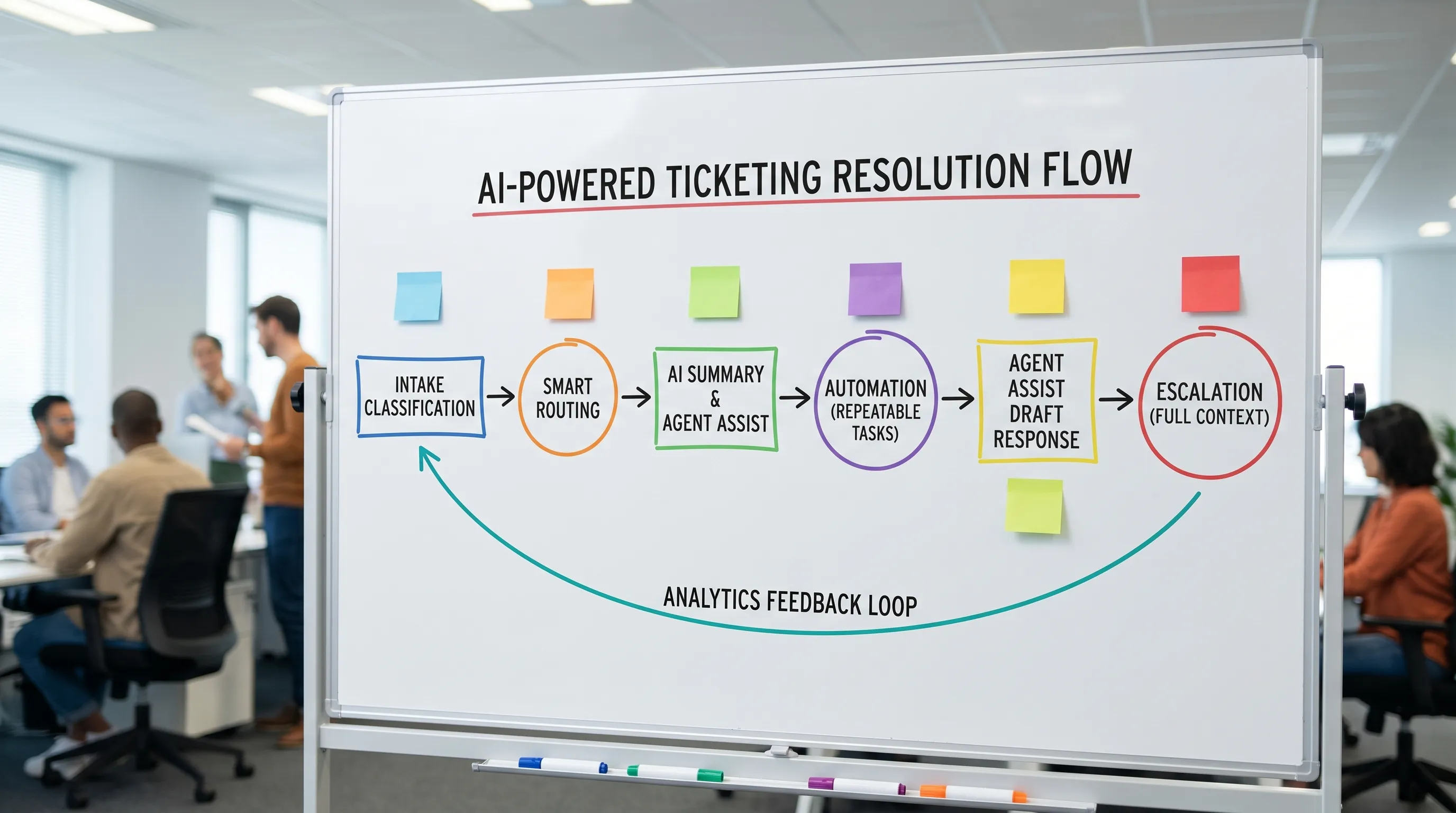
- Classify and prioritize incoming tickets
- Route to the right queue or agent
- Suggest knowledge base articles or next-best actions
- Summarize long threads
- Draft replies and macros
- Automate common workflows (password reset, status checks, refunds, appointment changes)
- Detect sentiment, urgency, or escalation risk
What it does not do by itself: fix broken processes, unclear policies, or inconsistent agent skill. AI accelerates whatever system you already have, which is why change management and training matter.
7 ways an AI ticketing system speeds up support resolution
1) Faster triage: clean intake, better categorization
Triage is where resolution time is quietly won or lost. If the issue type is wrong, everything downstream slows down.
AI improves triage by:
- Auto-detecting intent (billing dispute vs cancellation vs technical bug)
- Extracting entities (order ID, device model, app version, error codes)
- Auto-applying forms/fields so agents do not chase basics
Result: less manual sorting, fewer “can you share your order number?” loops, and fewer tickets sitting in the wrong queue.
2) Smarter routing: fewer handoffs and escalations
Routing is not just “send to Billing.” High-performing teams route by:
- Product area
- Customer tier
- Channel
- Language
- Severity
- Required permissions
- Agent skill or certification
AI routing uses historical outcomes to predict the best destination, which reduces:
- Transfers between teams
- “Waiting for Tier 2” bottlenecks
- Duplicate work when multiple agents touch the same case
Even a small reduction in handoffs can materially improve TTR because each handoff often adds hours (or days) of waiting.
3) Instant context: AI summaries for long threads
Support time is often consumed by reading, not solving.
AI-generated summaries can compress:
- The customer’s goal and constraints
- What has already been tried
- Key troubleshooting steps performed
- The current status and next action
This is particularly powerful for:
- High-touch accounts with multi-week threads
- “Bounced” tickets that change owners
- Escalations where engineers need a crisp problem statement
4) Agent assist: better answers in fewer steps
Many tickets are not complex. They are time-consuming because the agent must:
- Search the knowledge base
- Compare multiple articles
- Choose the right macro
- Customize tone and policy language
AI agent assist speeds this up by:
- Suggesting relevant articles based on the ticket content
- Recommending the next best question to ask (so you do not ask twice)
- Drafting replies that agents can edit and approve
McKinsey has highlighted meaningful productivity upside for customer operations from generative AI, especially through drafting and knowledge assistance, when implemented with proper controls.
Reference: McKinsey on generative AI and customer operations
5) Automation for repeatable work (without making customers hate it)
Automation speeds resolution when it is applied to the right categories:
- Status checks (order/shipping, appointment, outage)
- Simple account changes
- Password and access workflows
- Refund eligibility checks
- Basic troubleshooting flows
The key is containment with escape hatches: automation should quickly solve what it can, and smoothly hand off with full context when it cannot.
6) Prioritization that reflects business impact (not just “oldest first”)
Traditional ticketing logic often treats tickets as equal. They are not.
AI models can help prioritize by:
- Detected urgency (for example, service outage language)
- Customer tier or revenue impact
- Escalation risk (angry sentiment, churn signals)
- SLA risk (predicting which tickets will breach)
This speeds resolution where it matters most and reduces SLA firefighting.
7) Continuous improvement loops: analytics that point to root causes
Speed does not come only from agents working faster. It comes from:
- Fewer tickets
- Better self-service
- Fewer defects
- Clearer policies
AI-driven analytics can surface patterns like:
- Top emerging ticket drivers (after a product release)
- Articles that fail to resolve issues (high reopen rates)
- Steps in the workflow where tickets stall
- Teams or queues with growing backlog risk
That insight lets you fix the upstream causes that inflate TTR.
Where the biggest time savings usually come from (with metrics)
Not every AI feature moves TTR equally. Use this table to map features to measurable outcomes.
| AI capability in ticketing | Primary resolution-speed lever | Metrics to watch | Best fit use cases |
|---|---|---|---|
| Auto-classification and field extraction | Removes back-and-forth and manual triage | TTR, FCR, misroute rate | High volume inbound, inconsistent forms |
| Intelligent routing | Reduces handoffs and queue waiting | TTR, transfers per ticket, SLA breaches | Multi-team support, tiered support |
| Conversation summarization | Cuts reading time and improves handoffs | Handle time, TTR, escalation cycle time | Escalations, long email threads |
| Agent assist (KB suggestions + drafts) | Faster accurate responses | FRT, handle time, CSAT, reopen rate | Policies, troubleshooting, how-to tickets |
| Workflow automation | Eliminates repetitive steps | TTR, ticket volume, containment rate | Account tasks, status checks |
| Predictive prioritization | Solves the right tickets sooner | SLA breaches, churn escalations, CSAT | Mixed urgency, enterprise accounts |
A realistic implementation roadmap (so speed gains actually stick)
Start with ticket taxonomy and data hygiene
AI is only as good as your categories, labels, and outcomes.
Make sure you can answer:
- What are our top 20 ticket reasons?
- Which ones are truly “solved” vs temporarily closed?
- Which macros/articles are used, and do they correlate with lower reopen rates?
If your “Other” category is 40%, fix that first. You will get speed gains even before advanced automation.
Choose 2 to 3 high-impact workflows, not 20 features
Common fast-win bundles:
- Bundle A (triage + routing): classification, field extraction, routing rules
- Bundle B (agent assist): summaries + KB suggestions + reply drafts
- Bundle C (automation): 1 to 3 repeatable workflows with clear success criteria
Then measure for a few weeks and iterate.
Keep a human-in-the-loop for customer-facing actions
For most teams, the safest approach is:
- AI drafts and suggests
- Agents approve and send
- Automation runs only for low-risk workflows with clear confirmation
This reduces the risk of policy mistakes and tone issues, while still saving time.
Build guardrails: security, privacy, and knowledge grounding
Resolution speed cannot come at the cost of trust.
Work with legal and security on:
- Data retention and access controls
- Redaction of sensitive fields
- Approved knowledge sources (so AI answers are grounded)
- Audit logs for automated actions
If you operate in regulated industries, vendor security documentation and enterprise controls should be part of the evaluation.
Reference: NIST AI Risk Management Framework (useful for structuring governance conversations).
Train the team on “AI-assisted support,” not just button clicks
This is where many deployments stall.
Agents need practice on:
- Editing AI drafts for accuracy and tone
- Asking the best next question when AI is uncertain
- Knowing when to override automation
- De-escalating when sentiment flags are triggered
Without that, teams either over-trust AI (risk) or ignore it (no ROI).
Common pitfalls that slow you down (even with AI)
Mistaking speed for quality
If AI reduces handle time but increases reopen rate, you have not improved resolution, you have shifted work into the future. Always pair speed metrics with quality metrics.
Over-automating messy edge cases
Automate the stable, repeatable tasks first. If you automate a workflow with lots of exceptions, you will create customer frustration and internal rework.
Not aligning policies and macros
AI drafts are only as good as the policy and knowledge you feed them. If your refund policy is scattered across five docs, agents will still hesitate.
Ignoring channel differences
Chat, email, and voice have different rhythms.
- Chat needs brevity and fast clarifying questions.
- Email needs completeness and clear next steps.
- Voice needs real-time guidance and objection handling.
A one-size AI configuration often underperforms.
How Scenario IQ helps support teams realize the speed gains
An AI ticketing system can reduce triage time and draft responses, but resolution speed still depends on human skill: diagnosis, clarity, policy confidence, and de-escalation.
Scenario IQ focuses on that last mile through AI-powered roleplay training that helps support and service teams practice realistic interactions repeatedly, with personalized feedback. That can be especially helpful when you introduce new workflows like AI-assisted replies, new escalation paths, or updated policies, because teams can rehearse the situations that typically cause delays (angry customers, unclear requests, missing details, multi-issue tickets).
If you want the technology to translate into shorter TTR, consider pairing process improvements with structured practice.

Frequently Asked Questions
What is an AI ticketing system? An AI ticketing system uses AI to classify, route, summarize, and assist with responses to support tickets, often adding automation and analytics to speed up resolution.
Will an AI ticketing system replace support agents? In most organizations, it augments agents rather than replacing them. The biggest gains come from faster triage, better routing, and agent assist, with humans still approving customer-facing actions.
Which metric best proves faster support resolution? Time to resolution (TTR) is the clearest, but it should be paired with reopen rate and CSAT to confirm you are not trading speed for quality.
How do I avoid AI sending the wrong answer to customers? Use human approval for drafted replies, restrict AI to approved knowledge sources, and automate only low-risk workflows with clear confirmations and auditability.
How long does it take to see ROI from AI in ticketing? Teams often see early improvements within weeks for triage and routing, but the largest sustained gains usually require ongoing tuning, knowledge cleanup, and agent training.
Ready to reduce resolution time without sacrificing quality?
If you are rolling out an AI ticketing system (or trying to get more value from one), make sure your team can consistently apply the new workflows under pressure.
Scenario IQ helps support and service teams build that confidence through AI roleplay simulations, real-time feedback, and progress analytics.
Explore Scenario IQ here: Scenario IQ | AI Sales & Service Training That Closes Deals