

Customer expectations keep rising while support teams are asked to do more with fewer resources. That is why artificial intelligence customer service has moved from “nice to have” experiments to a practical operating model: automate the simple, accelerate the complex, and give agents better tools so customers get faster, more consistent help.
This playbook is designed for service leaders, CX ops, and support enablement teams who want to implement AI in a way that is measurable, safe, and actually adopted.
What “artificial intelligence customer service” really means in 2026
AI in customer service is not one thing. Most successful programs combine multiple AI patterns:
- Self-service automation: chatbots, voicebots, interactive help flows.
- Agent augmentation: suggested replies, summarization, next-best-action prompts, coaching.
- Operations intelligence: ticket routing, intent detection, QA monitoring, trend detection.
In practice, the highest ROI usually comes from pairing automation with agent augmentation. Automation reduces volume, augmentation reduces handle time and raises quality for the rest.
Start with outcomes, not tools
Buying an AI tool before defining the outcome is the fastest way to end up with a bot that deflects easy tickets but frustrates customers.
Anchor your AI customer service plan on three outcomes:
1) Faster resolution without quality loss
Speed is only a win if accuracy stays high. Track “time to resolution” alongside quality measures (CSAT, complaint rate, recontact rate).
2) More consistent experiences across agents and channels
AI can standardize tone, policy adherence, and troubleshooting steps, but only if it is grounded in your knowledge base and escalation rules.
3) Lower cost-to-serve without hidden costs
Hidden costs include escalations caused by wrong automation, higher churn from poor experiences, and security or compliance remediation.
The use case shortlist (what to implement first)
Most teams should begin with use cases that are low risk, high volume, and easy to measure. Here is a practical way to select your first two to three initiatives.
| Use case | AI pattern | Best for | What you need | Primary success metrics |
|---|---|---|---|---|
| FAQ and policy questions | Self-service automation | High-volume “where is my…” and “how do I…” | Clean help articles, clear policies | Containment rate, CSAT for self-service |
| Ticket summarization | Agent augmentation | Any team with complex threads | Access to ticket history | Average handle time (AHT), after-call work |
| Suggested replies and tone guidance | Agent augmentation | Email/chat teams, newer agents | Approved macros, brand tone rules | QA score, CSAT, time to first response |
| Intent detection and routing | Ops intelligence | Multi-skill teams and shared inboxes | Labeled historical tickets | Misroute rate, time to assignment |
| Knowledge article recommendations | Agent augmentation | Product-heavy support | Searchable knowledge base | Deflection, AHT, first contact resolution |
| Post-interaction QA sampling | Ops intelligence | Teams needing consistent compliance | QA rubric, transcripts | QA coverage, defect rate |
A common sequence that works well:
1) Agent assist first (summaries, suggested replies, knowledge recommendations). 2) Then targeted self-service for the top intents with clear answers. 3) Then operations intelligence (routing, QA, trend detection) once data is reliable.
Phase 1: Prepare your foundation (data, knowledge, and guardrails)
AI customer service quality is limited by your inputs. Before you automate anything customer-facing, make sure these foundations are in place.
Clean up your knowledge base for AI consumption
If your help content is outdated, inconsistent, or contradictory, AI will scale that confusion.
A practical standard to aim for:
- Each article has one clear purpose, one owner, and a review date.
- Policies (refunds, cancellations, SLAs) exist in a single source of truth.
- Troubleshooting steps are structured (symptoms, cause, steps, escalation).
Tip: If you are rolling out generative AI, create a “gold” set of articles that you trust first. Expand coverage only after you see accuracy holding.
Define your “allowed to answer” boundaries
Your AI should not treat every question the same. Classify topics into tiers:
- Green: safe, factual, low impact (hours, shipping timelines, basic how-to).
- Yellow: requires context and verification (billing, account changes, eligibility).
- Red: should never be handled autonomously (medical, legal, high-risk financial decisions, sensitive HR topics).
This makes containment targets realistic and reduces the risk of confidently wrong answers.
Put governance in writing
Even small teams need clear rules for how AI behaves and how it is monitored.
At minimum, define:
- Who approves knowledge updates that affect AI responses.
- What triggers an immediate rollback (for example, spikes in complaints).
- How you handle privacy, retention, and access control.
If you want a credible starting point for risk thinking, the NIST AI Risk Management Framework is widely referenced and provides practical language for governance.
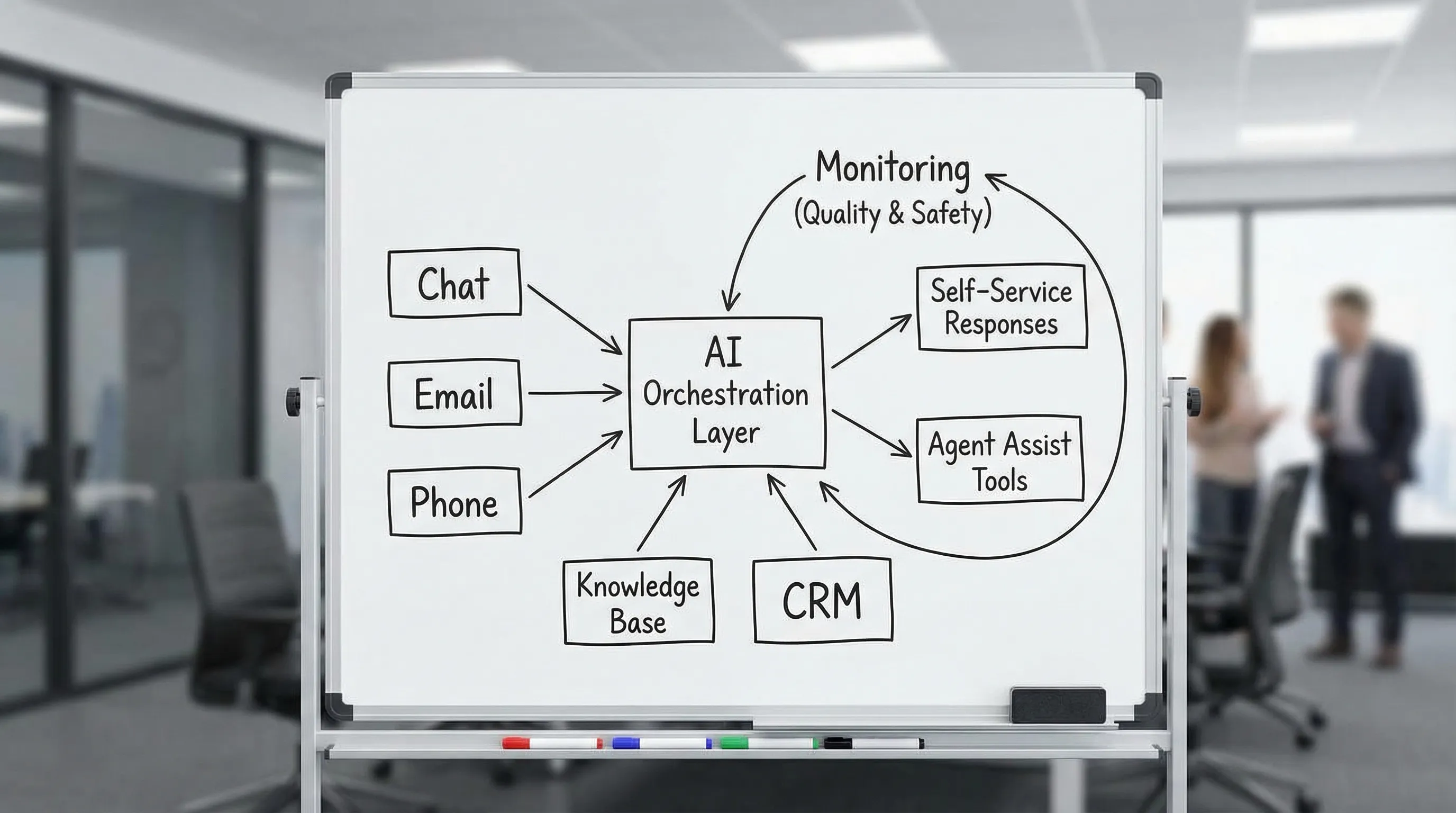
Phase 2: Design the customer experience (not just the bot)
A strong AI experience is designed like a service journey, with clear handoffs and minimal friction.
Design the escalation path first
Customers should never have to “fight the bot” to reach a human. Decide:
- When the AI must offer a human option (for example, after two failed attempts).
- What information is passed to the agent (summary, intent, steps attempted).
- How you label AI-assisted interactions for transparency and internal QA.
Use “progressive automation” instead of full deflection
Instead of aiming for maximum containment immediately, build confidence with a progression:
- Start with assistive automation (draft responses the agent approves).
- Move to guided self-service (AI suggests next steps and collects details).
- Only then allow autonomous responses for green-tier topics.
This lowers risk and increases adoption because agents see AI as help, not replacement.
Standardize prompts, tone, and policy adherence
Even the best model can drift without clear instructions.
Your AI should have explicit rules for:
- Tone (friendly, concise, no blame).
- Policy precedence (which source wins if conflicts exist).
- What to do when uncertain (ask clarifying questions, escalate).
Phase 3: Build, integrate, and test like you mean it
Many AI customer service rollouts fail because teams skip testing in realistic conditions.
Test with real tickets, not happy-path examples
Before production, run a pilot using a representative sample:
- Top 20 intents by volume.
- Top 10 intents by risk (billing, cancellations, account access).
- Edge cases (missing info, angry customers, ambiguous requests).
Evaluate both accuracy and interaction quality. An answer can be factually correct and still drive dissatisfaction if it is tone-deaf or incomplete.
Treat hallucinations as a product defect
If generative AI answers without a source, it can invent details. You reduce that risk by:
- Grounding answers in approved knowledge (retrieval-based responses).
- Requiring citations internally (even if you do not show them to customers).
- Using “I do not know” and escalation rules as a feature, not a failure.
For teams operating in regulated environments, it is also worth staying current on policy developments like the EU AI Act, even if you are US-based, because vendors and enterprise customers increasingly align to it.
Phase 4: Train agents for AI-assisted service (the adoption multiplier)
Technology does not improve service, people using it well do.
The moment you add AI to customer service, you change the job:
- Agents become editors of suggested replies.
- They must learn when not to trust an AI draft.
- They need to keep empathy high while moving faster.
That is why the highest-performing teams treat enablement as part of the AI rollout, not an afterthought.
What to train (and how to make it stick)
The most useful training focuses on behaviors that show up in real interactions:
- Asking clarifying questions before acting.
- Handling objections when customers doubt AI or are frustrated.
- Using summaries and suggested replies without sounding robotic.
- Escalating quickly when policy or risk demands it.
One effective approach is scenario-based roleplay that mirrors your real ticket types and brand standards. Platforms like Scenario IQ use AI-driven roleplay simulations and real-time feedback to help service teams practice objection handling, policy conversations, de-escalation, and consistent communication, without waiting for “live” mistakes to become training moments.

Phase 5: Measure what matters (the KPI set that prevents vanity metrics)
Containment rate and automation rate are tempting, but they do not tell the whole story. A practical scorecard balances speed, quality, and risk.
| KPI | What it tells you | Common pitfall | Better paired with |
|---|---|---|---|
| Containment rate | How often AI resolves without an agent | Inflated by forcing users through flows | CSAT, recontact rate |
| Time to first response | Speed of initial reply | Faster can be lower quality | Resolution time, QA score |
| First contact resolution (FCR) | True issue resolution | Hard to measure without definitions | Reopen rate, recontact rate |
| Recontact rate | Whether customers come back for same issue | Needs a time window definition | FCR, root cause trends |
| QA score / policy adherence | Consistency and compliance | QA rubrics not updated for AI | Complaint rate, escalations |
| Escalation rate from AI | Where AI fails or risk triggers | High escalation can be good early | Accuracy audits, intent coverage |
Two practical measurement habits:
- Define “resolution” precisely (by channel and ticket type), so AI does not “solve” by closing.
- Track failure demand (contacts caused by poor prior service), because AI can either reduce it or scale it.
Common failure modes (and how to avoid them)
Over-automating complex issues
If your bot tries to handle billing disputes, account takeovers, or emotionally charged complaints without a fast human path, customers will escalate angrier and churn risk increases.
Solution: Keep complex topics in yellow or red tiers, and use AI to collect details and summarize for agents.
Shipping AI without knowledge ownership
Without owners and review cycles, AI responses drift as policies and products change.
Solution: Assign article owners, set review dates, and treat knowledge updates as a release process.
Assuming agents will “figure it out”
AI changes workflows. If you do not train agents, you will get inconsistent editing, over-trust, or avoidance.
Solution: Use scenario practice, calibrate QA to AI-assisted interactions, and build coaching loops.
Measuring only cost reduction
Cost matters, but a narrow cost focus often creates a worse experience.
Solution: Commit to a balanced scorecard that includes quality, customer outcomes, and risk.
A practical 30 to 60 day rollout plan
If you want a realistic cadence, this is a proven structure for many teams.
Weeks 1 to 2: Scope and readiness
Define the first use cases, tier topics by risk, audit knowledge quality, and align on KPIs.
Weeks 3 to 4: Pilot build and internal testing
Run AI on historical and shadow tickets, test edge cases, and finalize escalation rules.
Weeks 5 to 6: Limited launch with coaching
Launch to a subset of customers or a subset of agents, then coach daily based on real transcripts and QA.
Weeks 7 to 8: Expand coverage and formalize governance
Add intents, improve knowledge, tighten monitoring, and codify ownership and rollback triggers.
Where artificial intelligence customer service goes next
The next wave is less about “a chatbot” and more about orchestrated assistance across the whole service motion: proactive issue detection, smarter routing, deeper personalization, and continuous coaching.
Teams that win with AI will not be the ones that automate the most. They will be the ones that:
- Choose the right use cases.
- Build strong guardrails.
- Train people to use AI well.
- Measure outcomes that customers actually feel.
If you are building toward that model, start small, design for escalation, and invest in scenario-based practice so your team gains confidence as capabilities expand.