

Sales reps do not lose deals because they lack effort. They lose deals because context gets missed, follow-ups slip, discovery is shallow, and objections catch them off guard in real time. An AI virtual assistant can take a meaningful share of that “sales friction” off your plate, if you use it like a workflow system (not a magic button).
This playbook shows how sales reps can plug an AI virtual assistant into a typical day, from morning pipeline review to post-call follow-up, while staying accurate, compliant, and human.
What an AI virtual assistant should (and should not) do for a sales rep
A strong AI virtual assistant for sales reps is best used for:
- Drafting and refining text (emails, call agendas, follow-ups)
- Summarizing and structuring information (call notes, account research)
- Generating options (objection responses, discovery questions, talk tracks)
- Creating reusable assets (templates, snippets, 30-60-90 plans)
- Coaching support (roleplay scripts, feedback checklists)
It should not be used for:
- Inventing facts about the prospect, product, pricing, or competitors
- “Confirming” legal, security, or contractual claims
- Replacing your CRM source of truth
- Handling sensitive customer data in a way that violates policy
If you want a simple rule: let AI accelerate your thinking and writing, but keep truth, judgment, and relationship in human hands.
Set up your guardrails before you automate your day
Before you copy and paste anything, clarify two guardrails with your manager, security team, or enablement lead:
Data handling rules
Most organizations need a clear “what is safe to share” policy for AI tools. A practical approach:
- Safe: public company info, your own templates, anonymized call summaries, sanitized objection lists
- Caution: anything tied to a named customer, deal size, contract terms, support tickets, pricing exceptions
- Not allowed: passwords, private keys, payment details, personal data, unredacted call transcripts (unless your approved system explicitly supports it)
For a solid framework to align internal policy, see the NIST AI Risk Management Framework.
Accuracy rules (your “no hallucinations” checklist)
Treat AI outputs like a first draft that must pass a quick verification step.
- If it is a claim, verify it.
- If it is a number, source it.
- If it is about your product, confirm it matches current enablement collateral.
- If it is about the prospect’s environment, validate it on the call.
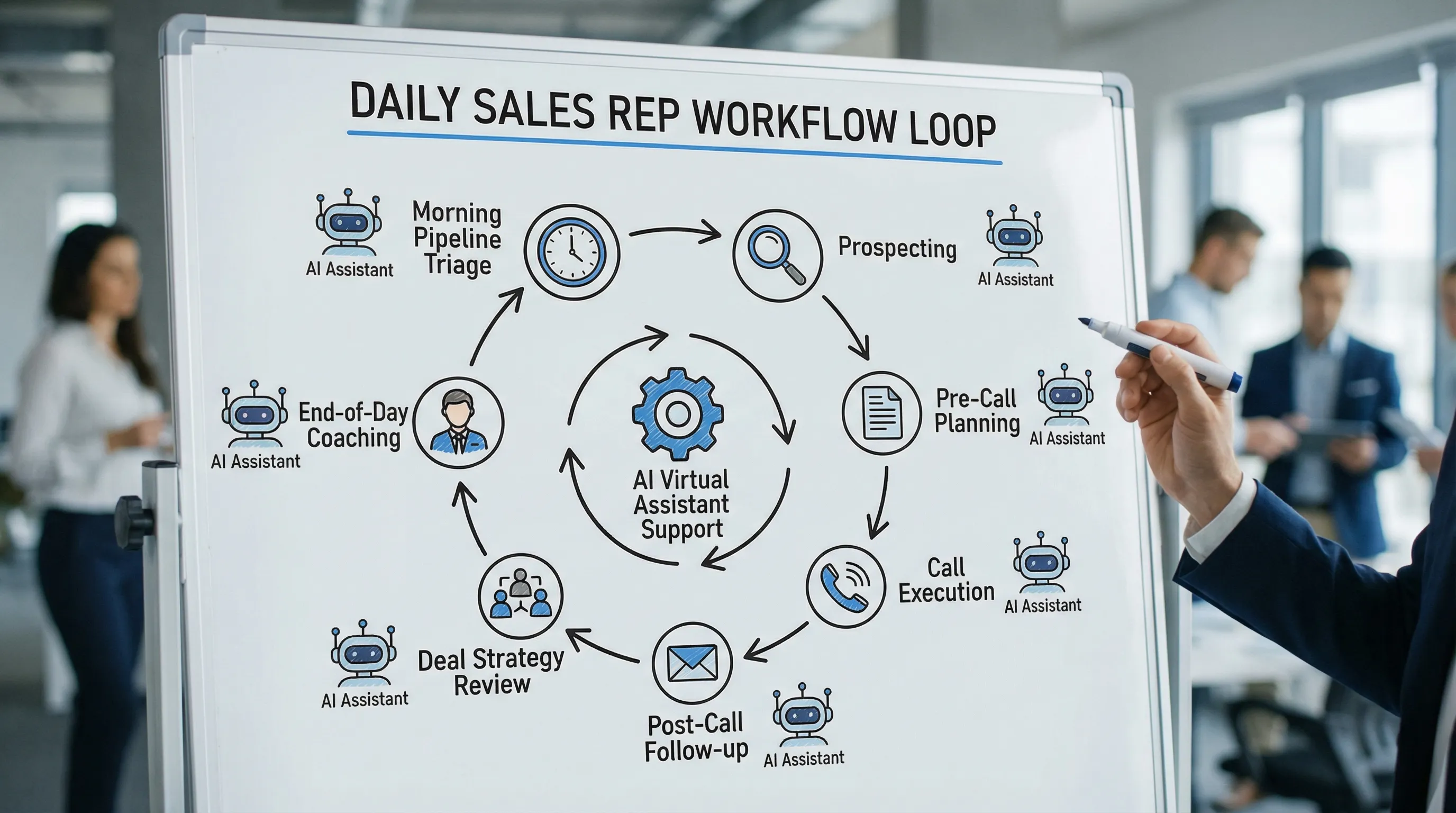
The daily workflow playbook: how top reps use an AI virtual assistant
Below is a practical day structure. Use it as-is, or adapt it to your role (SDR, AE, AM, CSM) and deal cycle.
| Time block | Sales rep focus | What the AI virtual assistant produces | Your quality check |
|---|---|---|---|
| Start of day | Prioritize pipeline + tasks | “Top 5” list, risk flags, next-step suggestions | Confirm in CRM, sanity check urgency |
| Prospecting | Personalization + targeting | Account angles, email variants, call openers | Verify relevance, avoid false claims |
| Pre-call | Discovery + meeting plan | Agenda, question set, likely objections | Ensure questions map to MEDDICC/BANT/etc |
| Post-call | Follow-up + next steps | Recap email, action items, mutual plan draft | Confirm commitments and dates |
| Midday | Deal strategy | Objection responses, stakeholder map prompts | Validate against real deal signals |
| End of day | Skill growth | Micro-roleplay, coaching notes, daily tips | Apply to tomorrow’s calls |
1) Start of day: a 10-minute AI-assisted pipeline triage
Your goal is to decide what deserves attention today, not to “review everything.”
Inputs you provide (2 minutes):
- Your open opportunities (names optional, you can anonymize)
- Stage, next step date, last activity date, known risks
- Today’s meetings and deadlines
Ask your AI virtual assistant for:
- A ranked list of priorities
- Risk flags (stalled stage, single-threaded deals, no clear next step)
- One “do this next” action per priority deal
Useful prompt (copy and adapt):
- “Here are 8 opportunities with stage, last touch, next step, and risks (sanitized). Create today’s priority list, explain why, and propose 1 next action per deal.”
Quality check: If the assistant suggests “send pricing” or “push to close,” confirm you have earned that step. If it suggests stakeholders, confirm the org chart is real and current.
2) Prospecting: turn research into angles, not essays
AI is great at pattern matching, but bad at guessing what truly matters to a buyer. The best use is: you bring signals, AI helps you craft angles.
Signals to feed it:
- A role (VP Sales, RevOps, Support Lead)
- A trigger (new product launch, hiring, tool migration, funding, outage)
- A plausible pain (slow ramp, inconsistent messaging, churn risk)
Ask your AI virtual assistant for:
- 3 positioning angles tied to that trigger
- 2 email drafts (short and shorter)
- A 15-second call opener
Prompt template:
- “Create 3 outreach angles for a [role] at [company type] based on [trigger]. Keep it specific, avoid assumptions, and include a simple question to validate on a call.”
Quality check: Remove any “I saw you…” lines unless you can prove it. AI commonly fabricates details that feel personalized.
3) Pre-call: build a discovery plan that prevents one-call-and-ghost
Most discovery fails because it is either too broad (friendly chat) or too rigid (interrogation). Use AI to generate structure, then keep it conversational.
Ask your AI virtual assistant for:
- A 30-minute agenda that earns the right to ask hard questions
- Discovery questions grouped by outcome (pain, impact, process, decision)
- A short “what good looks like” close for the meeting
Prompt template:
- “I have a 30-minute first call with a [persona] at [industry]. Our product category is [category]. Create a tight agenda and 12 discovery questions grouped into pain, impact, current workflow, decision process. Keep questions open-ended and practical.”
Quality check: Make sure your questions map to your qualification framework and your deal motion. Generic questions sound like generic reps.
4) During the call: use AI as a guide, not a crutch
In live conversations, you usually cannot rely on an AI assistant safely unless your org has approved tooling and process. Still, you can prepare “in the moment” scaffolding.
Create a one-page call sheet (AI helps draft it):
- Your opener (why you, why now)
- 5 core questions
- 3 likely objections and how you will respond
- Your close (next step with a calendar commitment)
This is where practice matters. An assistant can generate a good objection response, but you still need to deliver it naturally, handle follow-up questions, and keep tone aligned.
If your team uses a training platform like Scenario IQ, a strong workflow is to take your top objection for the day (for example, “we already have a tool for that”) and run a short AI roleplay before your call. You build muscle memory, then you execute.
5) Post-call: send a recap that moves the deal forward
A good follow-up email does three jobs:
- Confirms what you heard
- Documents mutual commitments
- Creates momentum toward the next meeting
Ask your AI virtual assistant for:
- A concise recap email with sections (Goals, Current State, Risks, Next Steps)
- A draft mutual action plan (MAP) outline
- A version for the champion to forward internally
Prompt template:
- “Turn these anonymized call notes into a 150-200 word follow-up email. Include 3 bullets of what we heard, 3 bullets of agreed next steps with dates (leave placeholders), and one question to confirm priority.”
Quality check: Ensure every “agreed” item was actually agreed. If you are unsure, label it as a proposal.
6) Midday: use AI to stress-test deal strategy
Great reps run pre-mortems. They ask, “If this deal dies, why?” AI can help generate blind spots, especially around procurement, security, and multi-stakeholder alignment.
Ask your AI virtual assistant for:
- A “deal pre-mortem” list of likely failure reasons by stage
- Stakeholder roles you might be missing
- A plan to create urgency without pressure
Prompt template:
- “Given this deal summary (sanitized), generate a pre-mortem: top 10 reasons it could stall or be lost, and a mitigation for each. Keep it realistic for enterprise buying.”
Quality check: Do not treat the list as truth. Treat it as a checklist to validate in your next customer interaction.
7) End of day: turn today’s friction into tomorrow’s practice
This is the highest leverage part of the workflow because it compounds.
Do a 5-minute “sales journal” (AI-assisted):
- What objection did you struggle with?
- Where did you lose control of the agenda?
- What question did you avoid asking?
Ask your AI virtual assistant for:
- A tight rewrite of your best email from the day (keep your voice)
- 5 alternative ways to answer your hardest objection
- A 3-minute roleplay script for tomorrow
Prompt template:
- “Based on this objection I faced today, create a 3-minute roleplay where you are the skeptical buyer. Ask tough follow-ups. After the roleplay, score me on clarity, relevance, and confidence.”
If you want this to be consistent across the team (and track improvement over time), that is where scenario-based roleplay systems like Scenario IQ fit well: simulations, real-time feedback, and progress tracking can turn “practice when I feel like it” into a repeatable routine.
A practical prompt library (that avoids common mistakes)
You do not need 100 prompts. You need a small set you trust.
| Workflow moment | Prompt goal | What to include | What to avoid |
|---|---|---|---|
| Pipeline triage | Prioritize and de-risk | Stage, last touch, next step, risks | Deal names, sensitive pricing, personal data |
| Personalization | Write relevant outreach | Trigger, persona, value hypothesis | Fake “I saw you…” specifics |
| Discovery | Generate question sets | Persona, use case, qualification framework | Overlong lists you will not use |
| Objections | Create response options | Exact objection wording, context | “One perfect answer” thinking |
| Follow-up | Send crisp recap | Notes, commitments, next step | Claiming agreement you did not get |
| Mutual plan | Align next steps | Desired outcome, stakeholders, timeline | Hard deadlines without buyer buy-in |
How to measure whether your AI virtual assistant workflow is working
If you cannot measure it, you will not sustain it. Track outcomes that tie to revenue, not just activity.
Consider reviewing these weekly:
- Speed to first follow-up (time from meeting end to recap email)
- Meeting-to-next-step conversion rate (how often a meeting ends with a scheduled next meeting)
- Stage progression time (are deals moving faster, or just generating more content)
- Objection “win rate” (how often a specific objection results in a productive next step)
- Talk-time balance and question quality (from call coaching or self-review)
AI can help you summarize patterns, but your CRM and call recordings (in approved systems) should remain your system of record.
Where Scenario IQ fits in a sales rep’s AI workflow
An AI virtual assistant makes reps faster at planning and follow-through. It does not automatically make reps better in the moment when a buyer pushes back.
Scenario-based AI training fills that gap by letting reps practice the hardest parts of the job in a safe, repeatable way. With Scenario IQ, teams can run AI-powered roleplay simulations, get real-time feedback, and track progress across key skills like discovery, objection handling, and confidence under pressure.
A simple way to combine both approaches:
- Use your AI virtual assistant to identify today’s riskiest deal and the most likely objection.
- Use Scenario IQ to roleplay that objection for 5 minutes.
- Run the real call.
- Feed the sanitized outcome back into tomorrow’s practice.
That is how “AI for sales” becomes a daily operating system, not another tool that gets ignored after week one.