
AI Training Software: Must-Have Capabilities for L&D Teams

L&D teams are under pressure to deliver measurable performance improvements faster than ever, often with tighter budgets and leaner enablement teams. That is why AI training software is showing up in more RFPs, not as a novelty, but as a practical way to scale practice, coaching, and reinforcement.
Still, “AI” can mean anything from a chatbot wrapper around static content to a true practice environment that builds job-ready skills. This guide breaks down the must-have capabilities to look for, the questions to ask vendors, and how to validate real impact during a pilot.
What “AI training software” should mean for modern L&D
For most L&D teams, the goal is not to replace an LMS or content library. It is to solve the hard part of capability building:
- Getting learners to practice the conversations and decisions they face on the job
- Providing consistent coaching at scale
- Creating evidence that skills are improving (not just completion rates)
This is especially relevant for sales and service, where performance hinges on live interactions, objection handling, discovery, empathy, and clarity.
Research consistently shows that practice and feedback drive skill development. For example, the learning science behind retrieval practice (actively recalling and applying knowledge) demonstrates durable gains versus passive review in many contexts (American Psychological Association overview). AI-enabled simulation is essentially a way to make retrieval practice and deliberate practice feasible at scale.
Must-have capabilities: the L&D checklist
1) Roleplay or simulation that mirrors real work
If the software cannot recreate realistic scenarios, it will struggle to move the metrics that matter.
Look for:
- Scenario-based roleplays tied to your real workflows (sales calls, renewals, complaint handling, escalation, collections, onboarding)
- Branching outcomes based on what the learner says and chooses
- Consistency across reps (so coaching is not dependent on manager time)
What to validate in a demo:
- Can you run the same scenario at different difficulty levels?
- Does the simulation reflect your policies, product positioning, and compliance needs?
- Can learners repeat the scenario and improve, or does it feel like a one-and-done chatbot?
2) Personalization that adapts to the learner
Personalization is not just using a learner’s name. In strong AI training software, the experience adapts as the learner improves.
Look for:
- Adaptive difficulty that increases challenge as proficiency grows
- Skill-level calibration so novices get guidance while advanced learners get pressure-tested
- Targeted practice based on performance gaps (for example, discovery questions vs closing)
Why it matters: L&D teams often serve mixed cohorts. Without adaptation, advanced learners disengage and newer learners get overwhelmed.
3) Real-time feedback learners can act on immediately
Feedback is only valuable if it is timely, specific, and clearly connected to behavior.
Look for:
- In-the-moment coaching (prompts or guidance during a roleplay, when appropriate)
- Post-scenario feedback mapped to a rubric (for example, rapport, problem diagnosis, clarity, objection handling)
- Actionable next steps (what to do differently in the next attempt)
A useful standard to keep in mind: feedback should be anchored to observable behavior, not vague traits.
4) Analytics that answer L&D’s hardest question: “Is this working?”
Completion rates are not performance. Modern L&D needs analytics that connect learning activity to skill and business outcomes.
Look for:
- Progress tracking at individual, team, and cohort levels
- Skill proficiency trends over time, not just single scores
- Manager and L&D visibility into strengths, gaps, and coaching priorities
- Exportable reporting (so you can combine training data with operational KPIs)
If a vendor claims business impact, ask how they support measurement. At minimum, you should be able to run a before-and-after comparison and segment results by team, role, or region.
5) Scenario authoring and governance that L&D can control
If every scenario requires a vendor ticket, your program will bottleneck quickly.
Look for:
- Fast scenario creation using templates or guided setup
- Version control so scenarios can evolve with your product and policies
- Approval workflows for regulated environments (financial services, healthcare, insurance)
- Reusable competency frameworks (so you can standardize scoring across scenarios)
A practical test: ask how long it takes to build a new scenario for a new product launch, and who needs to be involved.
6) Reinforcement and habit-building (not just courses)
Skills decay when practice stops. Strong AI training software supports reinforcement, not only initial training.
Look for:
- Short, repeatable practice loops (5 to 10 minutes)
- Ongoing nudges or tips that keep learners engaged
- Spaced practice support, so teams revisit key skills over time (a widely supported approach in learning science)
7) Team enablement features for managers and coaches
Most L&D programs succeed or fail at the manager layer. Your platform should make coaching easier, not add dashboards no one uses.
Look for:
- Team views that highlight where coaching time will have the biggest payoff
- Consistent scoring that reduces coach-to-coach variability
- Coaching prompts managers can use in 1:1s
8) Integrations that fit into your learning stack
The best tool still fails if it becomes “yet another login.”
Look for:
- SSO support (common in enterprise rollouts)
- Integration options with your LMS/LXP for assignment and tracking
- Alignment with your HRIS structure (roles, org units)
- If you are training sales or service teams, consider how insights might be shared alongside performance systems (for example, CRM-adjacent workflows)
Ask vendors what they integrate with today, and what requires custom work.
9) Enterprise security and privacy built for training data
AI training often involves sensitive content, including customer scenarios, pricing talk tracks, or recorded practice.
Look for:
- Enterprise-grade security and clear controls around data access
- Transparent policies on how data is stored, processed, and retained
- Clear answers on whether your data is used to train shared models
Why this matters: data security and privacy are business risks, not just IT checkboxes. IBM’s annual research on breach costs highlights how expensive incidents can be for organizations (IBM Cost of a Data Breach report).
10) Accessibility and global readiness
If you train a distributed workforce, accessibility and localization are core requirements.
Look for:
- Accessibility support aligned with common standards (ask what the platform supports)
- Multi-language scenarios if you operate globally
- Mobile-friendly experiences for frontline teams
Vendor evaluation table: questions that reveal real capability
Use this table to structure demos and scorecards.
| Capability | What “good” looks like | Questions to ask | Evidence to request |
|---|---|---|---|
| Roleplay realism | Scenarios mirror real calls and outcomes | “Can we recreate one of our top 5 scenarios end-to-end?” | Live demo using your situation |
| Personalization | Difficulty and coaching adapt to performance | “How does the system adjust when someone improves?” | Show a learner improving across 3 attempts |
| Feedback quality | Specific, rubric-based, actionable | “What exactly will a rep do differently after feedback?” | Sample feedback reports |
| Analytics | Trends, cohorts, coaching priorities | “Can we see team gaps by skill and time?” | Dashboard walkthrough + export |
| Authoring | L&D can build and govern scenarios | “Who can create/edit scenarios and how long does it take?” | Build a scenario in the demo |
| Reinforcement | Practice loops and ongoing prompts | “How do you drive continued usage after onboarding?” | Example reinforcement plan |
| Manager enablement | Coaching becomes easier | “What will a manager do weekly in this tool?” | Manager view demo |
| Integrations | Fits existing stack | “SSO, LMS tracking, user provisioning, what is native?” | Integration documentation |
| Security | Clear policies and controls | “Is our data isolated? How is it retained and protected?” | Security overview, policies |
How to run a pilot that proves impact (without boiling the ocean)
A strong pilot is focused, measurable, and tied to a real business problem.
Choose one high-value use case
Good pilot candidates include:
- Sales: first-call discovery, objection handling, negotiation, renewal conversations
- Service: de-escalation, empathy and clarity, policy explanations, complaint recovery
Define success metrics upfront
Pick a mix of learning and business signals:
- Learning: proficiency score improvement, scenario pass rates, time-to-proficiency
- Operational: QA scores, conversion rate, average handle time, CSAT, escalation rate
Compare against a baseline
Before the pilot, capture baseline performance for the cohort (even if imperfect). After the pilot, compare the same metrics and supplement with manager evaluation.
Pressure-test adoption
If the platform requires 45 minutes to get value, adoption will suffer. Look for fast time-to-value, short practice sessions, and clear reinforcement mechanics.
Common red flags when buying AI training software
“AI” that is mostly content search
If the product is primarily a knowledge assistant, it may help with information retrieval but not with skill execution under pressure. Skills typically require practice and feedback.
Black-box scoring you cannot explain
If you cannot understand why a learner got a score, you will struggle with trust and coaching. Ask how rubrics are built and how results are calibrated.
No path from insight to action
Dashboards are not a coaching plan. If the platform cannot translate performance data into targeted practice recommendations, L&D will still be stuck doing manual diagnosis.
Weak governance for sensitive or regulated scenarios
If you operate in regulated environments, scenario approvals, versioning, and policy updates are not optional.
Where Scenario IQ fits for L&D teams
Scenario IQ is built around AI-driven, personalized scenario-based training designed to improve communication, confidence, and performance across teams. If your goal is to go beyond passive learning and build on-the-job readiness, Scenario IQ aligns closely with the capabilities L&D teams typically prioritize:
- AI-powered roleplay simulations and personalized training scenarios to practice real conversations
- Real-time feedback with adaptive feedback and guidance to accelerate improvement
- Progress tracking analytics and performance metric dashboards to monitor growth over time
- Team-focused learning to support managers and cohorts
- Daily actionable tips to reinforce skills
- Enterprise-grade security for organizational deployment
To explore whether it fits your use case, start with a single scenario that is high-impact and high-frequency (for example, handling a pricing objection or de-escalating a frustrated customer). You can learn more at Scenario IQ.
The bottom line
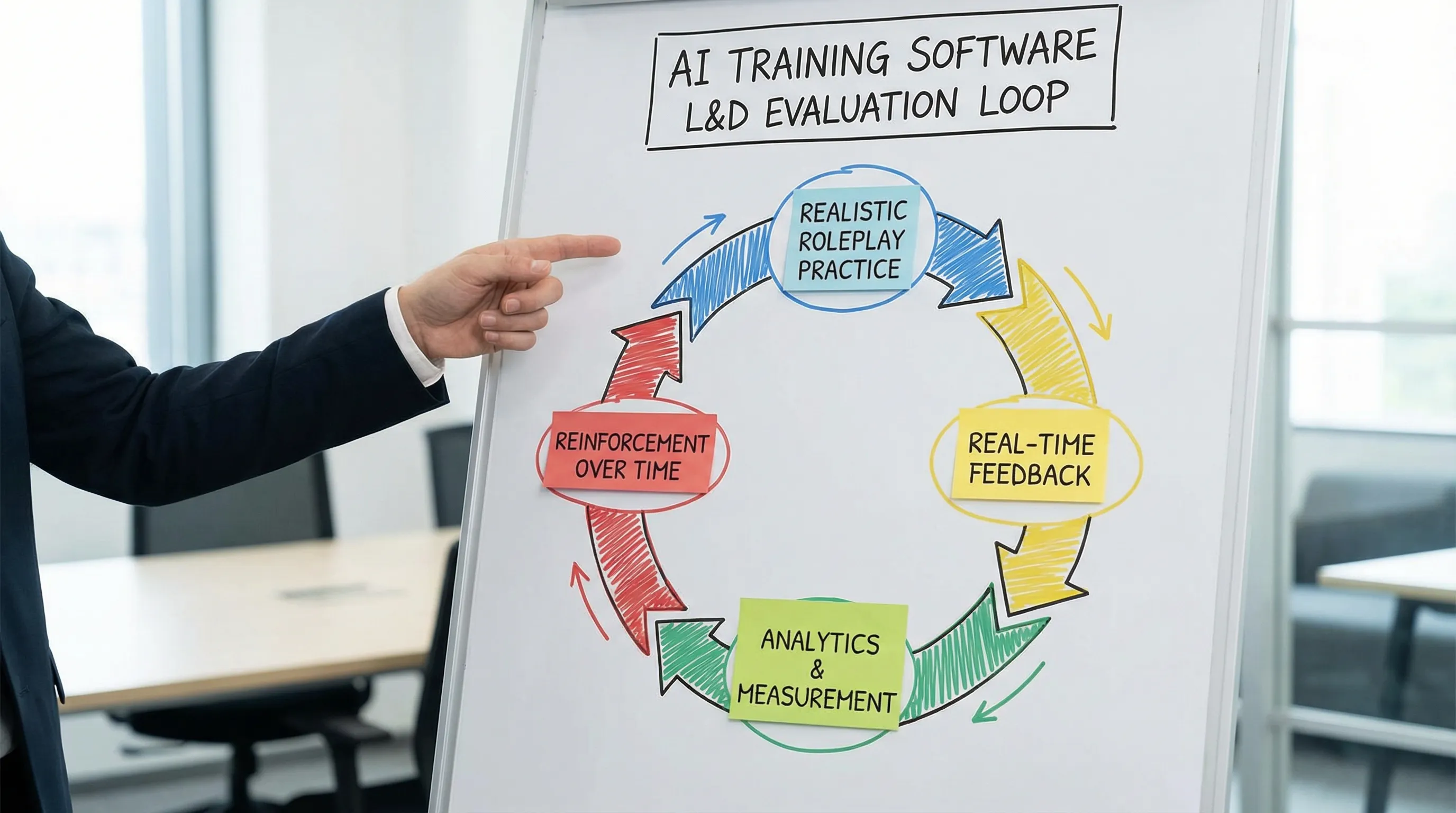
The best AI training software is not the one with the longest feature list. It is the one that reliably creates realistic practice, delivers clear feedback, drives repeat usage, and provides analytics that help L&D and managers coach smarter.
If you evaluate vendors using the capabilities above, and run a focused pilot tied to business outcomes, you will be in a strong position to choose a platform that improves performance, not just participation.