

In 2026, “AI support” is no longer a future roadmap item, it is the operating reality for customer service teams. The hard part is not deciding whether to use AI, it is deciding where automation should end and where a live agent should take over so you improve speed and cost without damaging trust, revenue, or retention.
This guide gives you a practical framework for choosing automation vs. humans, plus common use cases, handoff best practices, and the metrics that tell you if your model is working.
What “AI support” actually includes (and why the definition matters)
Many teams talk about AI support as if it is one thing, but it usually spans two categories:
Customer-facing automation (replaces some contacts): chatbots, virtual agents, IVR, automated email responders, self-serve knowledge bases, automated status updates.
Agent-assist AI (improves live support): suggested replies, conversation summaries, knowledge retrieval, next-best-action prompts, QA and coaching insights.
This distinction matters because “automation vs. live agents” is not always a binary choice. Often the best design is automation first, then human, while AI continues helping the human in the background.
The real tradeoff: efficiency vs. risk
Automation is great at consistency and scale. Humans are great at nuance and accountability. Problems happen when you apply one to the other’s job.
Here is a simple way to think about it:
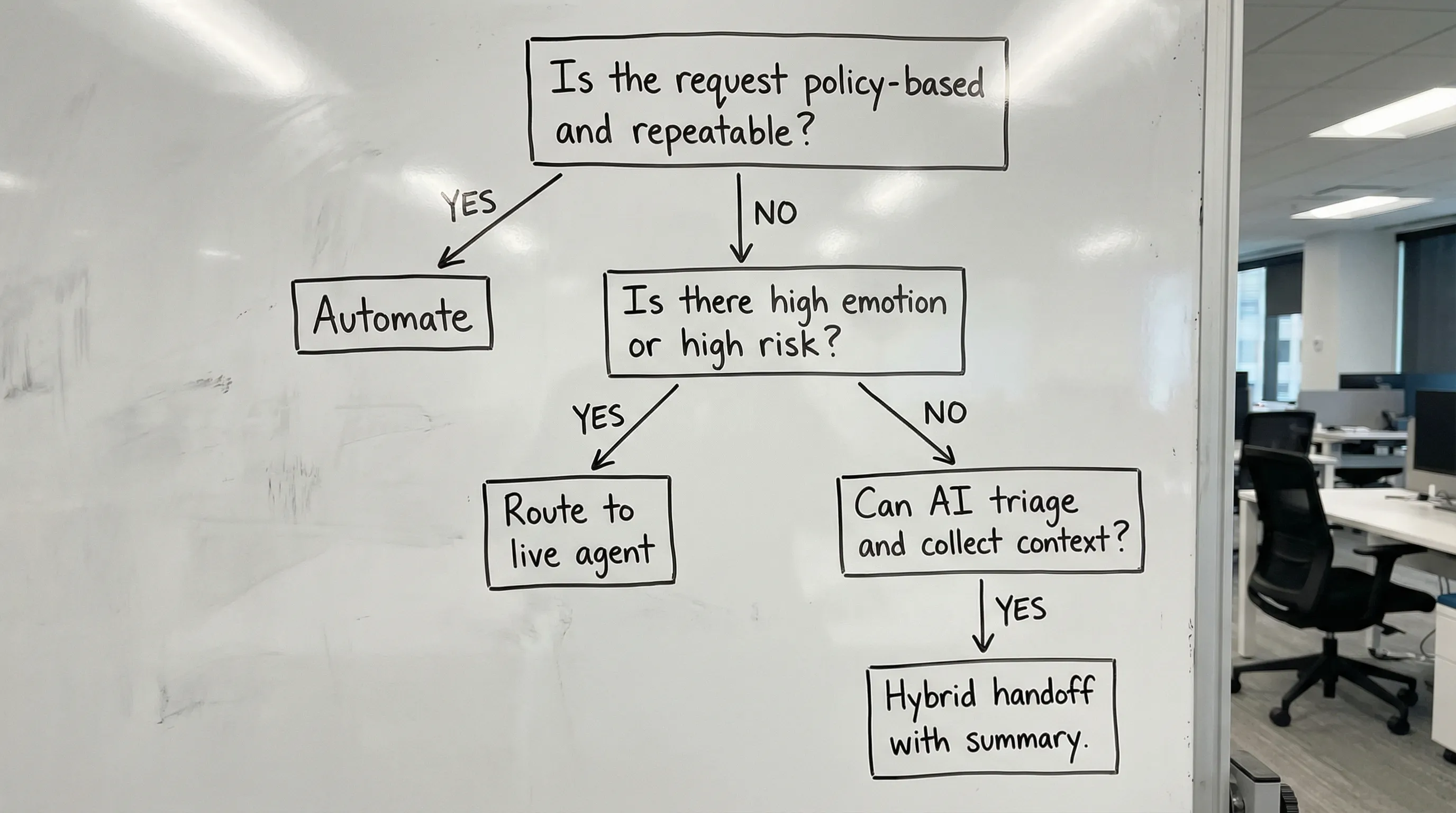
- If the customer goal is simple and repeatable, automation usually wins.
- If the customer situation is ambiguous, emotional, high-stakes, or exception-heavy, a live agent should lead (with AI assisting).
To ground that with reputable UX research, Nielsen Norman Group has repeatedly found that users tolerate bots for straightforward tasks, but trust drops quickly when bots fail to understand intent or block access to a person (especially during account, billing, or complaint scenarios). See their guidance on chatbot UX and user expectations.
Automation vs. live agents: a decision framework you can use today
Instead of debating “should we automate this channel,” decide at the scenario level. Evaluate each scenario against the criteria below.
The 7 criteria that determine the right path
1) Complexity (number of steps, dependencies, and edge cases)
If a request has many branching paths, multiple systems involved, or frequent exceptions, automation may increase handle time and frustration.
2) Customer emotion (stress, urgency, perceived unfairness)
If the customer is likely anxious, angry, or scared (fraud, cancellations, outages), a human reduces escalation risk.
3) Business risk (financial, compliance, reputational)
Refund exceptions, contract terms, safety issues, and regulated data should have clear human accountability. If you do use automation here, keep it tightly bounded with policy rules and auditability.
A helpful reference for thinking about risk controls in AI systems is the NIST AI Risk Management Framework.
4) Volume and predictability
High-volume, predictable contacts are ideal for automation, especially when customers want instant answers (order status, password reset).
5) Personalization needed
If the best resolution depends on customer history, context, sentiment, and relationship value, route to a human sooner, or use agent-assist to personalize safely.
6) Time-to-resolution expectations
If “now” is the expectation, automation can provide immediate triage, but only if it does not become a dead end.
7) Opportunity value (save, upsell, expansion)
When a contact is part support and part commercial moment (renewals, churn risk, plan fit), a trained human often performs better, with AI providing guidance.
Quick matrix: what to automate vs. what to staff
| Scenario attribute | Better fit for automation | Better fit for live agents |
|---|---|---|
| Problem shape | Clear, repeatable, low variance | Ambiguous, exception-heavy |
| Customer state | Neutral, task-focused | Emotional, urgent, frustrated |
| Risk | Low financial and compliance risk | High financial or regulatory risk |
| Data requirements | Minimal sensitive data | Sensitive data or identity complexity |
| Resolution | Policy-based, few steps | Investigation, negotiation, judgment |
| Success metric | Speed, deflection, consistency | Trust, retention, relationship |
Best-fit use cases for automation (where it tends to outperform humans)
Automation works best when the customer is not asking for “help,” they are asking for access or status.
Common high-ROI AI support automation scenarios include:
- Account access and credential flows: password reset, MFA help, unlocks (with secure verification).
- Order and delivery status: tracking, ETA, address change rules.
- Simple billing questions: invoice copies, plan details, payment confirmation.
- Policy lookups: return windows, warranty terms, SLAs.
- Triage and routing: identify intent, capture structured details, select the right queue.
A good automation experience has two non-negotiables:
A fast path to a human when confidence is low.
A visible sense of progress (what the bot is doing, what it needs, what happens next).
Best-fit use cases for live agents (where humans consistently win)
The highest-cost contacts are often the highest-value contacts. Many of these are precisely where human support protects revenue and brand.
Prioritize live agents (with AI assisting) for:
- Complex troubleshooting: multi-system issues, unclear root cause, intermittent bugs.
- Refund exceptions and disputes: anything beyond a straightforward policy rule.
- Cancellations and retention moments: saving churn is rarely a script-only interaction.
- High-value accounts: enterprise customers, strategic renewals, VIP tiers.
- Sensitive topics: fraud, identity, medical or safety-related concerns.
- Escalations and complaints: when the customer needs ownership, empathy, and a decision.
If your automation is handling these today, you might not notice the damage immediately. It often shows up later as higher churn, lower expansion, and worse word-of-mouth.
The hybrid model: how the best teams combine AI and humans
Most mature AI support programs are hybrid by design. The bot does the repetitive work, and humans do the accountable work.
A practical hybrid playbook
1) Start with AI triage that collects structured context. Ask for the minimum details needed to route well (product, issue type, urgency, order ID).
2) Use a confidence threshold, not a fixed script. When the AI is uncertain, stop guessing and escalate.
3) Hand off with a clean summary. The customer should never have to repeat their story. Use a brief recap that includes:
- Customer goal in one sentence
- What has been tried
- Key identifiers (order ID, account email, ticket number)
- Any policy constraints already checked
4) Keep AI active during the live conversation. Agent-assist can surface knowledge, draft responses, and suggest next steps, but the agent remains responsible for the final decision.
5) Close the loop into training. Every escalation and failure mode should become coaching material so both automation flows and agent skills improve.
This “close the loop” step is where many teams get stuck. They have transcripts and dashboards, but not a scalable way to turn patterns into better performance.
What to measure (so you do not optimize the wrong thing)
Containment rate and deflection are useful, but they can be misleading if they rise while satisfaction drops. Balance operational efficiency metrics with customer outcomes.
| Metric | What it tells you | Watch-outs |
|---|---|---|
| Containment rate | How often automation resolves without escalation | Can hide frustration if customers give up |
| Escalation rate by intent | Which scenarios fail automation | Look for spikes after bot changes |
| CSAT by channel and intent | Customer sentiment where it matters | Compare bot-only vs. hybrid vs. human-only |
| First contact resolution (FCR) | Whether issues are truly solved | Automation can create repeat contacts |
| Average handle time (AHT) | Agent efficiency | Lower AHT is bad if it reduces quality |
| Recontact rate | “Not solved” signal | Often the first sign of broken automation |
| Cost per resolution | True efficiency | Include tooling, staffing, and rework |
A useful benchmark approach is to set a goal like: “Automation must be equal or better on CSAT and recontact rate for a scenario before we expand it.”
The hidden requirement: training agents for AI support
Even with great automation, live agents carry the hardest conversations. AI also changes the agent’s job: they need to interpret AI suggestions, correct mistakes, and maintain empathy while moving fast.
Skills that matter more in AI-supported service teams:
- Objection and de-escalation mastery (especially when customers are angry at “the bot”)
- Policy-based decisioning with empathy (clear boundaries, respectful delivery)
- Critical thinking with AI assist (knowing when the AI is wrong or missing context)
- Consistent tone and brand voice across channels
- Clean handoffs and summaries that reduce repetition
Scenario-based practice is one of the fastest ways to build these skills because it mirrors real conversations, including curveballs and emotional moments.
If you want a structured way to train these high-stakes interactions, Scenario IQ provides AI-powered roleplay simulations with personalized scenarios, real-time feedback, and progress tracking analytics, so teams can improve faster without waiting for “real” escalations to learn.

Frequently Asked Questions
Is AI support the same as a chatbot? No. AI support can include chatbots, but also agent-assist tools, automated routing, knowledge search, conversation summaries, and QA coaching.
What is the biggest mistake companies make with support automation? Treating automation as a wall instead of a door. If customers cannot reach a person quickly when needed, trust and CSAT drop.
How do I decide which tickets to automate first? Start with high-volume, low-risk, repeatable scenarios with clear resolution steps (status requests, policy lookups, account access flows).
When should I force escalation to a live agent? Escalate when AI confidence is low, when the customer shows strong negative sentiment, when there is high financial or compliance risk, or when exceptions are likely.
How can I improve handoffs from automation to agents? Collect only the necessary details, pass a concise summary to the agent, and keep the full interaction history visible so customers do not have to repeat themselves.
Does automation always reduce costs? Not always. If automation increases recontact rate, escalations, or churn, the total cost per resolution can rise even if containment looks good.
Build a support model that scales without sacrificing trust
The best AI support strategies are scenario-based: automate what is predictable, route what is risky, and use AI to make your agents faster and more consistent.
If you are updating your automation thresholds, redesigning escalation paths, or rolling out new AI tools, you will get better results when your team can practice the hardest conversations repeatedly.
Explore Scenario IQ to run AI roleplay training for support and service teams, deliver real-time feedback, and track progress with actionable analytics.