

Modern service desks are being asked to do more with less: support more applications, more endpoints, more remote users, and tighter SLAs, all while keeping employee experience high. An AI service desk can help, but only when it is implemented as a disciplined operating model, not just a chatbot bolted onto ticketing.
This guide breaks down the essentials IT and operations leaders need to plan, deploy, and scale AI in the service desk, with practical use cases, governance considerations, and the metrics that prove impact.
What an AI service desk is (and what it is not)
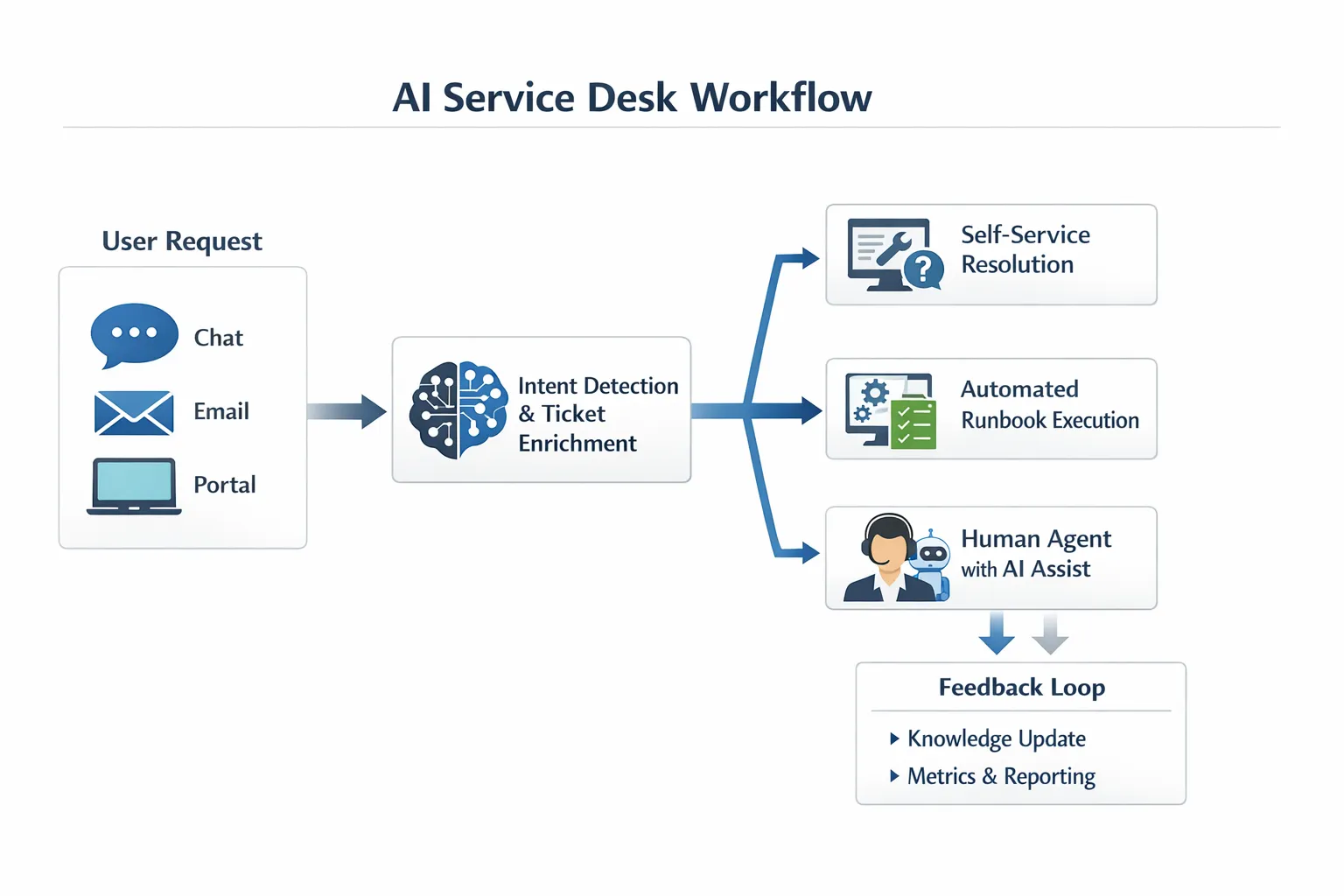
An AI service desk uses machine learning and generative AI to improve how requests and incidents are captured, understood, routed, resolved, and learned from. In practice, it usually combines several capabilities:
- Self-service that understands intent in plain language and suggests the right solution or form
- Ticket triage (classification, prioritization, enrichment) using context from the user, asset, and history
- Agent assist that drafts responses, suggests knowledge articles, and summarizes long threads
- Workflow automation that executes approved runbooks (password resets, access requests, account unlocks)
- Continuous improvement analytics that reveal recurring issues, knowledge gaps, and process bottlenecks
What it is not: a single “AI chat widget” that guesses answers from scattered documentation. Without guardrails, integrations, and training, that approach often increases escalations and erodes trust.
Why AI service desk matters to both IT and operations
The service desk is the operational front door for far more than IT. In many organizations it is also where employees go for:
- Access to tools and systems (IAM, SaaS provisioning)
- Device setup and troubleshooting
- Facilities requests and workplace services
- Operations support (store systems, manufacturing kiosks, field devices)
- HR-adjacent requests (onboarding coordination, policy lookups)
AI improves speed and consistency, but the bigger advantage is standardization at scale: the same best practice resolution path can be applied across locations, shifts, and experience levels.
AI service desk essentials: the components you cannot skip
1) A clean service catalog and knowledge foundation
AI amplifies what you feed it. If your service catalog is inconsistent, or if knowledge articles are outdated, the model will confidently surface the wrong path.
Focus on:
- Clear request types and ownership (who fulfills what)
- “Golden path” resolutions for your highest-volume issues
- Knowledge articles with verification dates, prerequisites, and rollback steps
A practical approach is to start with the top 10 to 20 ticket drivers and make those flows excellent before expanding.
2) Deep integration with your ITSM and identity stack
A useful AI service desk is connected to the systems that make service real:
- ITSM (ticket creation, status, assignment rules)
- CMDB and asset inventory (device model, OS, patch level)
- IAM (access request fulfillment, group membership)
- Monitoring and incident tools (alert correlation)
Integration is what turns AI from “helpful text” into “actionable resolution.” It also enables safer automation because actions can be permissioned, logged, and reviewed.
3) Automation that is runbook-driven, not improvisational
Generative AI is great at drafting and summarizing. It should not be “inventing” steps for production changes.
For operational safety, pair AI with:
- Pre-approved runbooks for repeatable fixes
- Policy-based decisioning (who can approve what)
- Rollback and escalation paths
Think of AI as the interface and coordinator, while the actual changes are executed by controlled workflows.
4) Human-in-the-loop controls and escalation design
The best AI service desks have a clear containment boundary.
Use AI to:
- Ask clarifying questions
- Collect logs and context
- Suggest likely causes
- Draft responses and summarize history
Escalate to humans when:
- The request involves privileged access or sensitive data
- The system detects low confidence
- The user signals urgency or safety risk
- The issue is novel (no validated knowledge path)
This is how you avoid “AI roulette” and protect the credibility of the service desk.
5) Security, privacy, and auditability as first-class requirements
Service desks handle identity, endpoints, and internal data. AI introduces new risk surfaces: prompt injection, over-sharing, and inadvertent exposure of restricted knowledge.
Your minimum baseline should include:
- Role-based access control aligned to ITSM permissions
- Data minimization (only send what is needed to the model)
- Logging for prompts, actions, and approvals
- Clear retention policies and vendor security review
For structured guidance, many teams map policies to frameworks like the NIST AI Risk Management Framework and to their existing security controls (SOC 2, ISO 27001, internal audit standards).
6) Measurement that connects operations to outcomes
If AI is “working,” you should see improvements in speed, quality, and consistency without hidden cost increases from rework.
A balanced measurement set typically includes:
| Metric | What it tells you | Why it matters |
|---|---|---|
| First contact resolution (FCR) | How often issues are resolved without escalation | Indicates true containment, not just faster ticketing |
| Mean time to resolve (MTTR) | End-to-end resolution time | Links directly to uptime and productivity |
| Time to first response | Initial acknowledgment speed | Strong driver of satisfaction |
| Reopen rate | Resolution quality | High reopen rates often signal bad knowledge or over-automation |
| Containment rate | Self-service success without agent involvement | Shows where AI is reducing workload |
| CSAT or internal NPS | User experience | Ensures speed does not replace empathy |
| Agent handling time | Efficiency and cognitive load | Validates the agent-assist value |
Cost tracking matters too. If you are piloting AI tools across IT and ops, it is easy to lose sight of subscription creep and experiment spend. Even a lightweight budgeting dashboard can help teams stay accountable when comparing pilots and renewals. Some teams use a personal finance-style tracker to keep a simple, transparent view of tool expenses and recurring bills, for example a free expense and budgeting tracker when a formal procurement dashboard is not available.
High-impact AI service desk use cases (with practical examples)
Intelligent ticket intake and enrichment
Instead of asking users to pick the perfect category, AI can translate “VPN keeps dropping every 10 minutes” into a structured ticket with:
- Likely service and CI
- Device and OS context
- Suggested severity based on role and impact
- Requested logs or screenshots
Result: better routing and fewer back-and-forth messages.
Knowledge discovery and answer drafting
AI can surface the most relevant knowledge article and draft a tailored response that matches the user’s context (Windows vs macOS, office vs remote, regional policy differences).
Key requirement: keep a clear link between responses and validated sources so agents can verify before sending.
Automated workflows for repetitive requests
Common candidates:
- Password resets and account unlocks
- MFA enrollment support
- Standard software installs
- Access requests that follow known approval chains
The winning pattern is “AI collects and verifies requirements, workflow executes steps, user gets confirmation.”
Major incident support for communications and triage
During incidents, AI can:
- Summarize incoming reports
- Draft stakeholder updates from a template
- Correlate symptoms by location or device class
- Keep a running timeline
This reduces cognitive load when teams are operating under pressure.
Operations support beyond IT (where service desks often struggle)
AI can be especially useful where frontline operations have high turnover and limited time for formal training:
- Store POS or kiosk issues
- Field device troubleshooting
- Facilities requests (badge access, room equipment)
- Standard operating procedure lookups
In these contexts, the ability to ask questions in plain language and get a consistent answer can materially reduce downtime.
A practical rollout plan for IT and ops leaders
Start with “thin slices” that prove value
Pick 1 to 2 workflows that are:
- High volume
- Low risk
- Highly repeatable
Examples include password reset flows, software install requests, and “how do I” knowledge surfacing.
Define guardrails before you expand scope
Document:
- What the AI can do autonomously
- What requires approval
- What must always escalate
- What data the AI is allowed to access
This becomes the basis for governance and user trust.
Build a feedback loop from day one
Treat AI performance like service performance:
- Review low-confidence interactions weekly
- Track knowledge gaps and create articles
- Identify the top escalation reasons and fix the underlying process
AI service desks improve fastest when content and process owners are accountable for continuous tuning.
The people side: training is an “essential,” not an add-on
AI changes how agents work. Instead of memorizing every fix, top performers learn to:
- Ask sharper diagnostic questions
- Validate AI suggestions against policy and evidence
- Communicate clearly when the answer is “not yet”
- De-escalate frustrated users while still moving fast
This is where practice matters. Traditional training often relies on slide decks and shadowing, which do not create consistent performance under pressure.
Scenario-based roleplay is a better fit for the AI era because it lets agents rehearse real interactions (angry users, ambiguous symptoms, policy constraints) and get immediate coaching.
Frequently Asked Questions
What is the difference between a chatbot and an AI service desk? A chatbot is usually a single conversational interface. An AI service desk combines conversation with ticket enrichment, knowledge retrieval, workflow automation, analytics, and governance so it can safely resolve issues and improve operations over time.
Will an AI service desk replace human agents? Most organizations use AI to reduce repetitive work and improve consistency, not to eliminate people. Complex issues, sensitive access, and empathy-heavy situations still require humans. AI is best viewed as capacity and quality leverage.
What should we automate first? Start with high-volume, low-risk tasks that have clear runbooks, like password resets, account unlocks, standard software installs, and knowledge lookups. Avoid high-risk changes until governance and auditing are mature.
How do we prevent AI from giving incorrect answers? Ground AI responses in approved knowledge sources, enforce confidence thresholds, require verification for sensitive actions, and design escalation paths. Regular review of low-confidence and reopened tickets is also critical.
What metrics best prove AI service desk ROI? Combine operational metrics (FCR, MTTR, time to first response, reopen rate) with experience metrics (CSAT) and efficiency metrics (agent handling time, containment rate). Track cost per ticket over time to confirm the gains are not offset by rework.
How long does it take to implement an AI service desk? A limited pilot can be done quickly if your ITSM integrations and knowledge base are ready. Scaling across multiple workflows typically takes longer because governance, change management, and content quality determine success.
Build AI-ready service teams with Scenario IQ
An AI service desk only performs as well as the people and processes around it. If you want your IT and operations teams to handle objections, triage faster, and communicate clearly under pressure, Scenario IQ can help you build those skills through AI-powered roleplay simulations, personalized scenarios, and real-time feedback, supported by progress tracking analytics.
Explore Scenario IQ here: https://scenarioiq.ai