

Buying AI prospecting tools feels deceptively easy in 2026. Most platforms promise better targeting, faster outreach, and more meetings booked. The hard part is choosing the right tool for your motion (SDR, AE, inbound, ABM, channel) and rolling it out fast enough that reps actually change behavior, without creating data, compliance, or brand risks.
This guide breaks down what “AI prospecting” really includes, how to evaluate tools quickly, and a rollout plan that gets to measurable impact in weeks, not quarters.
What “AI prospecting tools” includes (and what it doesn’t)
“AI prospecting tools” is a catch-all. Before you evaluate vendors, define which job you want AI to do inside your prospecting workflow.
Most tools land in one (or more) of these buckets:
| Category | What it helps you do | Where it fits in the workflow | What to watch for |
|---|---|---|---|
| Lead discovery and account targeting | Find accounts and contacts worth pursuing | Pre-outreach | Weak criteria can flood reps with low-fit leads |
| Data enrichment and verification | Improve firmographics, titles, emails, phone numbers | List building, routing | Stale data increases bounce rates and wasted dials |
| Intent and signal detection | Prioritize accounts based on activity or buying signals | Prioritization | Ask how signals are sourced, refreshed, and explained |
| AI messaging and personalization | Draft emails, LinkedIn messages, call openers | Outreach creation | “Generic AI copy” can hurt brand and deliverability |
| Sequencing and automation | Execute multi-step cadences | Outreach execution | Over-automation can create spam risk and poor timing |
| Lead scoring and next-best-action | Decide who to contact next and why | Daily planning | Black-box scoring reduces trust and adoption |
| Conversation intelligence for prospecting calls | Capture and coach discovery, objection handling | Call follow-up and coaching | Look for usable coaching workflows, not just transcripts |
What AI prospecting tools usually do not solve by themselves:
- Your ICP is unclear or not enforced in CRM.
- Your reps need practice to deliver the new talk tracks confidently.
- Your compliance and brand rules are undefined.
If those are your real blockers, the fastest path is pairing the tool rollout with enablement that changes behavior (more on that below).
How to choose AI prospecting tools quickly (without rushing the decision)
The goal is not to find “the best” tool. It is to find the best fit for your constraints: data, systems, team maturity, compliance posture, and how you sell.
Step 1: Start with a “one-metric” outcome
Pick one primary outcome for the first 30 to 60 days. Examples:
- More qualified meetings per rep per week
- Faster speed-to-lead for inbound
- Higher reply rate on outbound (at steady volume)
- More opportunities created from target accounts
A single outcome forces clarity on which AI capabilities matter. It also prevents a common failure mode: buying a broad “sales AI suite” and never fully implementing any part.
Step 2: Map where time is actually lost
Do a lightweight workflow audit with 3 to 5 reps and one manager. You are looking for the specific bottleneck AI should remove.
Common bottlenecks that AI can help with:
- Reps spend too long researching accounts before writing anything.
- Too many low-quality leads, reps do not trust the list.
- Messaging is inconsistent, especially for newer reps.
- Follow-up is inconsistent, cadences are not executed.
- Managers cannot coach prospecting because they do not have visibility into what was said and why.
If you cannot point to the bottleneck in one sentence, the rollout will likely sprawl.
Step 3: Use a short evaluation scorecard (focused on adoption)
Feature checklists do not predict success. Adoption does.
Use a scorecard that prioritizes workflow fit, governance, and time-to-value.
| Evaluation area | What “good” looks like | Questions to ask in demos |
|---|---|---|
| Workflow fit | Reps can use it inside their existing daily tools | “Show me how an SDR uses this from CRM to first touch in under 5 minutes.” |
| Output quality | Messages and prioritization are usable with light edits | “How do you prevent hallucinated facts about a prospect?” |
| Transparency and control | You can explain why a lead was recommended | “Can managers see the drivers behind this score?” |
| Data and integrations | Clean sync with CRM and engagement tools | “What objects and fields do you write to? Can we control write access?” |
| Security and privacy | Clear posture for customer data, access, and retention | “Do you offer SSO/SAML? What is your data retention policy?” |
| Governance support | Guardrails that match your policy needs | “Can we lock approved prompts, tone, and disclaimers?” |
| Admin overhead | Setup does not become a part-time job | “How long does initial configuration take, and who typically owns it?” |
| Measurement | Built-in reporting ties to pipeline, not just activity | “How do you attribute meetings and opportunities to AI-assisted touches?” |
Tip: Require every vendor to demo the same three workflows (for example: target selection, write a first email, handle a common objection). This makes comparisons fair and speeds up decision-making.
Step 4: Validate the tool against your risk profile (early)
Prospecting touches customer and prospect data, so procurement and security concerns can derail speed.
Bring these topics into evaluation from day one:
- Access controls (SSO, role-based permissions)
- Data retention and deletion
- Where data is stored (region considerations)
- How the model uses your data (training, isolation, opt-out)
- Audit logs for key actions
If you need a structure for this, the NIST AI Risk Management Framework is a practical reference for discussing AI risks in business terms.
A fast rollout plan (pilot to scale in weeks)
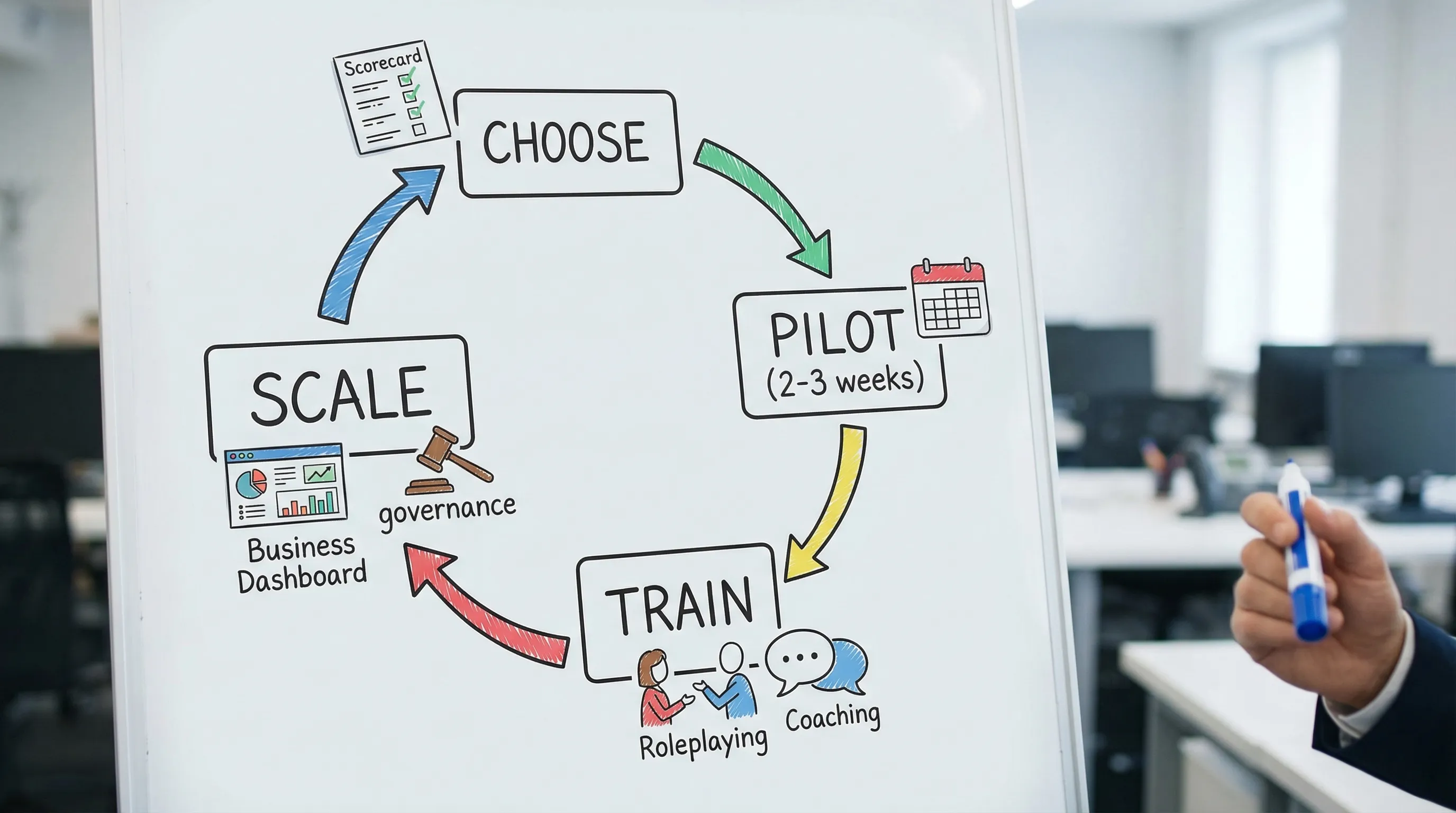
“Roll out fast” does not mean “turn it on for everyone.” It means you run a controlled pilot, prove impact, lock the process, then scale with training and governance.
Phase A: Prep (2 to 5 days)
Decide what “success” means and remove ambiguity.
Deliverables:
- A written pilot hypothesis (example: “AI-assisted personalization will increase positive replies by 20% on our Tier 1 accounts.”)
- A clear ICP slice for the pilot (one segment, one region, one motion)
- A baseline pulled from CRM and your engagement tool (reply rate, meetings booked, show rate, opportunities created)
- A lightweight governance note (what reps can and cannot do with AI content)
Phase B: Pilot (2 to 3 weeks)
Keep the pilot small enough to manage, but real enough to prove pipeline impact.
A strong pilot design:
- 6 to 12 reps total
- One manager accountable for weekly feedback
- A control group (even informal) using the current process
- Weekly check-in focused on outcomes, not opinions
What you should capture during the pilot:
- Time-to-first-touch (how long it takes to go from “assigned lead” to “first outbound”)
- Quality signals (positive replies, meeting acceptance)
- Failure signals (unsubscribe spikes, spam complaints, high bounce rates)
- Rep behavior changes (are they editing AI drafts, or copy-pasting?)
Phase C: Enablement that actually changes behavior (parallel to the pilot)
Most teams underestimate this. Even if the tool works, reps still need to:
- Ask better questions on calls to create personalization inputs
- Use better openers that match your positioning
- Handle objections consistently
- Stay compliant with what they can claim, promise, or imply
This is where AI-based practice can shorten time-to-competency.
Scenario IQ, for example, focuses on AI roleplay simulations with personalized scenarios, real-time feedback, and progress tracking analytics. Used alongside a prospecting tool rollout, it can help reps practice:
- New talk tracks for your ICP segment
- Objection handling that comes up in outbound (timing, budget, switching costs)
- Consistent messaging and tone across the team
- Manager-led coaching using measurable performance metrics
The key is to tie practice to the pilot metric. If you are improving meeting conversion, roleplay should focus on call openers, qualification, and objection handling, not generic product knowledge.
Phase D: Scale (1 to 3 weeks)
When the pilot hits the success threshold (or produces clear learnings), scale in a structured way.
Scaling checklist:
- Finalize your “gold standard” workflows (targeting rules, message guidelines, review steps)
- Publish an internal one-page playbook (what to do, what not to do)
- Run manager training first, then reps
- Turn on reporting dashboards that match your one-metric outcome
- Expand segment by segment, not all at once
Governance and compliance: the minimum viable guardrails
Prospecting sits at the intersection of AI risk and communications risk. A fast rollout still needs guardrails.
Put your rules in writing (and make them usable)
Your policy should answer:
- What data can be pasted into AI tools (PII, deal notes, call transcripts)
- What claims are prohibited (security claims, performance guarantees)
- When human review is required (first touches, regulated industries, pricing)
- What sources AI may use for personalization (and how to cite them internally)
If you operate in the US, the FTC’s guidance on AI and truthful marketing claims is a helpful baseline for keeping messaging compliant.
Protect deliverability and brand trust
A fast AI rollout can accidentally increase spam-like behavior. Reduce risk with:
- Volume caps during the pilot
- Domain warm-up discipline (if you are changing sending patterns)
- A requirement that AI-generated copy be edited before send (at least in early rollout)
- Centralized brand voice examples (good, acceptable, unacceptable)
Treat security review as a parallel workstream
Do not wait until week three to involve security. Ask vendors early for:
- Their security documentation and controls
- How they handle access control and logging
- Data retention and deletion practices
(If your organization uses SOC 2 reports as a vendor standard, request it as part of the procurement package. Whether a vendor has it varies, so avoid assuming.)
Common failure modes (and how to prevent them)
Failure mode 1: “The outputs are fine, but nobody uses it”
Root causes:
- Added steps in the workflow
- Reps do not trust the data or scoring
- No manager inspection and coaching
Fix:
- Choose tools that live where reps already work (CRM, sales engagement)
- Make one behavior non-negotiable (example: every Tier 1 account gets an AI-generated first draft that the rep edits)
- Use weekly manager review focused on real examples, not generic feedback
Failure mode 2: Personalization becomes confident nonsense
Root causes:
- AI invents details about the prospect
- Reps copy-paste without verifying
Fix:
- Require AI to cite the source text used for personalization (where supported)
- Add a simple “verification step” to the workflow (website, LinkedIn, newsroom)
- Train reps on what is safe to say versus what must be confirmed
Failure mode 3: You improve activity metrics but not pipeline
Root causes:
- The tool optimizes volume, not qualification
- Targeting rules are too broad
Fix:
- Tighten the ICP slice and disqualify aggressively during the pilot
- Measure meeting quality (show rate, conversion to opportunity), not just meetings booked
Failure mode 4: Tool sprawl and conflicting signals
Root causes:
- Multiple tools scoring leads differently
- Reps get competing recommendations
Fix:
- Assign a “system of truth” for prioritization (one place, one score)
- Disable overlapping features during rollout so reps have one clear workflow
How to measure success (so you can decide to scale)
Your measurement plan should connect tool usage to outcomes, with both leading and lagging indicators.
| Metric type | What to track | Why it matters |
|---|---|---|
| Speed | Time-to-first-touch, touches per lead in week 1 | Shows whether AI reduces prep time and increases follow-through |
| Quality | Positive reply rate, meeting acceptance rate, bounce rate | Protects brand and ensures AI output is actually relevant |
| Pipeline | Opportunities created from pilot segment, win rate trend (later) | Prevents “more meetings, same revenue” |
| Rep adoption | % of outbound using the new workflow, edits per AI draft (early) | Reveals whether behavior is changing |
| Risk | Unsubscribe rate, spam complaints, compliance exceptions | Avoids scaling a system that damages deliverability |
Two practical measurement tips:
- Use a short window for leading indicators (1 to 2 weeks) and a longer window for pipeline (30 to 90 days). Prospecting impact often shows up in stages.
- Keep the metric definitions consistent across the pilot and control group. Small definition changes can make results look better than they are.
Putting it together: choose, pilot, train, then scale
The fastest way to succeed with AI prospecting tools is to treat them as a workflow change, not a software install. A tight scorecard helps you pick a tool that fits how your team sells. A controlled pilot proves impact quickly. Training ensures reps can execute the new plays with confidence and consistency.
If you want the rollout to stick, pair your tool deployment with structured practice. Platforms like Scenario IQ can support that with AI-driven roleplay simulations, real-time feedback, and analytics that help managers coach the behaviors that turn better prospecting into real pipeline.