

Customers will not remember which model you chose, they will remember how fast you solved their problem and how you made them feel. In 2025, AI powered customer service is no longer a chatbot experiment, it is a full operating model that blends automation, agent assistance, and continuous training. This setup guide walks service, CX, and enablement leaders through the practical steps to launch or upgrade AI customer service with confidence, from strategy and data foundations to human-in-the-loop design and team readiness.
What AI powered customer service means in 2025
AI is now embedded across the service stack, not just in one channel.
- Self-serve virtual assistants that answer, troubleshoot, and transact within policy
- Agent assist that drafts replies, surfaces knowledge with citations, and recommends next actions
- Automatic call and chat summaries into CRM, including disposition and follow-ups
- Quality and coaching analytics that detect compliance risks and skill gaps
- Forecasting and routing that adapts to intent, risk, and customer value
The winners pair strong data and governance with frontline training. Technology handles the routine and the retrieval, people handle the relationship and judgment. Your setup should reflect both tracks.
Step 1, Define outcomes, guardrails, and ROI
Start with the business outcomes you will measure every week. Establish a baseline over 2 to 4 weeks before launch, then target improvements per use case. Create risk guardrails at the same time so speed never compromises trust.
Core metrics to instrument on day one
| Metric | What it measures | How to instrument | Setup tip |
|---|---|---|---|
| CSAT and Sentiment | Customer perception of resolution and tone | Post interaction surveys, sentiment analysis on transcripts | Tag by channel and intent so you see where AI helps or hurts |
| First Contact Resolution (FCR) | One and done resolution rate | CRM case linkages, reopen rate | Define what counts as resolved per intent category |
| Average Handle Time (AHT) | Efficiency of assisted interactions | Telephony or chat platform data | Split agent talk time and after call work |
| Containment Rate | Percent of issues solved in self service | Bot platform analytics | Exclude navigational bounces from attempts to keep this honest |
| Escalation Rate | Transitions from bot to human, or tier to tier | Routing logs | Add reason codes, policy, ambiguity, emotion, KBA failure |
| Cost per Contact | Fully loaded cost per resolved interaction | Finance plus volume analytics | Track separately for self service, assisted, back office |
| QA and Compliance Score | Adherence to policy and regulatory requirements | QA rubric sampling, automated checks | Weight critical failure items higher than soft skills |
| Knowledge Freshness | How up to date your answers are | Document last updated timestamp, broken link checks | Create an SLA for critical content refreshes |
Guardrails to define upfront:
- What the assistant can do, and cannot do, within policy and scope
- Sensitive intents that must route to a human immediately (payments disputes, cancellations, legal threats)
- PII handling, redaction, and storage policies
- Disclosure language, kept short and customer friendly
Step 2, Select the right use cases for your first release
Start where value is high and risk is low. You can expand to more complex transactions once you trust your data, routing, and oversight.
| Use case | Value potential | Complexity | Data dependency | Quick win tip |
|---|---|---|---|---|
| Auto summarize and log interactions to CRM | High, saves minutes per case | Low | None beyond transcript access | Ship this first to win agent support |
| Agent assist answer drafts with citations | High, boosts speed and consistency | Medium | Good knowledge base coverage | Require citations so agents can verify |
| Email or case triage and routing | High, reduces misroutes and wait time | Medium | Historical labeled data | Keep classes simple at first |
| Self service for top 20 FAQs | Medium, deflects volume | Medium | Clean, current help center | Design graceful escalation |
| Knowledge authoring and rewrite suggestions | Medium, improves content quality | Low | Existing content corpus | Add style and compliance checks |
| QA automation for policy items | Medium, scales coaching | Medium | Labeled QA rubrics | Focus on objective checks first |
If you serve specialized audiences, calibrate your knowledge and scenarios to their context. For example, teams that support budgeting apps or FIRE communities benefit from studying common misconceptions and terms customers bring to support. Reviewing reputable resources like financial independence and FIRE insights can inform what questions to anticipate and how to phrase explanations clearly.
Step 3, Build a strong data and knowledge foundation
Your AI will only be as good as your content and retrieval. Aim for accurate, citation supported answers, not creativity.
Content readiness checklist:
- Inventory all sources customers and agents rely on, help center, policy docs, product catalogs, status pages, known bugs
- Normalize formats, add titles, owners, and last updated metadata
- Remove or mask PII in training or evaluation data
- Tag content by intent and policy category to enable targeted retrieval
- Establish update SLAs for critical content, and a change log that triggers re indexing
Evaluation assets to prepare:
- A balanced test set of real customer questions per top intents
- Ground truth answers approved by policy owners with citations
- Red team prompts that try to bypass policy or extract PII
- Accuracy, refusal, and escalation thresholds that define pass or fail
Step 4, Choose an architecture that fits your risk and scale
Most successful stacks use retrieval augmented generation, so the model answers from your content and cites it. Keep the architecture simple at first, then harden around logging and safety.
Key components to plan:
- Core model access, enterprise contract with usage limits, data retention controls
- Orchestration layer that manages prompts, tools, and routing logic
- Retrieval, vector search over your approved knowledge with metadata filters
- PII redaction before storage and model calls where appropriate
- Content moderation, toxicity and jailbreak detection
- Observability, logs, metrics, and replay for audits
- Integrations, CRM, help desk, telephony, status page, order system, identity
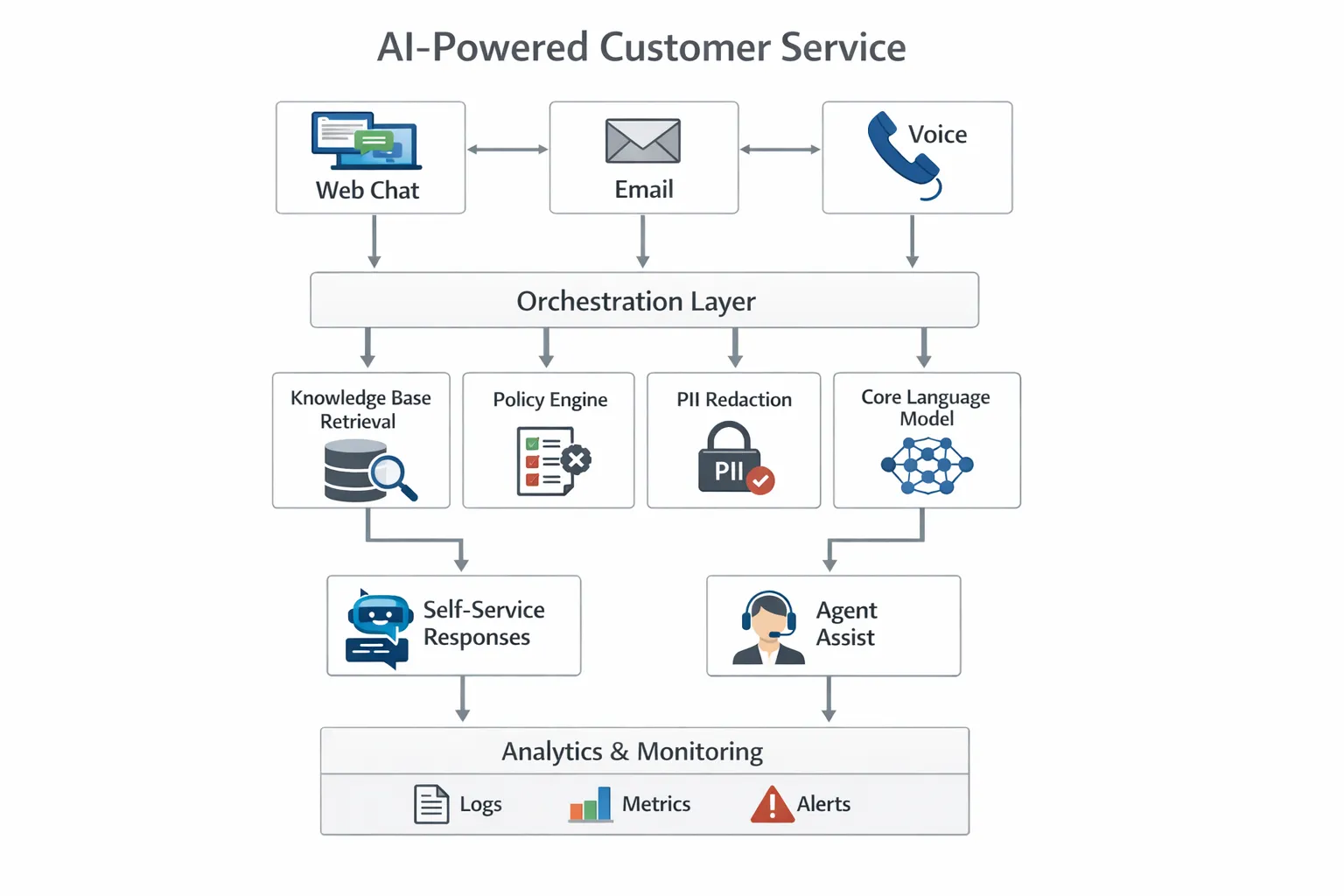
Design prompts that enforce policy. Use structured outputs for actions, for example JSON with fields like intent, confidence, citations, and action. Above all, log everything you can within your privacy policy so you can debug and improve.
Step 5, Security, privacy, and governance from day one
Adopt a risk framework and document your controls. The NIST AI Risk Management Framework is a practical starting point for governance, mapping risks to controls across the lifecycle. You can review it here, NIST AI RMF.
Minimum controls to implement:
- Enterprise identity and least privilege for admins and builders
- Zero retention or approved retention windows for model providers
- Pseudonymization or redaction of PII where possible
- Audit logs for prompts, model versions, and decisions
- Model cards and playbooks for high risk intents, for example payments, legal, health
- Clear escalation and incident response for AI related failures
Step 6, Human in the loop by design
AI should make it easy to do the right thing. Build routes and rules that hand off gracefully and keep the customer in the loop.
- Define confidence and policy thresholds that force escalation to agents
- Detect emotional cues and explicit requests for a human, then transfer without friction
- Show agents the full context, the assistant’s draft, and sources, but let them edit and own the final message
- Capture explicit customer consent before any sensitive action
A polished handoff increases trust. The assistant should summarize the issue for the agent, propose a next step with citations, and step out of the way.
Step 7, Train your people for AI enhanced service
Agent skill still decides the quality of the experience. AI reduces lookup and drafting time, agents deliver empathy, clarity, and judgment. High performing teams practice with realistic, high pressure scenarios and get targeted feedback.
With Scenario IQ, you can:
- Practice AI powered roleplay simulations that mirror your real customer intents and policies
- Personalize training scenarios by channel and skill level, for chat, email, and voice
- Give reps real time feedback on tone, structure, and policy adherence, with adaptive guidance
- Track progress with performance dashboards and analytics, so managers can coach strategically
- Roll out team focused learning paths, with daily actionable tips to keep skills sharp
Example scenarios to include in your 2025 curriculum:
- Billing dispute where the customer is at risk of churn, required outcome, calm, validate, resolve or escalate
- Refund outside policy with loyalty save offer, required outcome, offer within policy and explain clearly
- Shipping delay apology and expectation setting, required outcome, confirm new ETA and proactively credit if policy allows
- Security concern about data usage, required outcome, reassure with your privacy policy and next steps
- Service outage status handling for VIP customers, required outcome, prioritize and communicate updates on a promise schedule

Step 8, Launch plan that reduces risk and maximizes learning
Treat your first 90 days as a controlled rollout with clear gates.
Phase 1, Preparation
- Baseline metrics, finalize use cases, build evaluation set
- Secure approvals from security, legal, and compliance
- Train a pilot group of agents with Scenario IQ on the exact scenarios the AI will touch
Phase 2, Limited release
- Enable self service for top intents on one channel, and agent assist for one team
- A or B test versus a control group, log all outputs and human edits
- Hold daily stand ups the first two weeks, then weekly ops reviews
Phase 3, Scale and harden
- Expand to additional intents and channels once accuracy and satisfaction pass thresholds
- Build autoscaling, rate limits, and fallback paths
- Document playbooks and update your training program with what you learned
Step 9, Measure, monitor, and iterate
Operational excellence is continuous. Set up a weekly review that brings CX, ops, product, and compliance together.
- Review the metrics table at the top of this guide with deltas by channel and intent
- Sample transcripts where the assistant refused, gave long answers, or escalated, and fix root causes
- Refresh knowledge that caused wrong or outdated answers
- Update prompts and retrieval filters when policy changes
- Expand the Scenario IQ scenario library to include the newest product issues and seasonal spikes
Step 10, 2025 trends to watch and how to prepare
- Voice gets real time, expect more customers to talk instead of type, especially on mobile
- Multimodal troubleshooting, share a photo or screen capture and get guided steps
- Proactive service, assistants reach out when they detect risk signals, outages, or order anomalies
- Automated QA at scale, objective policy checks move from samples to near 100 percent coverage
- Synthetic data for edge cases, safely broaden training without exposing live PII
- Regulation matures, document your model lineage, data use, and escalation logic now to stay ahead
Common pitfalls that slow teams down
- Chasing model benchmarks instead of fixing knowledge gaps
- Launching everywhere at once instead of one channel and a few intents
- Over or under disclosure, keep it short and reassuring
- No human in the loop thresholds, err on the side of escalation early
- Skipping agent training, technology changes faster than habits without guided practice
Your 2025 readiness checklist
- Outcomes, metrics, and guardrails defined and signed off
- Content inventory complete, retrieval in place, test set ready
- Architecture diagrammed, observability and PII controls implemented
- Escalation logic and routing rules validated in staging
- Pilot group trained in Scenario IQ, feedback loop established
- Launch plan with gates and owners documented
- Weekly ops review cadence on the calendar
Bring it all together
AI powered customer service is both a platform and a practice. Get the foundations right, ship a small but valuable slice, and invest in your people so quality scales with automation. If you want a faster path to confident agents and consistent experiences, use Scenario IQ to create realistic simulations, personalize training by role and channel, and coach with real time, data driven feedback. You can learn more or talk to our team at Scenario IQ.