

Ticket volume rarely falls on its own. As your product grows, customers find new edge cases, policies evolve, and every channel you add (chat, email, social, in-app) creates more ways for work to enter the queue.
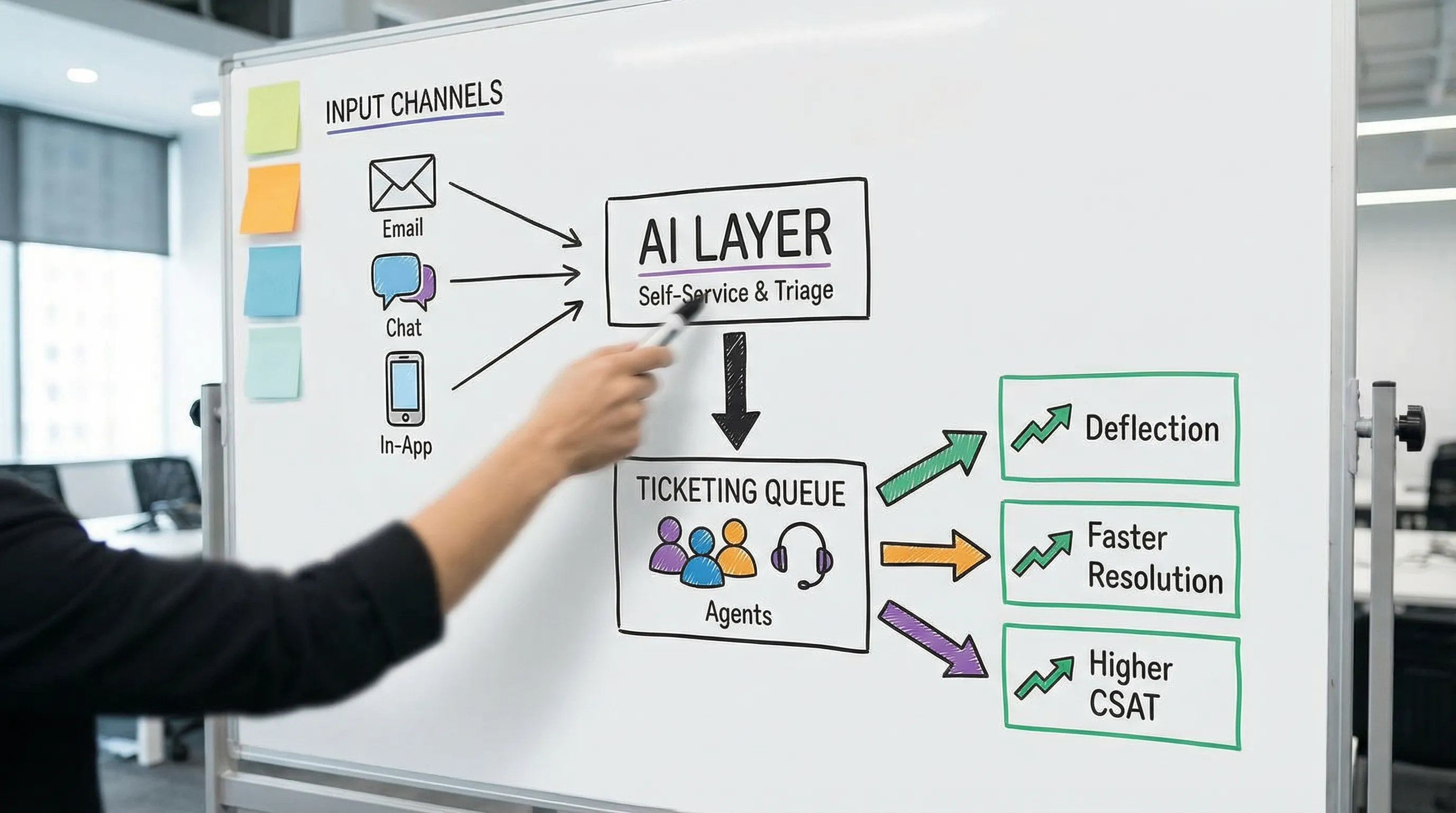
AI help desk software changes that equation by tackling the two root causes of high ticket load and low CSAT:
- Customers cannot find a correct answer fast enough, so they contact you.
- Agents spend too much time on triage, repetitive steps, and unclear next actions, so resolutions take longer and quality drops.
Done well, AI reduces demand (deflection and prevention) while increasing the quality and speed of the demand that remains (assist and automation). This guide explains what “good” looks like, which capabilities matter, and how to roll out AI without hurting trust, compliance, or your customer experience.
What “AI help desk software” actually means in 2026
Most teams use the term to describe one of three setups:
1) A traditional help desk with AI add-ons
You keep your current ticketing platform (case management, SLAs, routing) and add AI features like summarization, suggested replies, and knowledge search.
2) A help desk plus an AI customer-facing layer
You use an AI agent (chat, voice, in-app) to answer questions, guide troubleshooting, and collect information before creating a ticket.
3) An “AI-first” support platform
Ticketing, knowledge, AI agent, and agent-assist are designed as a single system, typically with unified analytics and governance.
The best choice depends on your maturity and constraints (security, integrations, change management), not on the flashiest demo.
How AI reduces tickets (without hiding problems)
Reducing tickets is not about making it harder to reach a human. Sustainable ticket reduction comes from deflection, better intake, and prevention.
AI-powered self-service that actually resolves issues
Classic self-service fails when content is outdated, hard to navigate, or too generic. AI improves this by:
- Understanding intent in natural language (not exact keyword matches).
- Asking clarifying questions (device, plan, error code, last step attempted).
- Returning a targeted answer with the right policy, steps, and links.
The ticket never gets created when the customer gets a correct, confident resolution quickly.
Smarter forms and intake that stop “back-and-forth”
A large slice of ticket volume is really avoidable rework caused by missing fields, vague descriptions, and incomplete screenshots.
AI intake flows can:
- Detect missing context and prompt for it before submission.
- Auto-categorize and auto-prioritize.
- Route the request to the best queue with the right metadata attached.
Even when a ticket is created, it starts “complete,” which reduces follow-up messages and reopens.
Proactive support that prevents repeat contacts
AI can surface patterns that humans miss in real time, especially across channels.
Examples of prevention workflows:
- Spike detection (sudden increase in password resets, shipping delays, or a specific error code).
- Knowledge gaps (topics that frequently lead to escalation).
- Product friction signals (steps where customers repeatedly get stuck).
Prevention is where ticket reduction becomes strategic: fewer issues exist in the first place.
How AI raises CSAT (while handling fewer tickets)
CSAT improves when customers feel they were understood, helped quickly, and treated fairly. AI supports that, but only if it is implemented with quality controls.
Faster time to resolution with agent-assist
Agent-assist features typically deliver the quickest wins because they reduce time spent on repetitive work:
- Summarize long threads and call transcripts.
- Suggest next steps based on policies and prior resolutions.
- Draft replies in your tone of voice.
- Pull relevant knowledge base content automatically.
This reduces handle time and boosts consistency, which customers experience as speed and competence.
More consistent answers across channels and agents
Inconsistent policy interpretation is a hidden CSAT killer. AI helps by grounding responses in approved sources (knowledge base, policy docs), then guiding agents to stay within guardrails.
To do this safely, you want configurable controls like:
- “Cite sources used” (internal citations for agents).
- Disallowed topics and escalation rules.
- Regional policy variations and permissions.
Better empathy and de-escalation at scale
AI can support tone, structure, and clarity, but it cannot replace judgment in sensitive scenarios. Where it helps most:
- Detecting frustration signals and recommending an escalation path.
- Coaching agents on de-escalation phrasing.
- Standardizing apology and accountability language without sounding robotic.
The capabilities that matter most (and what each impacts)
Not every AI feature moves the metrics you care about. Use the table below to map capabilities to outcomes.
| Capability | What it does | Primary impact on tickets | Primary impact on CSAT |
|---|---|---|---|
| AI self-service agent (chat/in-app/voice) | Resolves common questions, guides troubleshooting | High deflection when knowledge is strong | High if answers are accurate and escalation is easy |
| Intelligent intake | Collects missing info, categorizes, enriches tickets | Medium (less back-and-forth) | Medium (faster, fewer repeats) |
| Auto-triage and routing | Assigns priority, queue, and next action | Medium (less misroutes/reopens) | Medium (right agent sooner) |
| Agent-assist drafting | Suggests replies with tone and policy alignment | Low direct reduction | High (faster responses, consistency) |
| Summarization | Compresses long histories into key facts | Low direct reduction | Medium (less “please repeat”) |
| Knowledge search and answer grounding | Finds the right doc and highlights exact passages | Medium (fewer escalations) | High (accuracy, trust) |
| QA and compliance monitoring | Flags risky language, missing steps, policy violations | Medium (fewer reopens) | High (fewer bad experiences) |
| Analytics for demand and knowledge gaps | Identifies top drivers and broken content | High over time (prevention) | Medium to high |
A practical rollout plan (that avoids the common failure modes)
AI projects fail in support teams for predictable reasons: messy knowledge, unclear ownership, and metrics that reward the wrong thing (like deflection at any cost).
Step 1: Pick two outcomes and baseline them
Choose two primary targets for the first 60 to 90 days, for example:
- Ticket deflection rate for a specific topic cluster (billing, password reset, shipping status)
- First contact resolution (FCR) for a priority queue
Baseline the current numbers and define what “good” looks like. Without baselines, AI becomes an expensive opinion.
Step 2: Clean and structure knowledge before you “AI it”
Generative AI is only as reliable as the content and policies it can reference.
Do a focused knowledge sprint:
- Identify the top 20 ticket drivers.
- Ensure each has one canonical article with clear steps and edge cases.
- Remove duplicates and outdated pages.
- Add “when to escalate” rules.
This is not glamorous, but it is the difference between high CSAT automation and confident-sounding misinformation.
Step 3: Start with agent-assist, then expand to customer-facing automation
A common sequencing that reduces risk:
- Deploy summarization and knowledge search for agents.
- Add drafting and QA checks.
- Roll out AI intake to improve ticket quality.
- Launch self-service automation for a narrow set of intents.
You earn trust internally first, then scale to customers.
Step 4: Build escalation and “graceful failure” paths
Your AI should be excellent at admitting uncertainty.
Best practices:
- One-click “talk to a person” for sensitive topics.
- Clear messaging when the AI is using general guidance versus policy.
- Human review workflows for high-risk categories (refund disputes, account access, regulated scenarios).
For governance foundations, many teams reference frameworks like NIST’s AI Risk Management Framework to structure controls and accountability.
Step 5: Measure quality, not just volume
A drop in tickets can hide a worse experience (customers give up, churn quietly, or flood social). Track balanced metrics.
| Metric | What it tells you | Why it matters |
|---|---|---|
| CSAT (by channel and topic) | Customer sentiment after resolution | Catches “deflection at any cost” |
| Containment rate (AI resolved without human) | True automation level | Helps forecast staffing and ROI |
| FCR | Resolved without follow-up | Strong predictor of satisfaction |
| Reopen rate | Quality of solution | High reopens often mean wrong answers |
| Time to first response and time to resolution | Speed | Directly impacts experience |
| Escalation rate | Where AI or tier 1 hits limits | Guides training and knowledge improvements |
| Contact rate per active user | Demand trend | Shows prevention progress |
Integration and security: what to ask before you buy
AI help desk software touches sensitive customer data, internal policies, and sometimes payment or identity workflows. Your evaluation should include your security, legal, and IT stakeholders early.
Key areas to validate:
Data handling and privacy
- Where is data stored, and how is it encrypted?
- Can you control retention for transcripts, prompts, and outputs?
- Is customer data used to train vendor models by default, and can you opt out?
Permissions and access control
Your AI should respect existing roles (what agents can see, what customers can access) and avoid leaking internal-only content.
Auditability and QA
Ask how you can:
- Review AI conversations and agent-assist suggestions.
- Trace answers back to approved sources.
- Flag and correct failures quickly.
If your organization relies on recognized information security programs, it can be helpful to align vendor requirements with common standards like ISO/IEC 27001 (certification status varies by vendor, but the control themes are widely used).
The overlooked lever: training agents to handle the tickets AI cannot
Even with excellent automation, your hardest tickets remain: complex edge cases, escalations, angry customers, negotiation, policy exceptions, and high-stakes renewals.
This is where many support orgs hit a wall. They improve tooling, but agent capability does not scale at the same pace.
Scenario IQ is not a help desk system, but it can complement AI help desk software by strengthening human performance through AI-powered roleplay simulations, personalized scenarios, and real-time feedback. That matters because:
- Better discovery reduces misdiagnosis and rework.
- Stronger de-escalation reduces reopens and supervisor escalations.
- Consistent handling of objections improves trust and outcomes.
If your AI help desk initiative is reducing volume but CSAT is flat, or escalations are rising, the gap is often skill and confidence, not technology.
You can explore Scenario IQ’s approach to AI training at Scenario IQ.
A simple vendor shortlisting checklist
Use this to keep demos honest and aligned to outcomes.
For ticket reduction
- Does the AI agent reliably answer from your knowledge base (not generic web text)?
- Can it handle clarifying questions and multi-step troubleshooting?
- Can you limit automation to specific intents while you iterate?
- Does it support proactive recommendations (like “here’s the right article” before ticket submission)?
For CSAT improvement
- Does agent-assist cite internal sources and follow your policies?
- Can you tune tone and brand voice safely?
- Are escalations and sensitive-topic handoffs smooth?
- Do analytics connect AI interactions to CSAT, FCR, and reopens?
For operations and governance
- Integrations with your CRM, identity, and knowledge systems
- Admin controls for permissions, content scope, and retention
- QA workflows and audit logs
- Clear security posture and contractual data protections
Getting the outcome you want: reduce tickets and raise CSAT
AI help desk software works best when you treat it as an operating model change, not a feature toggle. The winning pattern is consistent across industries:
- Strengthen knowledge so AI and humans share a reliable source of truth.
- Start with agent-assist to improve speed and consistency.
- Expand to customer-facing automation in narrow slices, with strong escalation paths.
- Measure quality with reopens, FCR, and CSAT, not just ticket volume.
- Train humans for the complex conversations that automation will not solve.
If you build around those principles, reducing tickets and raising CSAT stops being a tradeoff and becomes the natural result of a smarter support system.