

Prospects are drowning in AI-written outreach that all sounds the same. The goal is not to write faster, it is to write messages a human will actually answer. This guide shows how to use AI to craft short, specific emails that earn replies, then how to coach your team so the quality scales.
What makes prospects answer sales emails in 2025
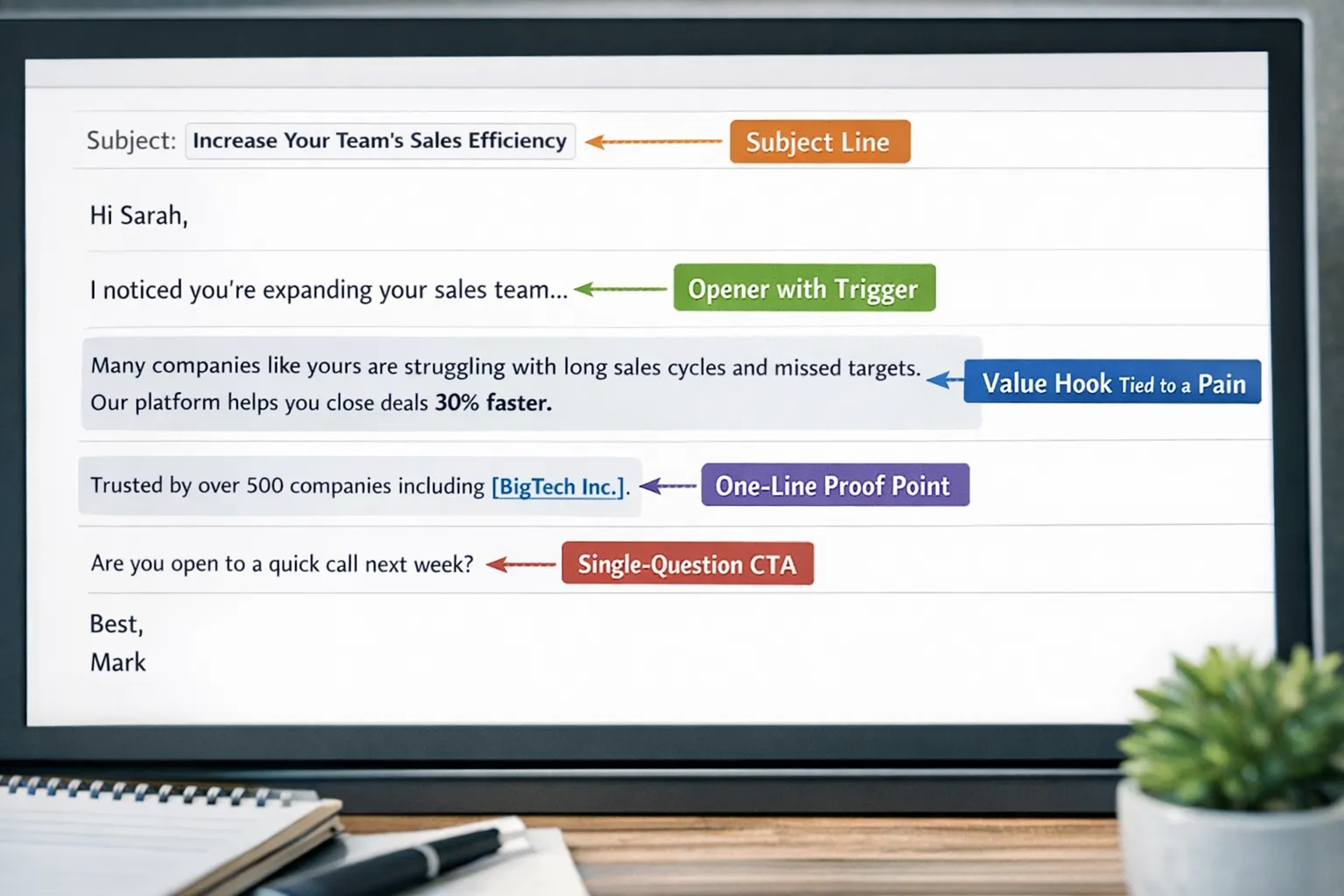
Most replies come from messages that do five simple things well. AI can help with all five, but only if you give it the right constraints and inputs.
- Relevance, the note maps to a live priority or trigger the buyer cares about.
- Specificity, concrete facts or observations replace generic value claims.
- Brevity, 60 to 120 words, one idea, one ask.
- Credibility, a proof point that feels adjacent to the buyer’s world, not a random logo dump.
- Clear next step, a single question, not a menu of options.
Short paragraphs, simple language, and one question at the end reduce cognitive load. Analyses of millions of sales emails published by respected sales platforms consistently show shorter, simple messages with a single question earn more replies. Treat AI like an editor that enforces these rules.
An AI workflow that scales craftsmanship
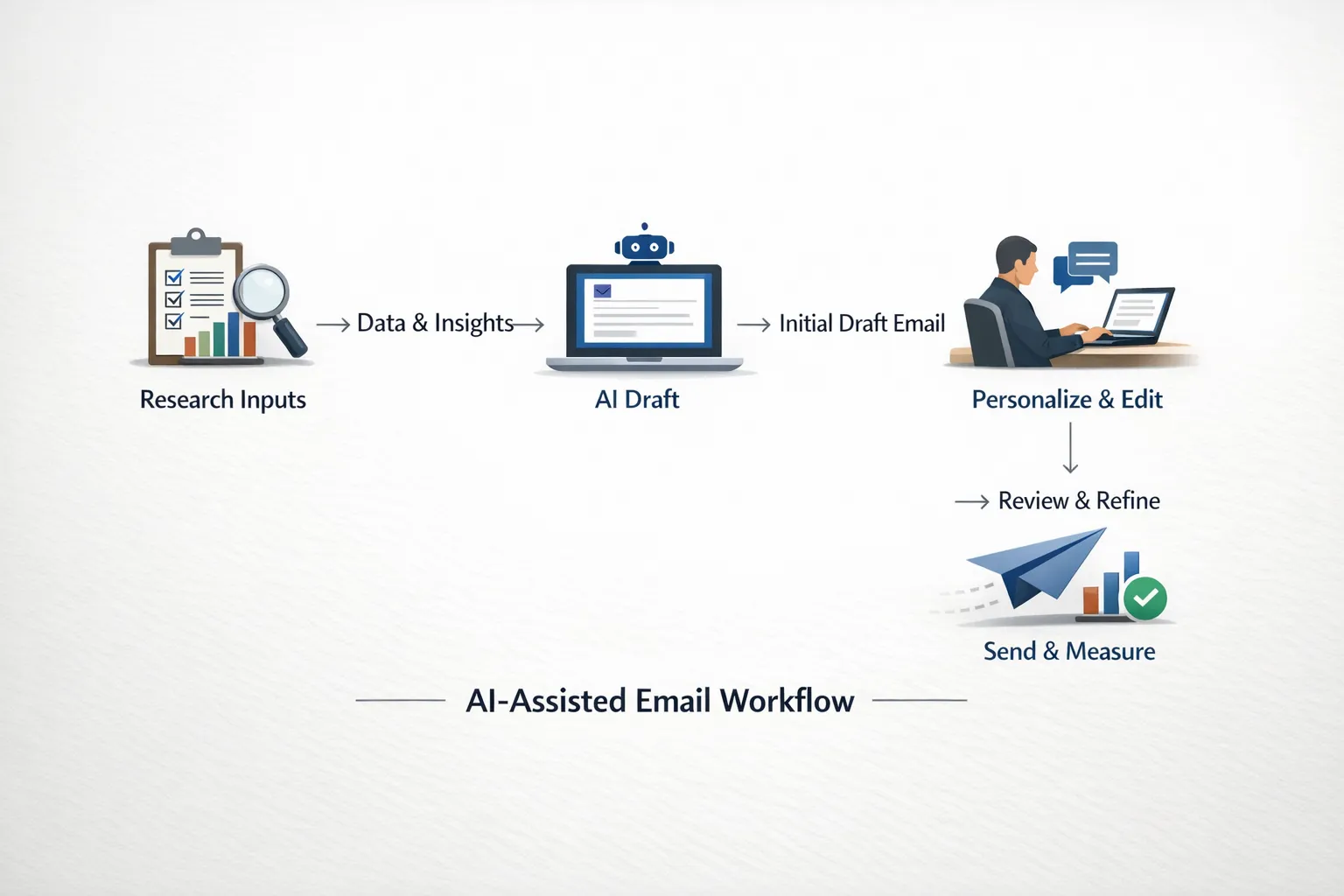
Great sales emails come from good inputs, not magic prompts. Use this simple workflow across your team.
1) Research, collect two verified facts per prospect, a trigger event and a role-specific pain.
2) Draft, ask AI for a 90 word first pass that strictly ties the trigger to the pain and proposes one next step.
3) Personalize, swap in a line that only applies to this prospect, a metric from their site, a quote from a recent interview, or a relevant project.
4) Edit, use AI to remove fluff, simplify words, and keep one CTA.
5) QA, scan for accuracy, compliance, and tone before you hit send.
6) Track, tag variants in your sequence tool and measure positive replies and meetings set, not just opens.
Quick table, prompts you can copy
| Component | Why it matters | Prompt to try | Quality check |
|---|---|---|---|
| Opener tied to trigger | Signals you did your homework | “Write 2 opening lines that reference [trigger] and matter to a [role]. Avoid praise, be specific.” | Can a stranger verify it in 10 seconds? |
| Value hook | Connects pain to outcome | “In 2 lines, link [pain] to [business outcome], use concrete nouns, no adjectives.” | Does it stand alone without buzzwords? |
| Proof | Low-friction credibility | “1 line of social proof adjacent to [industry size] and [use case]. No superlatives.” | Is it relevant to their world? |
| CTA | Creates reply clarity | “Offer 1 question CTA with a binary answer. No links or multiple options.” | Can they answer in under 10 seconds? |
| Subject | Earns an open without clickbait | “Give 5 subjects under 40 characters that reference [trigger] plainly.” | Would you open it if you were busy? |
Prompt recipes and working examples
Use the following base template, then tailor it per prospect.
Base cold email prompt
“Act as a senior account executive writing to a busy [job title] at [company]. They recently [trigger]. Their likely priority is [priority], which causes [pain]. Draft a 90 word email with: 1) a specific opener tied to the trigger, 2) a value hook connected to the priority, 3) one related proof point, 4) one binary question CTA. Use simple words at 7th grade reading level. No flattery, no exclamation marks, no links, no attachments, no bold. Output subject and body only.”
Industry-specific example, DevOps buyer
If you sell to engineering leaders, ground your message in uptime, cost, or deployment speed. When targeting firms that deliver DevOps services, study how they position reliability and automation. For instance, a provider of DevOps, cloud native and automation consulting will care about Kubernetes cost control and ISO-grade security, which gives you specific angles for your opener and value hook.
Example draft, cold email to a VP Engineering
Subject, Cutting deploy time without more headcount
Hi Priya, saw your team moved more workloads to EKS last quarter. Many teams hit slower deploys as services grow, which drags cycle time and on-call.
We help platform teams shave minutes off CI and reduce reverts by standardizing test gates and golden paths. In one fintech with 120 services, that freed up two sprints a year.
Worth a quick look to see if similar patterns exist in your pipelines, or not the right focus now?
– Alex
Short follow ups that add value
Follow up 1, new angle
Subject, Missed you, one idea
Quick add, teams at your stage get wins by trimming test flake in CI. If you want it, I can share a 3 line checklist we use to spot it.
Take a look, or pass for now?
Follow up 2, micro proof
Subject, 30 day result
Looping back with one data point, a peer team cut mean time to merge by 18 percent after removing three slow checks. Happy to share the before and after if useful.
Worth a look, or should I close the loop?
Follow up 3, break up
Subject, Close the loop
I do not want to keep sending notes if this is not a priority. Should I close your file, or is there a better time or person?
Objection handling over email
Objection, Not a priority
Totally fair. When teams say this, it is usually because either deploy speed is fine or the cost to change feels high. If I send a 1 page checklist you can scan in two minutes to spot any quick wins, would that be useful, or best to revisit next quarter?
Objection, Send me info
I can send a one pager, and to keep it relevant, which is closer to your world today, reducing failed deploys or lowering CI costs? I will send the right page based on your answer.
Subject lines that earn opens without clickbait
Use plain language that previews value. Keep under 40 characters when possible.
- Idea to cut CI costs
- Question on onboarding time
- Note on failed deploys
- Quick idea for churn risk
- Congrats on your Series B
- Question about Kubernetes SLAs
- Trim time to first value
- Idea for handoff quality
- Hiring plan and ramp time
- Fewer reverts this quarter
- Shorten trial to paid
- Speed up first meeting
Edit with AI, the last 60 seconds that matter most
Most drafts are 30 percent too long and too abstract. Use AI to compress and clarify.
Editing prompt
“Edit to 90 words. Keep one idea and one question. Replace abstract phrases with concrete nouns. Remove adverbs and hype. Use plain verbs. Keep reading level to grade 7. No emojis, no links, no exclamation marks, no bold. Return subject and body.”
Quality checklist before sending
- One verified fact, no assumptions.
- One proof point that is adjacent, not generic.
- One question CTA with a binary answer.
- No attachments or calendar links in the cold email.
- From line shows a real person, not a no-reply.
Measure what matters, and fix the right thing
Focus on reply quality and meetings, not opens. Use this map to diagnose.
| Signal | What it likely means | What to change |
|---|---|---|
| Low opens | Subject or sender does not earn trust | Shorten subject, test plain preview text, ensure domain health |
| Opens but no replies | Value is vague or CTA is unclear | Tighten hook, make one binary question, remove extras |
| Replies but low positive rate | Targeting or proof is off | Narrow ICP, improve adjacent proof, reference a live trigger |
| Positive replies but few meetings | Friction in scheduling | Offer two time windows in-thread after the first positive reply |
Track each variant for at least one full sales cycle. Tag by persona and trigger, not just subject lines, so you can learn what angle worked for which buyer.
Turn AI drafts into team habits with Scenario IQ
Tools can draft emails, teams need skills to make those drafts credible and specific. This is where coaching and practice matter.
With Scenario IQ, you can turn your best performing emails into repeatable skills across the team.
- AI-powered roleplay simulations, reps practice writing and defending their outreach against realistic buyer reactions.
- Personalized training scenarios, tailor by vertical, persona, and trigger so emails feel relevant.
- Real-time feedback and adaptive guidance, get instant suggestions on clarity, length, and the strength of the value hook and CTA.
- Progress tracking analytics and performance dashboards, see who improves reply quality over time and where they get stuck.
- Team-focused learning and customizable skill levels, onboard new hires faster and raise the floor on messaging quality.
- Enterprise-grade security and daily actionable tips, roll out safely and keep the habit fresh.
A simple way to implement this in your enablement plan
- Pick three personas and three triggers each. Build nine scenarios that mirror real deals.
- Upload two winning emails per scenario, plus one that underperformed, then have reps diagnose why.
- Run weekly 20 minute drills, opener, hook, proof, CTA, with real-time feedback.
- Track positive reply rate from each sequence before and after training to prove impact.
If you want to scale reply-worthy outreach without sounding robotic, add coaching to your stack. Explore how Scenario IQ helps teams practice, measure, and improve email quality with AI-driven roleplay and feedback.
Final word
AI can help you write more emails. The advantage comes when you use AI to think better, not just type faster. Give the model verified inputs, enforce brevity and clarity, ask for a single question CTA, and iterate based on measured outcomes. Then turn what works into team muscle memory with deliberate practice. That is how you write messages prospects answer.