

Customer expectations have shifted from “good support” to “good support, right now.” At the same time, no one wants to feel like they are talking to a script, a chatbot, or a system that is trying to deflect them. That tension is exactly why AI customer care is evolving toward an experience that feels fast, helpful, and human, not robotic.
The teams that win in 2026 are not the ones who “add AI.” They are the ones who redesign customer care around three outcomes:
- Fast: customers get to the right answer or person quickly, with minimal repetition.
- Helpful: the solution is accurate, contextual, and actually resolves the issue.
- Human: the experience shows empathy, good judgment, and appropriate accountability.
This guide breaks down what that looks like in practice, the operating model that makes it sustainable, and how to train teams so AI raises the bar instead of lowering trust.
What “fast, helpful, and human” really means in AI customer care
“Fast” is not just short handle time. It is speed to clarity. Customers will happily spend a few extra minutes if the conversation is coherent, the next step is clear, and they are not forced to repeat themselves.
“Helpful” is not just knowledge base retrieval. It is applying policy, product context, and customer history correctly, and knowing when to escalate.
“Human” is not pretending the AI is a person. It is communicating with warmth and accountability, using the right tone, acknowledging frustration, and making smart tradeoffs when policies meet real-life situations.
A practical way to define the target experience is:
- One story: the customer explains once, the context travels with them.
- Right channel, right moment: self-serve for simple tasks, a person for nuance.
- No dead ends: every AI interaction has a clear path to resolution or escalation.
Industry research consistently shows that customers value speed and convenience, but also want smooth handoffs and human support for complex cases. For broader CX benchmarks and trends, see Zendesk’s annual Customer Experience Trends reporting.
Where AI actually improves customer care (without killing the vibe)
The best AI customer care programs focus less on “automating conversations” and more on removing friction around conversations.
1) Triage and routing that reduces time-to-help
AI can classify intent, detect urgency, identify language preferences, and route to the right queue or specialist. Done well, this is invisible to the customer, they just get to someone who can solve it.
Key design choice: route based on the customer’s goal and context, not just keywords. For example, “cancel” can mean churn risk, billing dispute, compliance requirement, or a simple plan change.
2) Agent assist that makes reps faster and more accurate
For complex support, AI is often best positioned as a “copilot”:
- Drafting replies in the company’s tone
- Surfacing relevant knowledge articles and policy snippets
- Summarizing long threads and call transcripts n- Suggesting next best actions (with sources)
This is where “fast” and “helpful” are easiest to achieve, because the human remains responsible for judgment and empathy.
3) Conversation summaries and automatic case notes
After-contact work is a major drag on speed and morale. AI summaries can:
- Standardize documentation
- Reduce errors from rushed note-taking
- Improve continuity when cases transfer
The human step that matters: agents should quickly validate summaries, especially any commitments, refunds, or compliance-related statements.
4) Quality assurance that scales coaching, not just scoring
AI can flag patterns like missed identity verification, over-promising, policy deviations, or tone issues. The organizations that benefit most treat QA as a coaching engine, not a punishment engine.
5) Industry workflow automation that reduces customer wait states
Many customer “support” issues are actually operational bottlenecks: underwriting queues, claims processing, manual data entry, back-office approvals. In regulated industries, automation here can be the difference between a customer feeling “handled” versus “ignored.”
For example, insurance teams often use specialized AI platforms to speed up underwriting and claims workflows, which can reduce delays that drive inbound “where is my claim?” contacts. One reference point is Inaza’s AI-powered insurance automation, which focuses on automating parts of underwriting and claims operations to improve turnaround times.
The trust problems that make AI feel “unhelpful” or “inhuman”
Most negative reactions to AI customer care come from a few predictable failure modes.
Hallucinations and confident wrong answers
If an AI system can generate answers without grounding them in approved sources, it can create policy violations, financial liability, and reputational damage.
Practical guardrail: require retrieval from an approved knowledge base for anything policy-related, and make the AI show sources internally (for the agent) even if sources are not shown to the customer.
Tone mismatch and empathy gaps
A fast answer delivered coldly can feel slower than a slightly longer response that acknowledges the situation. AI also tends to overuse generic empathy phrases unless trained and coached.
Practical guardrail: define “tone rules” by scenario type (billing dispute, outage, safety issue, complaint escalation) and test them with real transcripts.
Bad handoffs that force repetition
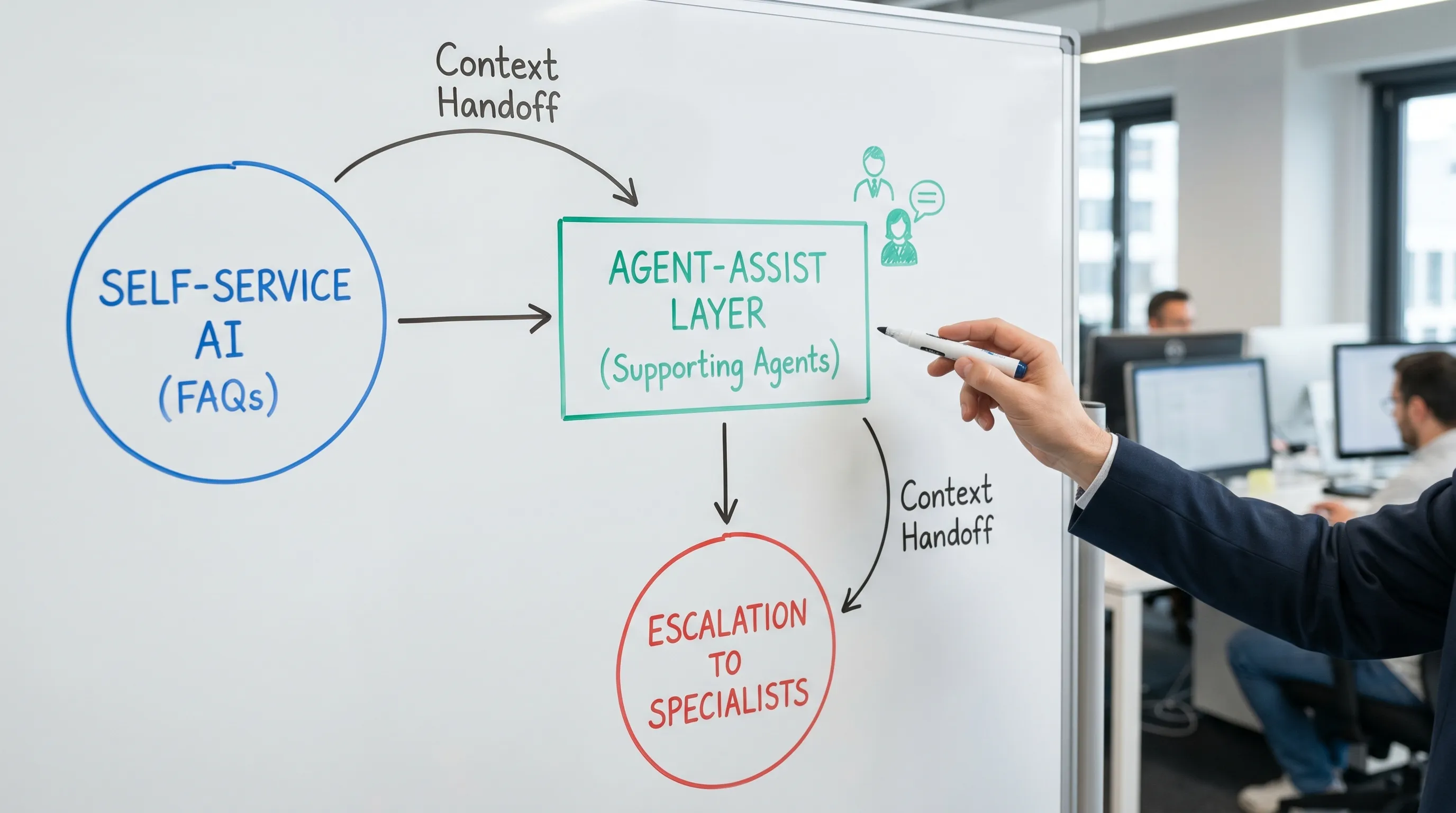
Nothing breaks “human” faster than making the customer restate everything. Your handoff design matters as much as your AI.
Practical guardrail: every escalation should pass:
- Customer goal in one sentence
- What has already been tried
- Current status and next step
- Any constraints (deadlines, accessibility needs, compliance)
Over-automation of emotional or high-stakes moments
Customers tolerate automation for simple tasks. They do not tolerate it when the stakes are high (fraud concerns, medical issues, account lockouts, major refunds) and the system blocks a human.
Practical guardrail: define “never-bot” categories where a person is always reachable.
The operating model: people plus AI (with clear responsibility)
AI customer care works when teams are explicit about who does what and what cannot be automated.
Here is a practical division of labor you can adapt.
| Customer care task | Best AI role | Best human role | Guardrail to add |
|---|---|---|---|
| Simple FAQs, order status, password resets | Self-serve automation | Escalation only | Clear exit to human, confirm identity when needed |
| Complex troubleshooting | Agent assist and guided workflows | Diagnosis and decision-making | Approved sources only, no speculation |
| Billing disputes and refunds | Draft responses, policy retrieval | Judgment, exceptions, accountability | Require human approval for commitments |
| Complaints and churn risk | Summarize history, suggest retention options | Empathy, negotiation, ownership | Tone review, escalation thresholds |
| Compliance-heavy topics | Retrieve approved scripts, checklist prompts | Execute steps, ensure consent | Audit logs, standardized phrasing |
If your team cannot explain this operating model in one minute, customers will feel the confusion.
Training is the missing layer in most AI customer care rollouts
Many organizations invest heavily in tools and lightly in behavior change. But “fast, helpful, human” is mostly a skill problem:
- Agents need to ask better questions to get better AI outputs.
- They need to verify, edit, and personalize drafts quickly.
- They need to handle objections when customers push back on AI (“Can I talk to a person?”).
- They need to navigate edge cases without freezing.
This is where scenario-based practice outperforms static playbooks.
What to train (beyond product knowledge)
To make AI customer care feel human, focus training on repeatable behaviors:
- Conversation control: setting an agenda, confirming the goal, summarizing progress.
- Empathy with precision: acknowledging impact, then moving to action.
- De-escalation: language patterns that reduce defensiveness.
- AI copilot fluency: prompting, verifying, rewriting, and citing policy correctly.
- Handoff excellence: transferring context cleanly to reduce customer repetition.
How Scenario IQ supports this kind of training
Scenario IQ is designed for exactly this gap: helping customer-facing teams build confidence and consistency through AI-powered roleplay simulations. Instead of hoping good behavior shows up on live tickets, teams can practice the real scenarios that make or break trust.
Organizations typically use platforms like Scenario IQ to:
- Run personalized training scenarios that match your customer reality (angry billing calls, outage updates, renewal objections, policy exceptions)
- Give agents real-time feedback so they can correct tone, structure, and accuracy in the moment
- Track improvement with progress tracking analytics and performance metric dashboards
- Adapt difficulty using customisable skill levels, so new hires and senior agents both stay challenged
- Reinforce learning via daily actionable tips that keep skills fresh between coaching sessions
The result you are aiming for is not “AI answers tickets.” It is “AI helps humans deliver better care, faster.”

What to measure (so “fast” does not destroy “human”)
If you only optimize for speed, you can accidentally create a worse experience (more transfers, more repeat contacts, lower trust). Balance your scorecard.
A simple measurement approach is to track outcomes (what customers feel) alongside mechanics (how efficiently you operated).
| Metric | What it tells you | Watch out for |
|---|---|---|
| First contact resolution (FCR) | Helpfulness and completeness | Inflated FCR if customers give up |
| Customer satisfaction (CSAT) or sentiment | Human experience quality | Survey bias, low response rates |
| Time to resolution | End-to-end speed | Can hide recontacts if measured poorly |
| Reopen rate / repeat contact rate | Whether you truly solved it | Needs good identity matching |
| Escalation rate | AI boundaries and routing quality | Too low can mean blocked humans |
| Average handle time (AHT) | Efficiency | Lower is not always better |
| QA policy adherence | Risk management | Over-scoring can reduce empathy |
| Agent confidence and adoption | Whether change is sticking | Measure by team, not anecdotes |
Tip: treat “containment rate” (the percent solved without a human) as a secondary metric. High containment with low trust is a short-term win and a long-term loss.
A practical rollout plan for AI customer care (without chaos)
You do not need a perfect system on day one. You need a controlled path to reliability.
Start with a service blueprint, not a bot
Map your top contact reasons, where customers get stuck, and which steps are policy-bound. Identify:
- The 10 to 20 intents that represent the majority of volume
- The 5 to 10 scenarios that create most escalations, refunds, or churn
- The “never-bot” categories where human access must be immediate
Ground AI in approved knowledge and clear decision rules
Customers experience “helpful” when answers are consistent. Your AI should be constrained by:
- A maintained knowledge base with owners and review cycles
- Escalation rules (risk, emotion, value, compliance)
- Templates for high-stakes moments (outages, recalls, fraud)
Pilot with tight feedback loops
Pick one channel (chat or email), one team, and a small set of intents. Review transcripts weekly, then adjust:
- Knowledge gaps
- Prompting standards
- Tone guidelines
- Escalation thresholds
Train continuously with roleplay
This is the lever most teams underuse. As policies, products, and customer expectations shift, your training should keep pace.
Scenario-based training lets you:
- Introduce new scripts safely
- Practice difficult customer emotions repeatedly
- Standardize what “good” looks like across teams
- Build speed without sacrificing empathy
Frequently Asked Questions
What is AI customer care? AI customer care is the use of AI to improve customer support and service, often through self-service automation, agent assist, case summarization, routing, and QA insights.
Will AI replace customer support agents? In most organizations, AI is replacing repetitive tasks and after-contact work more than it replaces agents. Complex, emotional, and high-stakes situations still benefit from human judgment and empathy.
How do you make AI support feel human? Make the experience human by designing clean handoffs, using tone guidelines, avoiding dead ends, and training agents to personalize, verify, and own the outcome instead of sending generic AI text.
What are the biggest risks of AI in customer care? Common risks include confident wrong answers, policy violations, tone-deaf responses, customers being blocked from a human, and poor handoffs that force repetition.
What should we measure to know if AI is working? Track a balanced set of metrics like first contact resolution, time to resolution, repeat contact rate, CSAT or sentiment, escalation rate, and policy adherence, not just handle time or containment.
Build customer care that customers actually trust
If you want AI customer care that feels fast, helpful, and human, the differentiator is not the model, it is your team’s execution in real conversations.
Scenario IQ helps teams practice the scenarios that matter most through AI-driven roleplay, real-time feedback, and analytics that make coaching measurable. Explore how it works at Scenario IQ.