

Most AI chat support projects do not fail because the model is “bad.” They fail because the operation around it is vague: unclear triage, messy routing, and an escalation path that agents do not trust.
If you want AI chat support to reduce queue times without wrecking CSAT, you need the same fundamentals every high-performing support org uses, just adapted to automation:
- Triage: classify the conversation and decide what should happen next.
- Routing: send the right work to the right place (bot flow, team, agent, queue).
- Escalation: define the safe, fast handoff to a human (and sometimes a specialist) when risk or complexity spikes.
This guide walks you through a practical setup, including sample rule frameworks, escalation matrices, and the metrics that tell you whether the system is working.
What “good” AI chat support looks like (in one sentence)
A customer can start in chat, get quick self-serve help for simple issues, and seamlessly reach the right human with full context when needed, without repeating themselves.
That outcome requires designing the system around decisions, not just answers.
Step 1: Define your triage taxonomy (the minimum you need)
Triage is your AI’s decision layer. Keep it small at first, then expand once you have data.
A useful starting taxonomy usually includes:
- Intent (what the customer is trying to do)
- Urgency (how time-sensitive it is)
- Complexity (how likely it needs a human)
- Risk (privacy, safety, compliance, reputational risk)
- Customer context (plan tier, account status, region, language)
A practical triage table you can implement immediately
Use a table like this to turn “support instincts” into consistent rules.
| Triage dimension | Example values | How to detect | Why it matters |
|---|---|---|---|
| Intent | Billing, login, bug report, cancellation, how-to | Button selection + intent classifier + keywords | Drives routing to the right queue and workflow |
| Urgency | Low, normal, high | SLA keywords ("down", "urgent"), account type, sentiment | Prevents VIP and outage issues from getting stuck |
| Complexity | Simple, moderate, complex | Steps required, policy constraints, account changes | Determines bot-only vs human-in-loop |
| Risk | Standard, sensitive, restricted | PII presence, payment data, legal threats, self-harm | Triggers safe responses and fast escalation |
| Customer context | Language, tier, region, product | CRM/profile lookup + user choice | Enables the right policy and specialist coverage |
Tip: Start with 5 to 10 intents that represent most volume. Avoid building a 40-intent tree on day one.
Step 2: Decide what the AI is allowed to do (and what it must not do)
AI chat support performs best when you clearly separate:
- Informational help (low risk): product guidance, troubleshooting steps, policy explanations.
- Transactional actions (higher risk): refunds, cancellations, account changes, address edits.
- Regulated or sensitive topics (highest risk): medical, legal, financial advice, payment details, identity verification.
A simple control you can apply is a “permission ladder”:
- Level 1 (Answer): AI can explain and guide.
- Level 2 (Assist): AI can collect info, pre-fill forms, draft responses for an agent.
- Level 3 (Act): AI can execute changes (only with strong verification and strict logging).
If you do not have the verification, audit, and rollback path for Level 3, do not ship Level 3.
Step 3: Build routing like a call center, not like a chatbot
Routing is where most teams leave money on the table. You want customers to land in the shortest path to resolution, and you want agents to receive work they can solve.
Routing inputs that matter
The routing decision should consider more than intent:
- Language and regional coverage
- Product area and specialization
- Tier/VIP rules (if you have them)
- Channel constraints (chat vs email vs phone)
- Agent availability and queue health
- Risk classification (from triage)
A routing blueprint (with clean handoffs)
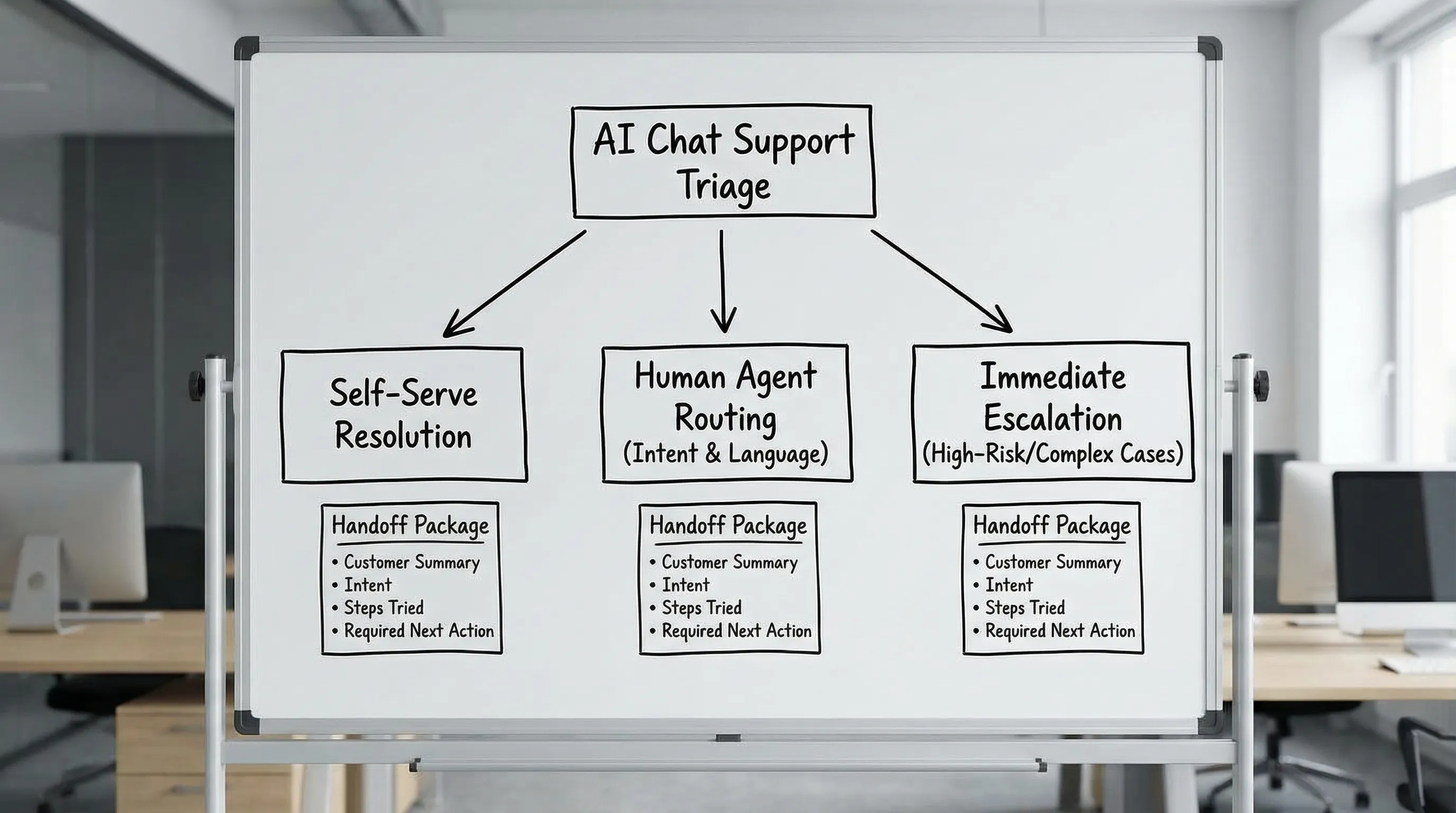
A strong default flow looks like this:
- AI greets and captures goal (one question, plus suggested buttons)
- AI triages (intent, risk, urgency, complexity)
- AI routes to one of three modes:
- Self-serve mode: AI provides steps, checks success, logs outcome
- Hybrid mode: AI collects details, then hands off to an agent
- Escalation mode: AI hands off immediately (risk, compliance, severe sentiment, outage)
Step 4: Design escalation as a system (not a panic button)
Escalation is not failure. It is a safety feature and a customer experience feature.
Your escalation design should answer:
- When do we escalate? (triggers)
- Who do we escalate to? (target queues and roles)
- What context must be transferred? (handoff package)
- How fast must it happen? (SLA)
- What does the AI say while escalating? (customer messaging)
Common escalation triggers (use these as defaults)
Escalate when any of the following is true:
- The customer asks for a human twice
- The AI confidence is low (based on your own threshold)
- The conversation includes payment details, identity documents, or sensitive personal data
- The customer is threatening chargeback, legal action, or shows severe frustration
- The issue involves account access and verification is required
- The user reports a service outage or critical defect
A sample escalation matrix
| Escalation type | Typical trigger | Target | AI’s job before handoff | SLA goal |
|---|---|---|---|---|
| Warm handoff to frontline | Low confidence, multiple clarifications | General support | Summarize issue, collect account identifiers safely, list steps tried | Minutes |
| Specialist escalation | Billing dispute, integrations, API errors | Billing team, Technical support | Gather logs/errors, confirm environment, capture exact timestamps | Minutes to hours |
| Risk escalation | PII, payment, compliance, threats | Trust & Safety, Security, Legal | Stop data collection, provide safe instructions, preserve transcript | Immediate |
| Emergency escalation | Self-harm language or imminent harm | Your crisis workflow (policy-dependent) | Use approved messaging, route instantly, avoid improvising | Immediate |
Note: For crisis and self-harm scenarios, follow established guidance and local regulations. In the US, you can reference 988 Lifeline for approved resources and language.
Step 5: Write the “handoff package” your agents will actually thank you for
Escalation succeeds or fails on context transfer. Your agents should not need to scroll.
A good handoff package includes:
- One-sentence summary (customer goal + current state)
- Triage tags (intent, urgency, risk, complexity)
- Customer/account context (tier, region, relevant product)
- What the AI already attempted (links or steps)
- What is needed next (the next best action)
- Exact customer wording for critical details (errors, order number, timestamps)
If you use a helpdesk like Zendesk or Salesforce Service Cloud, store these fields where agents already work, not in a separate dashboard they will ignore.
Step 6: Add guardrails that reduce risk without killing the experience
Guardrails should be visible in behavior, not in long disclaimers.
Guardrails to implement early
- Sensitive-data detection: if the customer pastes card numbers or passwords, do not store or repeat them.
- Verification gates: for account changes, require authentication steps before proceeding.
- Policy-bound responses: refunds, cancellations, and exceptions should follow approved policies.
- No hallucinated certainty: train the AI to say what it can and cannot do, and to escalate when needed.
For security-minded teams, align your workflows with generally accepted practices for security and privacy programs. A helpful baseline reference is the NIST Cybersecurity Framework.
Step 7: Instrument the right metrics (so you can improve routing weekly)
AI chat support is not “set and forget.” Treat triage and routing as a living system.
Track metrics in four categories:
| Metric category | What to measure | Why it matters |
|---|---|---|
| Customer outcomes | CSAT, containment satisfaction, complaint rate | Proves quality, not just deflection |
| Efficiency | First response time, time to resolution, agent handle time after handoff | Shows whether routing reduces work or creates rework |
| Safety and quality | Escalation accuracy, policy violations, sensitive-data events | Prevents brand and compliance risk |
| Routing performance | Misroutes, transfers per ticket, intent classification accuracy | Directly improves queue health and staffing |
Two practical signals to review weekly:
- Repeat contact rate for “AI-resolved” chats (a quiet indicator of bad containment)
- Handoff friction (how often customers repeat themselves after escalation)
Step 8: Train your team for the new reality (and do it with roleplay)
Even with great automation, humans still close the loop on complex, emotional, and high-stakes cases. The best support teams train for:
- Taking over mid-conversation without losing rapport
- Handling escalations with confidence (billing disputes, angry customers, cancellations)
- Using AI summaries effectively, while still verifying key facts
- De-escalation language that protects the relationship
This is where scenario-based training is unusually effective, because agents can practice the exact handoff moments your workflow creates.
With Scenario IQ, teams can run AI-powered roleplay simulations for common escalation moments, get real-time feedback, and track progress with analytics across the team. Instead of hoping agents “pick it up,” you can rehearse your triage and escalation rules until they become muscle memory.
Common pitfalls (and how to avoid them)
Pitfall 1: Routing only by intent
Two customers can have the same intent (“refund”), but vastly different risk and urgency. Add sentiment, account context, and policy constraints to the routing decision.
Pitfall 2: Escalation that feels like starting over
If the first human message is “How can I help?”, your handoff package is not working. The first human message should confirm understanding and propose the next step.
Pitfall 3: Over-containment
Pushing the bot to resolve everything often backfires. A fast, respectful escalation can be cheaper than a long, frustrating bot loop.
Pitfall 4: No continuous improvement loop
Your top intents, policies, and product UI change constantly. Review transcripts, tag misroutes, and update your triage rules on a schedule.
A simple implementation checklist (one-page version)
If you want a quick build plan, aim for this sequence:
- Triage taxonomy with 5 to 10 intents, plus risk and urgency
- Routing rules that consider intent, language, tier, and queue health
- Escalation triggers with a published matrix and SLAs
- Handoff package fields mapped into your helpdesk
- Guardrails for sensitive data, verification, and policy-bound actions
- Weekly review cadence for misroutes, repeats, and escalation quality
- Roleplay training for high-frequency escalations and objection handling
Frequently Asked Questions
What is triage in AI chat support? Triage is the system that classifies a chat (intent, urgency, complexity, risk) and decides whether the AI should resolve it, collect info for an agent, route to a specialist, or escalate immediately.
How do I know when to escalate from AI to a human? Escalate when the AI is uncertain, the user requests a human (especially more than once), the issue involves sensitive data or account changes, or the customer sentiment indicates high frustration or risk.
What’s the difference between routing and escalation? Routing sends work to the right destination under normal conditions (team, queue, workflow). Escalation is a higher-priority transfer triggered by risk, urgency, or failure to resolve.
How can I reduce customers repeating themselves after escalation? Use a structured handoff package: summary, intent, steps tried, key identifiers, and the next best action. Train agents to reference the summary in their first reply.
Should AI chat support be allowed to issue refunds or cancel accounts? Only if you have strong verification, strict policies, and audit logs. Many teams start with AI assisting and collecting details, then let humans complete high-risk transactions.
How do I train agents to handle AI-to-human handoffs effectively? Practice with realistic roleplays that start mid-conversation, include upset customers, and require policy-aligned decisions. Scenario-based simulations help agents build consistency and confidence.
Build AI chat support customers trust
If your team is rolling out AI chat support (or fixing a rollout that is not hitting CSAT), the fastest win is often not a new model. It’s training your team on triage decisions, clean handoffs, and escalation conversations.
Scenario IQ helps support and service teams practice real scenarios with AI roleplay, get real-time coaching, and track improvement with analytics.
Explore Scenario IQ here: https://scenarioiq.ai