

Buying AI chat software is easy. Buying the right one (for your data, your workflows, and your users) takes a more disciplined approach, because most demos look great until you hit real edge cases: ambiguous questions, compliance constraints, escalation rules, and performance reporting.
This guide is a practical, buyer-focused checklist of the features to look for before you buy AI chat software, plus the questions that quickly reveal whether a vendor is ready for production.
First, clarify what “AI chat software” means for your use case
“AI chat software” can refer to several different product categories that behave very differently in practice:
- Customer-facing support chat (deflect tickets, answer FAQs, route to agents)
- Sales chat (qualify leads, answer product questions, book meetings)
- Internal assistants (help employees find policies, draft content, summarize knowledge)
- Training and coaching chat (roleplay conversations, build skills, provide feedback)
The feature set you need depends on which category you are buying, and whether the tool must be customer-safe (public-facing) or training-safe (internal enablement where controlled risk is acceptable).
A quick way to set requirements is to write down:
- Your primary outcome (ticket deflection, lead conversion, faster onboarding, better objection handling)
- Your required guardrails (what the AI must never do)
- Your “handoff” model (when AI escalates to a human)
- Your reporting needs (what leadership needs to see weekly)
Core features every serious AI chat software should have
These are table stakes. If a vendor is missing several of them, you are likely looking at a prototype, not an enterprise-ready system.
1) Strong conversation design tools (not just a chat box)
Great AI chat experiences are designed. Look for:
- System-level instructions and tone controls (brand voice, formality, disclaimers)
- Conversation flows or policies for common tasks (returns, pricing requests, cancellations, meeting booking)
- Human escalation rules (confidence thresholds, intent triggers, sentiment triggers)
- Conversation memory controls (what is remembered, for how long, and where it is stored)
What to ask in evaluation: How do you prevent the assistant from “making up” policies when it is unsure, and what happens when the AI cannot answer?
2) High-quality knowledge grounding (RAG) with citations
If your AI chat software will answer questions about your business, it must be able to ground responses in approved sources.
Look for:
- Retrieval-augmented generation (RAG) that pulls from your knowledge base
- Source citations (links or document references) so users can verify answers
- Content sync and freshness controls (scheduled re-indexing, incremental updates)
- Access control aware retrieval (employees see employee docs, customers do not)
A common failure mode is “RAG that technically exists” but retrieves irrelevant snippets or ignores permissions. Ask vendors to run your messy, real documents, not a curated demo dataset.
3) Guardrails and safety controls you can actually configure
Public-facing chat requires more than a “safe model.” You need enforceable policies.
Look for:
- Blocked topics and refusal behavior (regulated advice, disallowed content)
- PII handling (redaction, masking, secure capture, retention policies)
- Prompt-injection defenses (attempts to override instructions)
- Rate limiting and abuse prevention
A useful reference here is the OWASP Top 10 for Large Language Model Applications, which outlines common failure and attack patterns teams should plan for.
4) A robust analytics layer (beyond chat transcripts)
Transcripts are not analytics. You need reporting that answers business questions.
Look for:
- Intent and topic analytics (what users ask, what is trending)
- Resolution and escalation rates (where AI succeeds, where it fails)
- Response quality signals (thumbs up/down, “did this help,” short surveys)
- Time-to-resolution and containment metrics for support use cases
- Search gaps (questions your content cannot answer yet)
If you are using AI chat for enablement or training, analytics should also cover performance improvement over time (skills, competency levels, progress tracking).
5) Integrations that match your operating reality
AI chat software becomes valuable when it connects to the systems where work happens.
Look for native integrations (or strong APIs/webhooks) for:
- Help desk platforms (ticket creation, escalation context)
- CRM (lead capture, enrichment, activity logging)
- Knowledge bases and document stores
- Identity providers (SSO) and user management
In evaluation, ask what the integration can do (write actions vs read-only), and what data is stored by the vendor.
Enterprise-ready features that prevent expensive surprises
These are the features that matter after launch, when security, IT, and legal get involved, and when stakeholders ask for proof of ROI.
6) Security, privacy, and compliance alignment
You do not need every certification in the world, but you do need clarity and evidence.
Look for:
- SSO (SAML/OIDC), role-based access control, and audit logs
- Data encryption in transit and at rest
- Tenant isolation and strong administrative controls
- Clear data retention policies and deletion workflows
- If relevant, SOC 2 reports, ISO 27001 alignment, and regional privacy support (GDPR, CCPA)
If your vendor talks about “enterprise-grade security,” ask them to specify what that means in writing.
Here is a buyer-friendly security checklist you can use during procurement:
| Area | What “good” looks like | What to ask the vendor |
|---|---|---|
| Identity and access | SSO + RBAC + least privilege | Do you support SAML/OIDC? Can I limit admin actions by role? |
| Data handling | Clear retention, export, deletion | How long are chats stored? Can we set retention by workspace? |
| Training on customer data | Explicit opt-in or opt-out | Are our conversations used to train models? Where is this controlled? |
| Auditability | Logs for admin and user activity | Can we export audit logs to our SIEM? |
| Model risk | Testing and mitigations | How do you test for jailbreaks and prompt injection? |
For broader governance framing, the NIST AI Risk Management Framework is a helpful reference when defining internal standards for AI systems.
7) Control over model behavior and change management
AI systems change. Models update, prompts evolve, documents change, and results drift.
Look for:
- Versioning of prompts, policies, and knowledge sources
- Staging environments (test before production)
- Evaluation tools (test sets, regression checks, success criteria)
- Release notes and update controls (what changed, when, and why)
If a vendor cannot explain how they prevent regressions, you are accepting hidden operational risk.
8) Cost controls and predictable pricing mechanics
Even if you love the demo, you need to understand what drives cost.
Ask:
- Is pricing based on seats, conversations, messages, or tokens?
- What happens during high-traffic months?
- Are there limits on knowledge base size or integrations?
- Are premium security features (SSO, audit logs) paywalled?
The goal is not “cheapest,” it is predictable unit economics you can defend.
9) Human handoff that preserves context
For customer support and sales, escalation is not failure, it is part of a good experience.
Look for:
- Seamless transfer to live chat or ticketing
- Conversation summaries and structured context passed to agents
- Reason codes (why escalation happened)
- Agent assist options (suggested replies, knowledge surfacing)
A strong handoff prevents customers from repeating themselves and helps teams trust the tool.
10) Administration that supports real organizations
Many tools work for one team and break for multi-team reality.
Look for:
- Multi-workspace support (by region, brand, or business unit)
- Granular permissions for content editors vs admins
- Approval workflows for knowledge or prompt updates
- A clear operating model (who owns what)
Feature priorities by buying scenario
Different buyers should weight features differently. Use this table to avoid over-optimizing for the wrong thing.
| Your primary goal | Highest-priority features | Common mistake |
|---|---|---|
| Support deflection | RAG quality, escalation rules, analytics, permissions | Launching without measuring unresolved intents |
| Sales conversion | Lead capture, CRM integration, scheduling, brand voice | Letting the AI discuss pricing without guardrails |
| Internal assistant | Access-controlled retrieval, SSO/RBAC, audit logs | Indexing sensitive docs without permission-aware retrieval |
| Training and coaching | Roleplay realism, adaptive feedback, progress analytics | Using generic chatbots with no performance measurement |
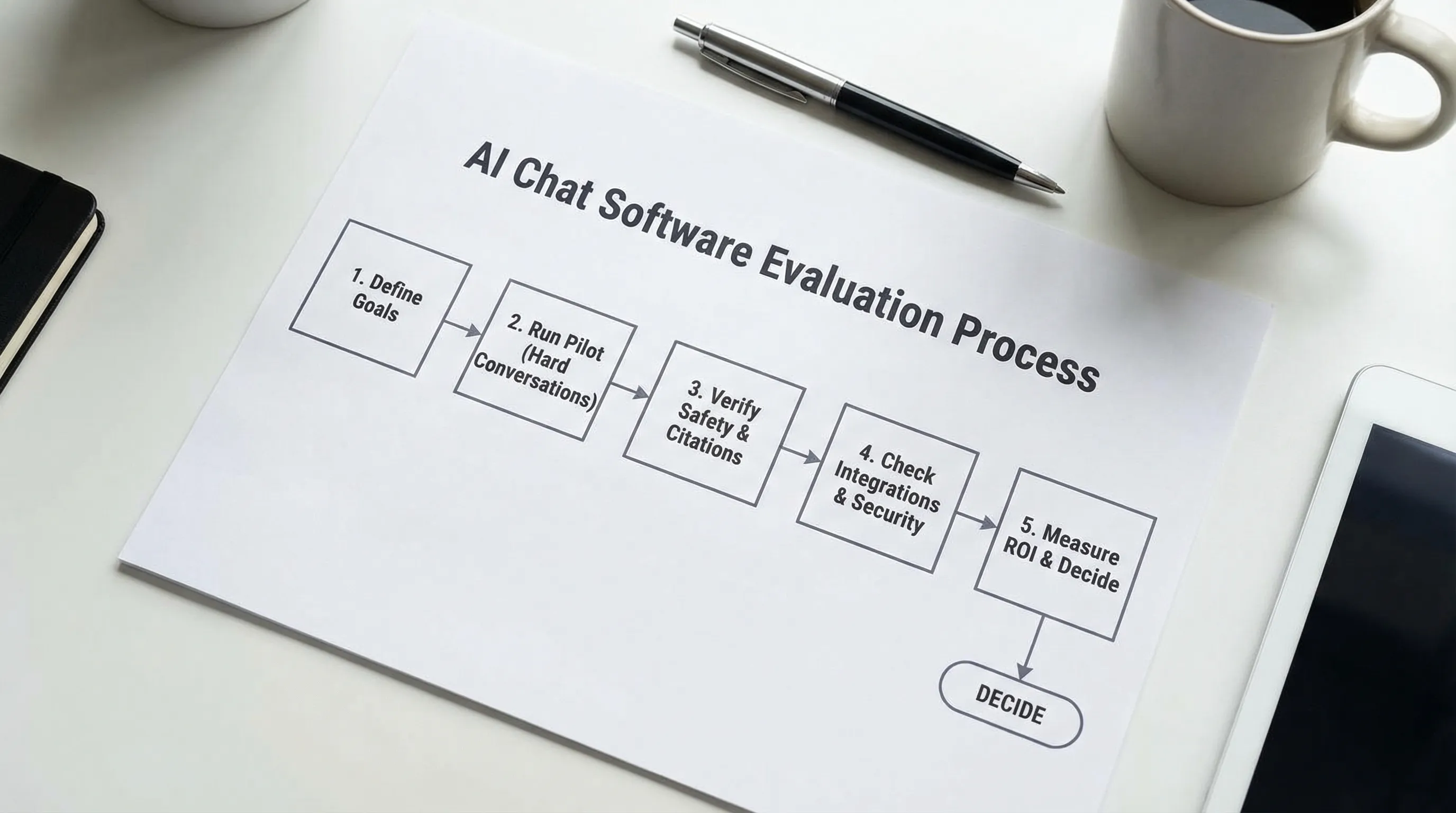
How to evaluate AI chat software in a realistic pilot
A pilot should create evidence, not just excitement. A simple structure:
Define success metrics before the demo
Pick 3 to 5 metrics and write them down. Examples:
- Containment rate (support)
- Qualified leads captured (sales)
- Time to correct answer (internal)
- Skill improvement over time (training)
Test with “hard” conversations
Bring scenarios that tend to break systems:
- Ambiguous questions with missing context
- Policy edge cases
- Multi-intent questions (“I need a refund and to change my address”)
- Attempts to override instructions
Require explainability: citations, policies, and escalation logs
During evaluation, you want to see:
- Where the answer came from (citations)
- Which policy applied (guardrail behavior)
- Why a conversation escalated (auditability)
Validate operations, not just features
Ask to see admin workflows:
- Updating knowledge and rolling back changes
- Reviewing safety incidents
- Exporting analytics
- Managing permissions and retention
Where Scenario IQ fits (if your “AI chat” use case is training)
Not every organization is buying AI chat software for customer-facing automation. Many teams want the conversational interface for practice, especially in sales and service.
Scenario IQ focuses on AI-driven, personalized, scenario-based roleplay training that helps teams build confidence, handle objections, and improve communication. Instead of only answering questions, it is designed to simulate realistic conversations and provide real-time feedback, adaptive guidance, and progress tracking analytics for individuals and teams.
If you are evaluating AI chat tools specifically for enablement, coaching, and consistent practice across a team, prioritize:
- Scenario authoring and personalization (roles, industries, difficulty)
- Feedback quality (specific, actionable, aligned to skills)
- Team analytics (progress tracking, performance metrics)
- Security and enterprise controls (especially for regulated industries)
Those requirements are often underserved by generic chat platforms that were built primarily for Q&A.

A practical “before you buy” checklist (use this in procurement)
Use this as a final filter once you have a shortlist:
- Does the tool provide grounded answers with citations, and does retrieval respect permissions?
- Can we configure guardrails, escalation rules, and PII handling without engineering?
- Do analytics show outcomes (resolution, escalation, skill improvement), not just transcripts?
- Can we run a controlled pilot with versioning, test sets, and rollback?
- Are SSO, RBAC, audit logs, and retention controls available and clearly documented?
- Do integrations match our core systems (help desk, CRM, knowledge base, IDP)?
- Is pricing predictable under real usage, including peak periods?
If a vendor gives vague answers to two or more of these, slow down and require proof. AI chat is now a frontline interface for many brands, and “we will fix it after launch” is rarely a good plan.
The bottom line
The best AI chat software is not the one with the most impressive demo. It is the one that stays accurate under pressure, respects your data boundaries, integrates cleanly, and produces measurable outcomes you can report.
If you are buying for sales and service performance improvement through conversational practice, an AI roleplay platform like Scenario IQ may fit better than a general-purpose chat tool, because it is built around training realism, feedback, and performance analytics rather than basic Q&A alone.