

An AI chat assistant can be your highest-leverage “employee”, it answers questions 24/7, qualifies leads in seconds, and deflects repetitive tickets. But it only performs as well as the conversation flows behind it. When flows are unclear, users get stuck in loops, handoffs fail, and conversions drop.
This guide breaks down how to build AI chat assistant flows that convert and support, with practical patterns you can copy, the metrics that matter, and a training approach to help your team continuously improve what the assistant says and does.
What “flows” mean in an AI chat assistant (and why they matter)
A flow is the structured path your assistant follows to reach a user outcome, such as booking a demo, resetting a password, or escalating to a human. Even when you use a modern LLM-based assistant, strong flows still matter because they:
- Reduce ambiguity (the assistant knows what it is trying to accomplish)
- Improve reliability (fewer hallucinations and fewer dead ends)
- Keep experiences consistent across channels and teams
- Make performance measurable (you can track drop-off and completion)
In practice, the best assistants combine:
- Intent-based routing (identify what the user wants)
- Guardrails (what the assistant can and cannot do)
- Structured steps (collect info, confirm, resolve or hand off)
- Knowledge retrieval (answer from approved sources)
- Escalation rules (when to involve a human)
If you only do “open chat” with no flow logic, you might get impressive individual answers, but you usually lose consistency, compliance, and conversion discipline.
Start with intent mapping (not “cool features”)
High-performing flows start with a simple question: Why are people coming to chat?
For most sales and service teams, the top intents cluster into:
- Pre-sales questions (pricing, compatibility, implementation, security)
- Proof and trust (case studies, ROI, compliance)
- Purchase action (book a demo, talk to sales, request a quote)
- Account help (login, billing, plan changes)
- Product support (how-to, troubleshooting, bug reporting)
A useful way to design flows is to define, for each intent, the goal, the minimum information needed, and the handoff criteria.
| Intent (what the user wants) | Flow goal | Minimum info to collect | “Good” resolution | Escalate when |
|---|---|---|---|---|
| “How much does it cost?” | Move toward qualification and next step | Use case, team size range (optional), timeline | Provide pricing guidance or route to sales | User asks for a quote, contract terms, or a custom plan |
| “Can you integrate with X?” | Confirm fit or capture details | Tool name, environment, must-have workflow | Provide documented answer and next step | Integration is unclear, custom, or not documented |
| “I can’t log in” | Restore access fast | Email (or account identifier), error message | Link to reset flow or guide steps | Security-sensitive, repeated failures, possible compromise |
| “Something is broken” | Triage and reduce time-to-resolution | Product area, steps to reproduce, urgency | Provide fix or collect ticket details | Data loss, outage, regulated data, angry customer |
Two design rules keep this manageable:
- Prioritize: build flows for the highest-volume and highest-value intents first.
- Minimize fields: collect only what you need to move forward. Every extra question lowers completion.
Conversion-focused flow patterns (that feel helpful, not pushy)
Conversion in chat is rarely about one persuasive line. It is about removing friction while keeping the user in control. These patterns consistently work.
Pattern 1: Confirm intent, then offer two fast paths
Users come to chat to move quickly. Give them a fork that matches how “ready” they are.
Example structure:
- Confirm: “Got it, you’re looking for pricing.”
- Offer options: “Do you want a quick estimate, or would you prefer to book time with sales?”
This reduces drop-off because users don’t feel trapped in a sales funnel.
Pattern 2: Progressive qualification (ask less, earlier)
Instead of a long intake form, use progressive questions that each unlock value.
Good qualifying questions tend to be:
- Contextual: “What are you trying to accomplish?”
- Bounded: “Is this for a team of 1 to 10, 11 to 50, or 50+?”
- Outcome-based: “What would success look like in 30 days?”
Avoid “interrogation mode.” If the assistant needs 5 fields before it can help, your flow is probably overdesigned.
Pattern 3: Objection handling as a micro-flow
When someone raises a concern (price, security, change management), treat it like a flow with steps:
- Acknowledge the concern
- Ask one clarifying question
- Provide a concise answer from approved info
- Offer the next best action (document, demo, specialist)
This is where consistency matters most. For guidance on usability and clarity in conversational UI, Nielsen Norman Group’s chatbot research is a strong reference point: NN/g on chatbots and conversational interfaces.
Pattern 4: “Next best action” that matches user intent
A flow should end with a clean action, not “Let me know if you need anything else.” Examples:
- “Would you like me to connect you with a specialist, or send a short overview?”
- “I can create a support ticket with the details you shared, want to proceed?”
- “Do you want to book a 15-minute call, or see a 2-minute summary first?”
In other words, always close with a decision that is easy to make.
Pattern 5: Lead capture without breaking trust
If you collect contact info, do it transparently:
- Explain why: “So we can send the security overview and follow up if needed.”
- Offer an alternative: “If you prefer, I can summarize it here instead.”
- Confirm consent when appropriate (especially across regions and policies)
Support-focused flow patterns (containment without frustration)
“Containment” (resolving issues without a human) is valuable, but only if it still feels respectful. Support flows should optimize for time-to-resolution and confidence.
Pattern 1: Triage first, then troubleshoot
Before you jump into steps, identify category and severity.
Good triage questions are short:
- “Is this login, billing, or product usage?”
- “Are you blocked from working right now?”
- “What error message do you see?”
This prevents the assistant from giving generic advice when the issue is urgent.
Pattern 2: Step-by-step troubleshooting with checkpoints
A common failure mode is dumping a long list of steps. Instead:
- Give one step
- Ask if it worked
- Continue or branch
This also creates clean analytics (you can see where users drop off).
Pattern 3: Knowledge answers with citations and limits
Users trust answers more when you:
- Keep responses concise
- Use consistent language
- Link to an official help article when available
- Say what you cannot do (especially for account, billing, or security actions)
Microsoft’s guidance on designing bot conversations is helpful for building these predictable paths: Microsoft guidance on conversational design.
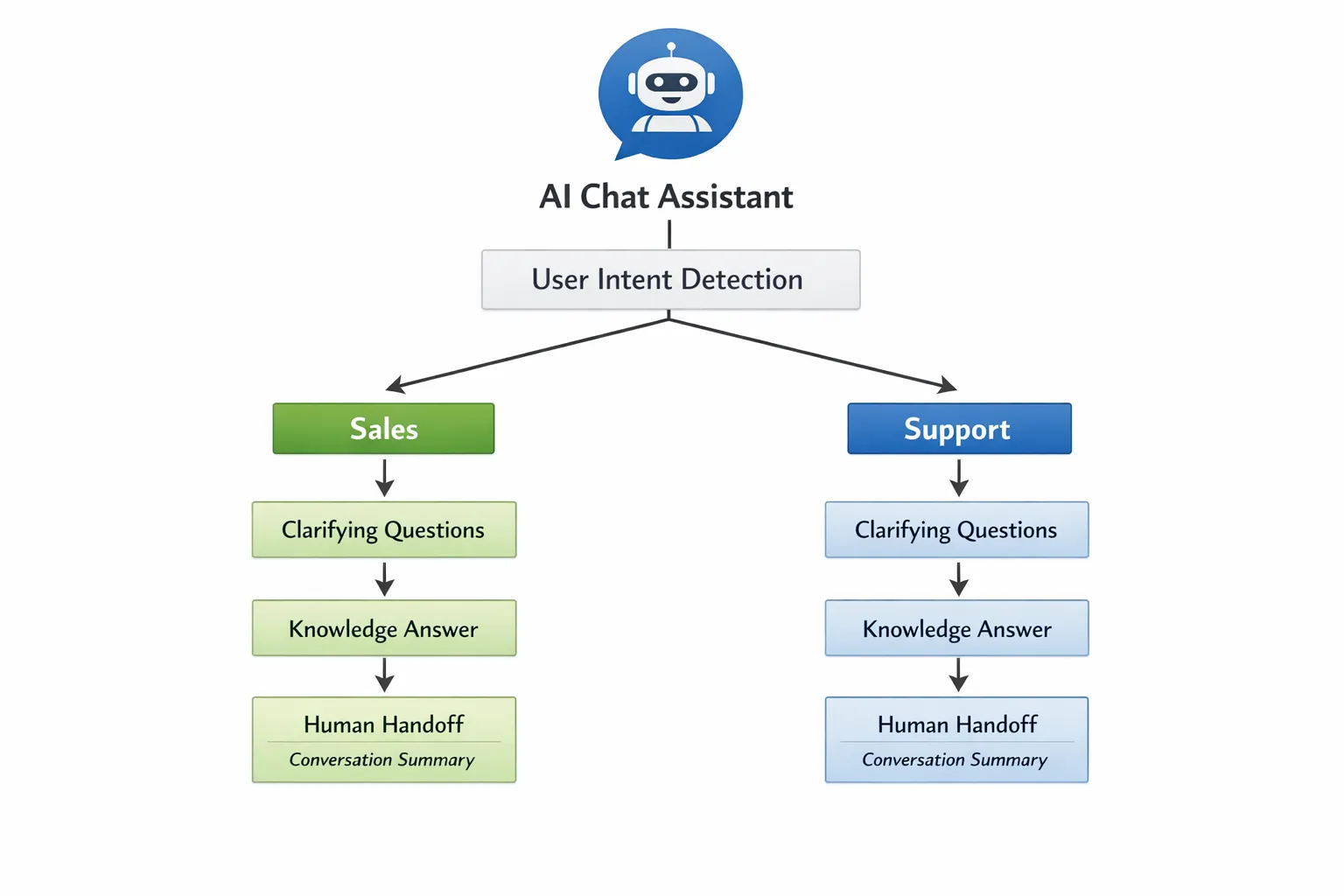
Pattern 4: Escalation that preserves context
The handoff is where many chat experiences break.
Your escalation flow should:
- Summarize the issue in 2 to 4 lines
- Ask permission to share details with an agent
- Collect only the extra info the agent needs
- Set expectations (response time, channel)
A “warm handoff” is not just routing, it is packaging context so the user does not repeat themselves.
Write messages that convert and support (without sounding robotic)
Even the best flow logic fails if the copy feels cold or confusing. Strong assistant writing follows a few consistent principles.
Be explicit about what the assistant can do
A short capability statement reduces friction:
- “I can help you find the right plan, answer product questions, or connect you to a person.”
This prevents users from testing the bot with unrealistic requests.
Ask one question at a time
Multi-part questions create errors and drop-off. If you must collect multiple fields, split them into small turns.
Use “confirm then act” for sensitive steps
For account changes, ticket creation, or sharing personal details:
- Confirm understanding
- Confirm the action
- Then proceed
This is both good UX and good risk control.
Design a graceful fallback
Your fallback should not blame the user. It should:
- Restate what it thinks the user means
- Offer 2 to 3 suggested options
- Provide a clear “talk to a human” path
Measure what matters: the metrics behind high-performing flows
If you cannot measure a flow, you cannot improve it. These metrics are practical for most teams.
| Metric | What it tells you | Why it matters |
|---|---|---|
| Flow completion rate | Percent of users who reach the intended outcome | Core indicator of friction and clarity |
| Containment rate (support) | Percent resolved without an agent | Tracks efficiency, but should be balanced with CSAT |
| Handoff rate | How often users require a human | Useful when broken down by intent |
| Conversion rate (sales) | Percent who book, request, or purchase | Ties chat directly to revenue outcomes |
| Time to resolution | How long it takes to resolve common issues | Strong predictor of satisfaction |
| Drop-off point | Where users abandon the flow | Pinpoints the exact question or step to rewrite |
Two operational tips:
- Segment by intent: overall averages hide bad flows.
- Review real transcripts weekly: dashboards show what happened, transcripts show why.
Test flows like you would test a sales or support playbook
Treat conversation flows as living playbooks.
Effective testing usually includes:
- Adversarial testing (users who are vague, angry, or off-topic)
- Policy and compliance testing (refunds, privacy, security claims)
- Edge case testing (multi-intent questions, typos, partial info)
- Iteration on tone (overly formal vs overly casual)
A practical habit is to maintain a small “test library” of real scenarios your team sees every week, then use it to validate each flow change.
Where Scenario IQ fits: training teams to execute and improve chat flows
Even with a great AI chat assistant, your outcomes depend on the humans behind the system:
- Sales reps taking handoffs and closing the loop
- Support agents resolving escalations quickly and consistently
- Managers coaching better responses and updating playbooks
- Enablement teams designing scenarios that reflect real objections
This is where Scenario IQ can support your workflow. Scenario IQ provides AI-driven, personalized scenario-based training with roleplay simulations, real-time feedback, and progress tracking analytics. Instead of hoping your team “figures it out” after launch, you can rehearse the exact conversations your assistant routes to humans.
Examples of training scenarios that map directly to chat flows:
- Sales handoff: user asks pricing, receives estimate, requests a call, rep must qualify and book next steps
- Objection escalation: user challenges security posture, rep must respond within approved language and offer the right collateral
- Support escalation: user is frustrated after failed self-serve, agent must de-escalate, confirm context, and resolve efficiently
Because Scenario IQ supports customizable skill levels and team-focused learning, you can coach new hires on baseline handoffs while training experienced reps on edge cases and higher-stakes objections.
If you want your assistant’s flows to consistently convert and support, consider building a feedback loop where:
- Chat analytics reveal where users struggle
- Your team trains on those exact scenarios
- Updated behaviors and playbooks get reflected back into the assistant’s flows
Learn more at Scenario IQ.

A practical blueprint you can use this week
If you are rebuilding or launching an AI chat assistant, focus on the highest-impact sequence:
- Choose the top 5 intents (by value and volume)
- Define one clear outcome per intent
- Design a short flow with progressive questions
- Add a warm handoff with a strong context summary
- Instrument completion, drop-off, and conversion
- Train your team on the handoff and objection paths using roleplay scenarios
Flows that convert and support are not magical. They are operational excellence applied to conversation, built step by step, measured, and continuously coached.