

Most teams say they “want a chatbot,” when what they actually need is a better customer support experience: faster answers, fewer escalations, and more consistent service quality.
The problem is that chatbots and AI-based customer support are often lumped together, even though they solve different problems and carry different risks. One is typically a scripted interface for handling predictable requests. The other is an intelligence layer that can understand context, reason over knowledge, and support (or automate) more complex service workflows.
Below is a clear, practical breakdown of the key differences, where each approach fits, and how to choose without over-automating (or under-investing).
What people mean by “chatbots”
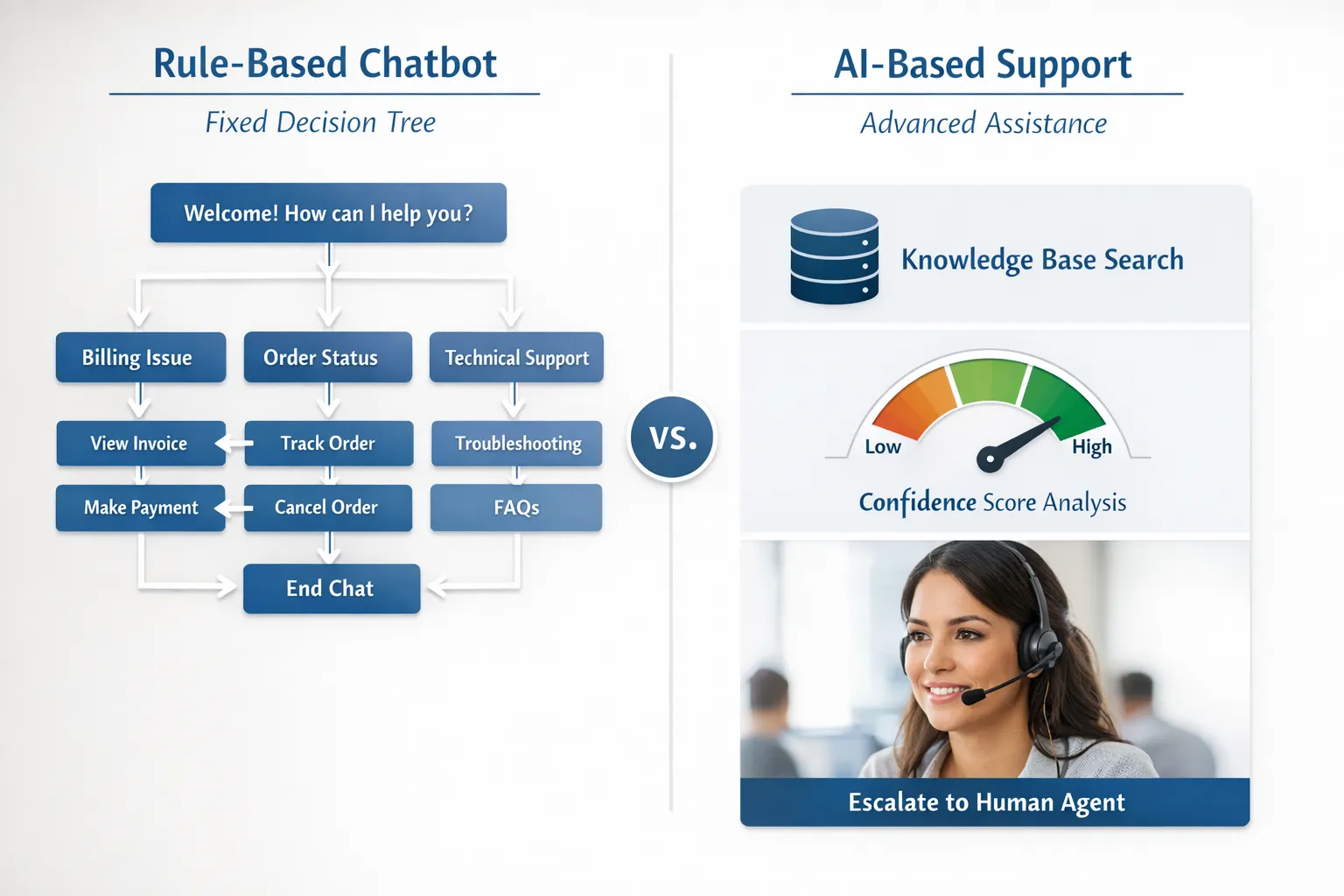
A chatbot is a conversational interface that helps customers complete tasks or get answers. Historically, chatbots have been:
- Rule-based (decision trees, keyword triggers)
- Template-driven (prewritten responses)
- Form-like (guided flows for returns, password resets, booking)
Modern “chatbots” may include AI features, but many deployments still behave like a structured menu. That is not a bad thing, as long as the requests are predictable and the cost of a wrong answer is high.
What “AI-based customer support” typically includes
AI-based customer support usually means a broader system that uses machine learning (often including large language models) to:
- Understand intent and sentiment from natural language
- Use company knowledge (help center, policies, product docs, CRM data) to answer accurately
- Take actions (create tickets, update orders, process refunds, route cases)
- Assist human agents in real time (draft replies, suggest troubleshooting steps)
- Improve over time through analytics, evaluation, and coaching loops
In other words, the AI is not just “the chat window.” It is the brain behind how support is delivered.
AI based customer support vs. chatbots: the key differences
Here is the practical comparison most buyers are looking for.
| Dimension | Traditional chatbots (rule-based or flow-based) | AI-based customer support (LLM/ML-powered) |
|---|---|---|
| Primary strength | Consistency for known requests | Flexibility for varied, nuanced requests |
| Best for | FAQs, status checks, password resets, simple triage | Troubleshooting, policy interpretation, personalized help, agent assistance |
| How answers are produced | Prewritten scripts and decision trees | Generated responses grounded in knowledge sources (when implemented correctly) |
| Context handling | Limited (often per-session) | Stronger multi-turn context and intent detection |
| Failure mode | “I didn’t understand” loops | Confident but wrong answers if not properly grounded and constrained |
| Maintenance | Updating flows and scripts | Maintaining knowledge, integrations, guardrails, evaluations |
| Escalation design | Often manual handoff at certain steps | Can route dynamically based on confidence, risk, customer value, sentiment |
| Typical ROI path | Deflect repetitive contacts | Reduce handle time, improve first-contact resolution, scale quality |
A useful rule of thumb: chatbots are great at structured conversations; AI-based support is great at unstructured conversations.
Where traditional chatbots still win
There are plenty of situations where a scripted chatbot is the smarter choice.
High-risk, low-variation requests
If giving the wrong answer creates legal exposure or safety risk, a deterministic flow can be preferable. Examples include:
- Identity verification steps
- Regulated disclosures (financial services, healthcare)
- Warranty eligibility checks that require precise conditions
Narrow tasks with clear inputs
Chatbots excel when the user can provide a few inputs and the system can complete the task.
Examples:
- “Track my order”
- “Reset my password”
- “Change my appointment time”
In these cases, the fastest route to value is often a clean workflow, not a sophisticated language model.
Where AI-based customer support wins (and why)
AI-based support tends to outperform when your contact drivers are messy, contextual, or product-specific.
Complex troubleshooting and “gray area” policy questions
Customers rarely describe issues the same way your help docs do. AI systems can interpret intent, ask clarifying questions, and guide a resolution path without forcing customers through a rigid menu.
Personalization at scale
When implemented with the right guardrails, AI can tailor guidance to:
- Product version and plan
- Recent orders or tickets
- Customer segment (new vs. power user)
- Channel context (email vs. live chat)
Agent assist (often the safest high-ROI starting point)
Many teams start with AI that helps agents rather than replacing them. Common outcomes include:
- Shorter time to first response
- More consistent tone and policy adherence
- Faster knowledge retrieval
This approach limits customer-facing risk while still delivering measurable efficiency gains.
The hidden requirement: your support experience must be “AI-ready”
AI-based customer support is not a plug-and-play upgrade if your underlying systems are fragmented.
To work reliably, AI needs:
1) A clean knowledge foundation
If your help center contradicts internal macros, or policies live in scattered PDFs, AI will mirror that inconsistency.
Strong AI deployments typically include:
- A single source of truth for policies
- Clear ownership for updates
- A documented “what we can and cannot say” boundary
2) Integrations that match your real workflows
If customers ask about order changes, refunds, shipping holds, subscriptions, or account access, the AI needs safe ways to fetch data or take action.
This is also where your website and customer portal matter more than most teams expect. If you are rebuilding the experience customers interact with (forms, account areas, lead capture, automation), working with a partner that understands both UX and systems integration can help, for example a custom web design and development team that can connect front-end flows with the tools your support team relies on.
3) Guardrails and evaluation, not just prompts
If you are using LLM-style AI, you need to design for predictable behavior:
- Allowed sources (help center, internal KB, CRM)
- Refusal behaviors (when the AI should say it cannot help)
- Confidence thresholds that trigger escalation
- Ongoing testing against real tickets
For a practical risk-management lens, the NIST AI Risk Management Framework is a useful reference for governance and oversight.
Common pitfalls (and how to avoid them)
Pitfall 1: Treating AI like a “better chatbot”
If you deploy AI on top of weak processes, you can scale confusion faster.
Fix: Define what “good support” means in your business (resolution, accuracy, tone, compliance) and design the AI around those outcomes.
Pitfall 2: Hallucinations and overconfidence
LLM-based systems can produce plausible answers even when unsure.
Fix: Use retrieval grounding (answering from approved sources), include citations internally, and require escalation when confidence is low or the topic is sensitive.
Pitfall 3: Over-automation that hurts CSAT
Some customers want speed. Others want assurance a human understood them.
Fix: Offer clear paths to a person, and design escalation triggers (refund requests, repeated contact, negative sentiment, VIP customers).
Pitfall 4: “Set it and forget it” deployments
Support changes every week: new bugs, new promos, policy tweaks.
Fix: Assign ownership and review cycles. Treat AI as an evolving support channel with QA.
What to measure: chatbot metrics vs. AI support metrics
You can evaluate both approaches with similar KPIs, but expectations should differ.
| Metric | Why it matters | Watch-outs |
|---|---|---|
| Containment (deflection) rate | How often the system resolves without human help | High containment is bad if customers reopen cases or churn |
| First Contact Resolution (FCR) | A stronger signal of real resolution | Requires good tagging and consistent definitions |
| CSAT / CES | Customer-perceived quality | Survey bias, channel differences |
| Average Handle Time (AHT) | Efficiency for agent-assist deployments | Lower AHT should not come from rushed, incomplete answers |
| Escalation rate and escalation quality | Whether handoffs are timely and well-packaged | Poor handoffs increase customer effort |
| Policy compliance / accuracy audits | Especially important for AI-generated responses | Needs sampling and a scoring rubric |
If you can only measure one thing early, focus on FCR plus a simple accuracy audit. These two keep you honest.
Choosing the right approach (a practical decision guide)
The fastest way to decide is to start from your top contact drivers.
A chatbot is usually enough if:
- The top 10 intents are repetitive and easy to validate (order status, store hours, password reset)
- The conversation can be completed in fewer than 5 steps
- The cost of a wrong answer is high and you prefer deterministic flows
AI-based customer support is a better fit if:
- Customers describe problems in many different ways
- Troubleshooting requires context and follow-up questions
- You need consistent quality across a growing team
- Your agents spend time searching for answers and rewriting similar messages
Many mature teams land on a hybrid: chatbot-style flows for the simplest tasks, AI for knowledge-heavy questions, plus human escalation for edge cases.
Implementation tip: start with agent confidence, not full automation
A common mistake is launching AI directly to customers before the organization trusts it.
A lower-risk path is:
- Deploy AI internally for agent assist (drafting, summarizing, suggesting articles)
- Add tight customer-facing use cases (FAQ answers grounded in the help center)
- Expand into actions (refund initiation, account changes) once guardrails are proven
This sequencing tends to produce faster ROI and fewer brand-damaging incidents.
The overlooked differentiator: training your team to work with AI
Even the best AI support systems depend on how humans:
- Review and correct responses
- Handle escalations smoothly
- Stay consistent with tone and policy
- Recognize when automation is making things worse
This is where scenario-based training becomes practical. If you want your team to deliver consistent service while adopting AI, roleplay simulations can help reps practice real conversations (angry customers, policy exceptions, complex troubleshooting) in a safe environment, then improve with feedback.
Scenario IQ focuses on AI-powered roleplay simulations, personalized scenarios, and real-time feedback to help teams build confidence and consistency. Used well, that kind of training supports a healthier rollout: agents learn how to supervise AI suggestions, handle edge cases, and keep the customer experience human.
Bottom line
Chatbots and AI-based customer support are not interchangeable.
- Chatbots are best when the problem is structured and the solution is known.
- AI-based customer support is best when the problem is varied, contextual, and knowledge-heavy, especially when paired with strong guardrails and a thoughtful escalation design.
If you are deciding between them, start with your contact data and risk profile, then build toward the approach that improves resolution quality, not just deflection.